capo.js: audit the order of elements in your HTML head
capo.js is an Apache-2.0 tool that scores the order of head elements by load priority, as a browser extension or an npm package.
Project facts
GitHub Ecosystem- License
- Apache-2.0
- Language
- JavaScript
- Stars
- 1,101
- Data checked
- 2026-10-24
Snapshot figures reflect the check date and may change over time.
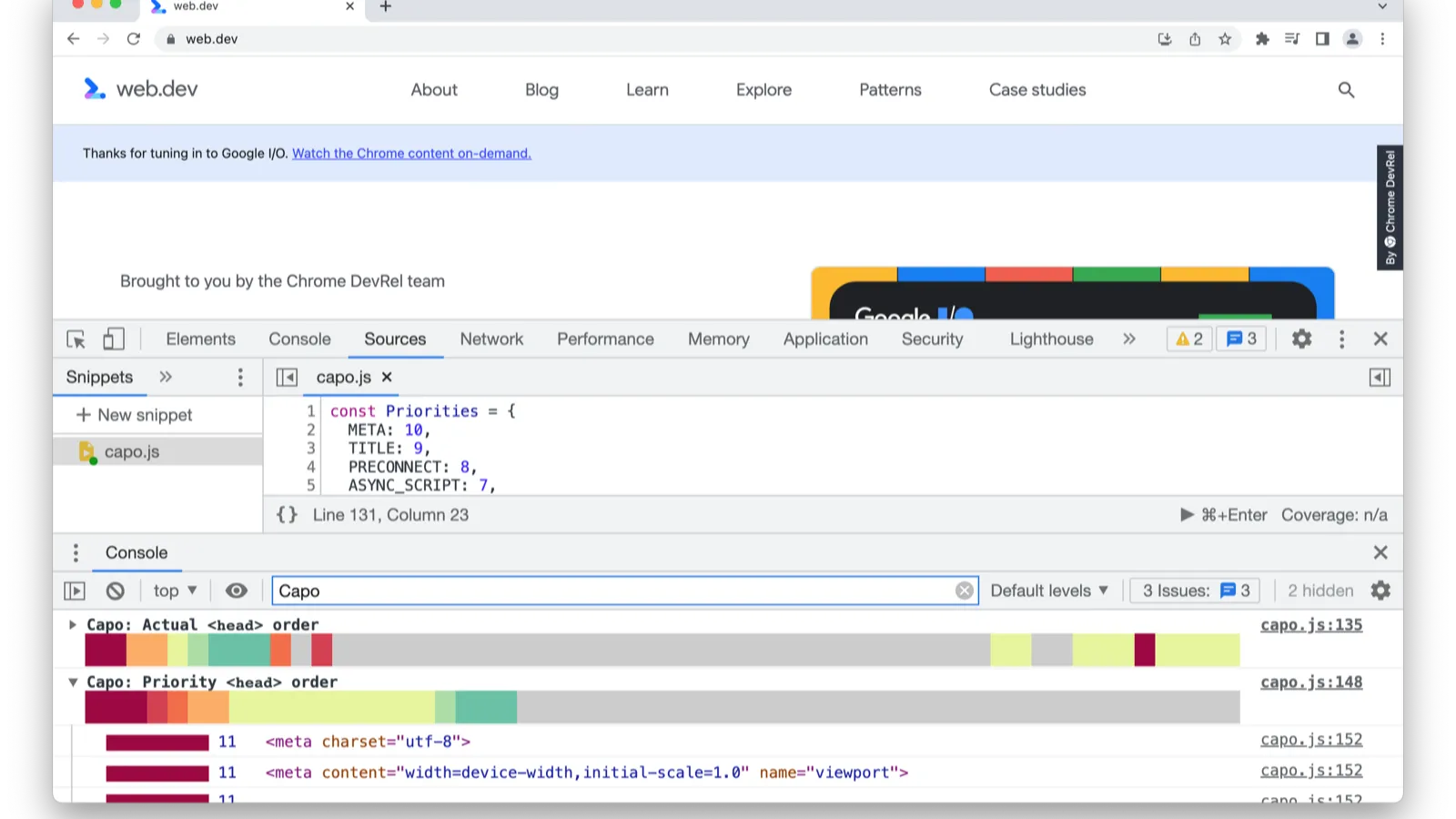
How fast a page renders is not only about which resources it loads — it is also about the order those resources appear in <head>. A synchronous script placed too late leaves the renderer waiting; a preconnect that shows up too late wastes the connection setup it was meant to save. capo.js, an Apache-2.0 project maintained by Rick Viscomi, assigns a weight to every element in the head based on how it affects loading and rendering, flags the ones that are out of place, and reports them in the console with colors. It grew out of Harry Roberts’ ct.css and Vitaly Friedman’s Nordic.js 2022 talk; the repository was created in May 2023 and its latest release, v2.3.1, shipped on September 19, 2026.
Core features
- One weight table, straight from the source: meta tags that matter (charset, viewport, CSP) and base rank highest at 10, followed by title (9), preconnect (8), async scripts (7), styles containing @import (6), synchronous scripts (5), synchronous stylesheets (4), preload (3), deferred scripts (2), and prefetch or prerender at the bottom (1).
- Browser extension, zero setup: extensions for Chrome and Firefox print a color-coded ordering report for any page straight into the DevTools console, so out-of-order elements are visible at a glance.
- A real API since v2:
npm install @rviscomi/capo.jsgives youanalyzeHead(head, new BrowserAdapter()); the rules API (ElementWeights,getWeight) and the validation API (isValidElement) are exported as subpaths, so you can import only what you need and keep bundles small. - Custom adapters: the documentation walks through building your own adapter, so the same analysis can run inside a build step or another JavaScript runtime instead of a live browser.
- Server-rendered heads only: the README cautions that for applications which add head elements dynamically on the client, you should analyze the server-rendered head to get an accurate picture of what the browser actually received first.
Typical use cases
- Speeding up a page: run the extension once, see which elements are out of order, and reorder a few lines. Sync scripts and blocking styles that sit too late stop costing render time, and early preconnects start doing their job.
- Fitting head checks into review: the programmatic API makes it possible to fail a build or flag a pull request when the head regresses, instead of remembering to open the console by hand on every release.
- Learning how browsers load pages: the weight table doubles as a cheat sheet of what the browser wants to see first — why charset and viewport belong at the very top, why deferred scripts are safer than synchronous ones, and why prefetch belongs at the end.
- Pairing it with a site-wide audit: the head also carries SEO-relevant elements; to check the rest of a site alongside, jev-seo runs a one-command audit of content and structured data.
Quick start
- Install the extension for Chrome or Firefox, open any page, and read the color-coded report in the DevTools console.
- To use it in code:
npm install @rviscomi/capo.js, then callanalyzeHead(head, new BrowserAdapter())on the element you want to inspect. - To analyze HTML that is not a live browser DOM, implement an adapter following the custom-adapters guide; the full API reference lives at rviscomi.github.io/capo.js.
Summary
capo.js is a small tool for a problem that is easy to forget: the order in which the head is written. It does not change the page by itself — it tells you exactly which elements are out of place and why the browser would prefer them elsewhere, and the fix is usually a handful of lines. For anyone who has ever moved a script tag around hoping to shave a few milliseconds off first paint, it turns that guesswork into a table you can actually follow.