floorplan-3d: a floor plan and interior design tool in one HTML file
floorplan-3d puts a 2D floor plan and a Three.js 3D scene in one HTML file: drag furniture, remove walls, measure, estimate floor cost. MIT.
Project facts
GitHub Ecosystem- License
- MIT
- Language
- HTML
- Stars
- 2,499
- Data checked
- 2026-10-20
Snapshot figures reflect the check date and may change over time.
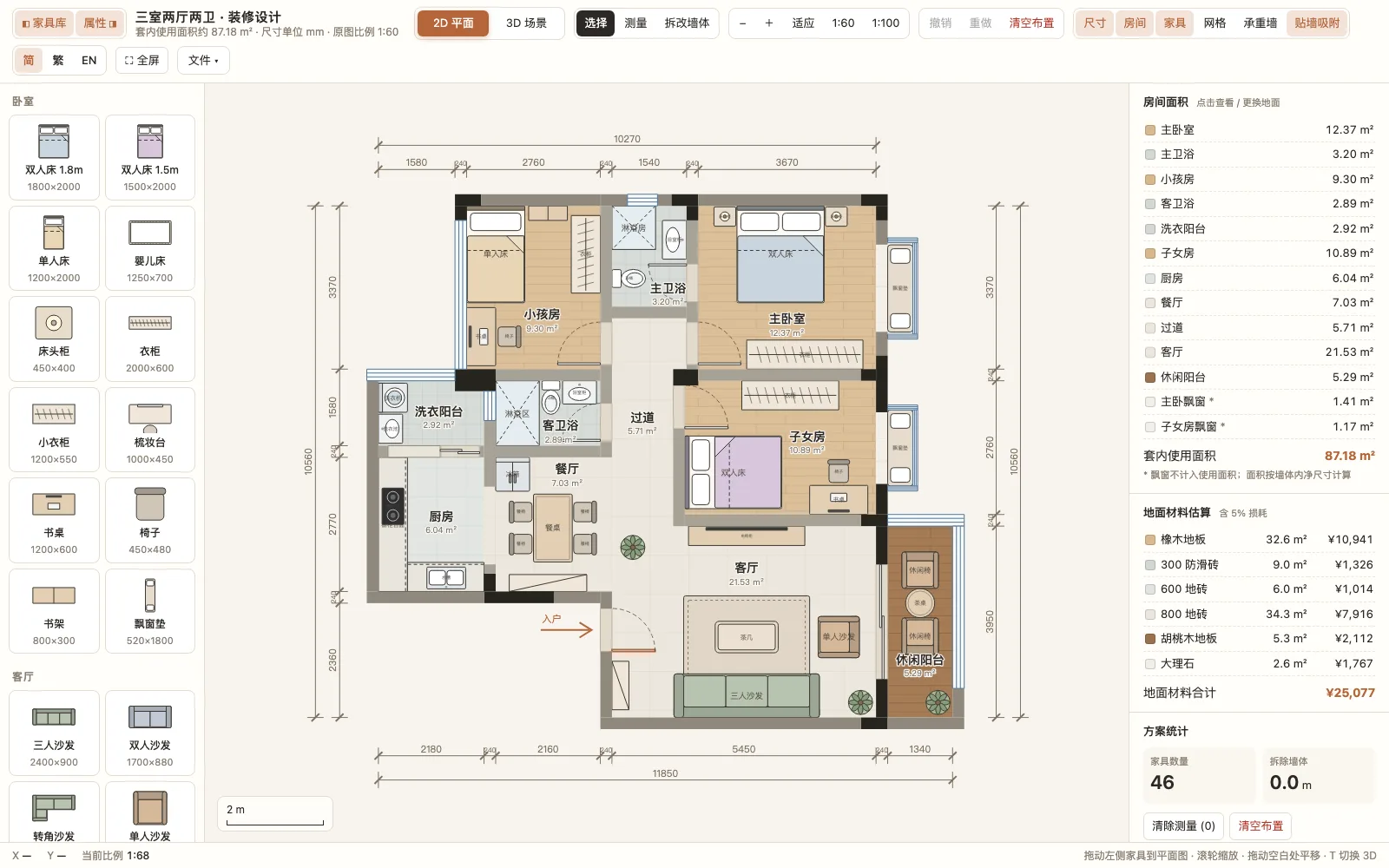
Trying out a furniture layout in your own apartment, or checking what a room looks like with two walls gone, usually means installing a design suite or paying for a web tool by the year. floorplan-3d squeezes that into a single file: the whole app is index.html, with no build step, and it runs when you open it in a browser. Furniture on the left, a floor plan measured in millimetres in the middle, room areas and floor-material costs on the right, and one keypress to a Three.js 3D scene. The repository is MIT-licensed, its primary language is HTML, and it had 2,499 stars on October 20, 2026.
That screenshot is the default view after opening index.html locally. The sample plan ships with 46 furniture items and a net usable area of 87.18 m².
Core features
- 2D floor plan: Displays the plan at 1:60 / 1:100 with dimensions in millimetres. Drag 60+ furniture and appliance items in from the library on the left, move them, rotate freely with
Shift, and let them snap to walls. A measuring tool snaps to nearby walls, and layer toggles cover dimensions, room names, furniture, the grid and load-bearing walls. - Wall removal: You can remove non-load-bearing walls; load-bearing walls are marked separately so the two never get confused.
- One-click 3D: The 3D scene renders with Three.js r160 and offers bird’s-eye, oblique and top-down views; clicking a room in the list flies the camera to it. Walkthrough mode is
WASDplus mouse on desktop and a virtual joystick on touch devices, and doors can be opened and closed by clicking. - 2D and 3D stay in sync: Furniture can be selected and dragged in 3D, and the change is reflected back in the plan, and the other way round. Walls switch between full height and cut-away, a slider sets the time of day for sunlight, and there is night lighting.
- Area and cost estimates: Room areas and the net usable area are computed automatically. Each room can take a different floor material (wood, tiles, marble, terrazzo, carpet and more), with costs estimated from the area plus 5% wastage; the sample plan totals ¥25,077 for flooring.
- Local storage and export: Undo and redo, plans auto-saved to the browser’s
localStorage, PNG export, and plan import/export as JSON. The interface switches between Chinese and English.
Typical use cases
- Planning a renovation yourself first: Draw in your own dimensions, try a few furniture layouts, and check whether a walkway is wide enough before a designer produces drawings.
- Budgeting a rental: Changing floor materials shows the area and an estimated cost right away, so you have a number before asking for quotes.
- Anyone unsure about knocking out a wall: Load-bearing walls are labelled separately, so you can see which one cannot be touched.
- Starting point for a 3D scene: It is one HTML file, so changing a few data structures swaps in your own layout, and it is easy to embed in another page.
Quick start
No build step. Clone it and open index.html, or serve the folder:
git clone https://github.com/wy51ai/floorplan-3d.git
cd floorplan-3d
python3 -m http.server 8000
# Visit http://localhost:8000
You can also skip the server and open index.html directly. It starts in the 2D plan; press T for 3D. Note that Three.js loads from the jsDelivr CDN, so the first visit to the 3D scene needs a network connection.
The plan data lives in index.html. A few variables swap in your own layout: ROOMS holds the room polygons, names and default floor materials, WALLS and WINS the walls and window openings, MATS the floor materials and their unit prices, and LIB the furniture library.
Summary
It suits people who want to try furniture layouts quickly, see what a wall removal looks like, and get a rough flooring cost, as well as developers who want an editable 3D floor plan as a starting point. It does not suit teams that need construction drawings, multi-user collaboration or a precise BIM workflow; what it solves is “open it and try things”, not “draw it and build it”.
A few things to know before using it. The repository was created on September 29, 2026, has 2,499 stars, and was last pushed on October 2, 2026, with no commits since. It is a new project by wy51ai, and the README lists only an X account, @akokoi1. There are no tests, no build and no backend; index.html is a single 185 KB file holding all the logic, so any further development means reading that file. The 3D view depends on Three.js from a CDN, so offline or with the CDN blocked it stays in 2D. We only opened the 2D view in a local headless browser and did not verify the 3D scene. Compared with something like Pascal Editor, a WebGPU 3D architecture editor built for “humans and AI agents” with an MCP interface, floorplan-3d is much lighter and has no collaboration or construction-drawing output. HTML, MIT.