Developer tools#Multi-agent#Coding agent
gstack: Garry Tan turns Claude Code into a virtual engineering team
gstack is YC president Garry Tan's open-source Claude Code setup: 23 slash commands act as CEO, designer and QA, turning one developer into a team.
Project facts
GitHub Ecosystem- License
- MIT
- Language
- TypeScript
- Stars
- 134,611
- Data checked
- 2026-09-30
Snapshot figures reflect the check date and may change over time.
Ask Claude Code to build a feature and it will happily refactor files you never mentioned, then call it done without a test in sight. The missing piece is process, and process is exactly what gstack sells — for free. It is YC president Garry Tan’s own Claude Code setup, open-sourced in full: the official description counts 23 opinionated tools that serve as CEO, Designer, Eng Manager, Release Manager, Doc Engineer, and QA, and the README adds 8 power tools on top, every one of them a slash command. The part worth studying is the sequencing. Skills chain in sprint order — think, plan, build, review, test, ship, reflect — so the design doc /office-hours writes is what /plan-ceo-review reads next, and nothing has to be re-explained. A March 2026 video from 蒋林伶Linling recommended it early (it counted 25 skills; the number has moved with versions, and 23 is what the repo claims today).
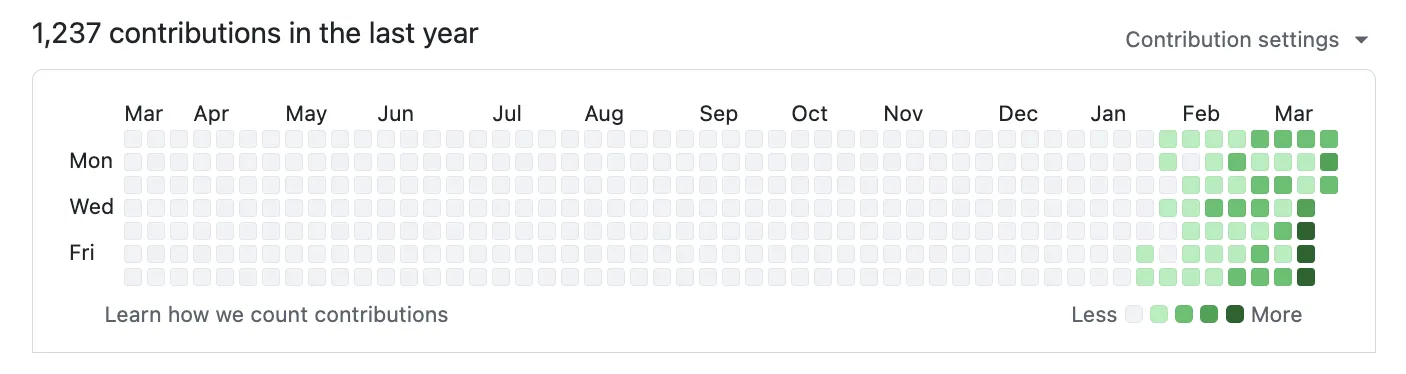
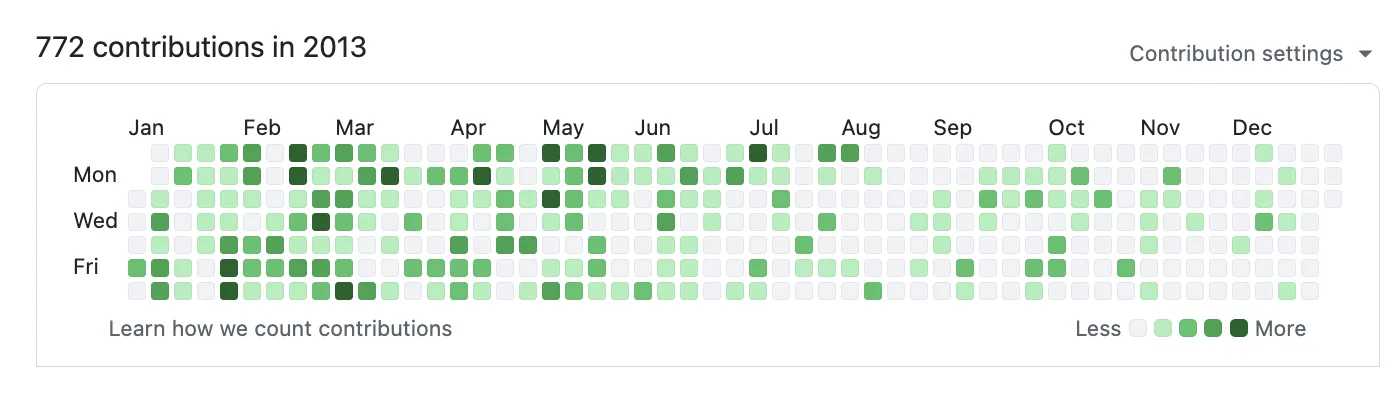
The README opens with receipts: 1,237 GitHub contributions in 2026 through late September, against 772 for all of 2013, the year he built Bookface, YC’s internal social network. By his own logical-lines-of-code accounting, his 2026 pace is roughly 810 times his 2013 one (11,417 vs 14 logical lines/day, measured across 40 public and private repos minus one demo, with the methodology and reproduction script in the repo). That is the author grading his own homework. The concrete behaviors below are the more useful part.
Core features
gstack gives each command a job title and a written scope in the README:
- /office-hours product interrogation: six forcing questions that reframe what you are building. In the README’s example, you say “daily briefing app,” it pushes back that you have described a “personal chief of staff AI,” then offers three implementation approaches with effort estimates, recommends shipping the narrowest wedge first, and hands the design doc to every downstream skill.
- Review pipeline: /plan-eng-review locks architecture, data flow and test matrices; /review hunts the bugs that pass CI but blow up in production, auto-fixing the obvious ones; /autoplan runs CEO → design → DX → eng review in one command, with eng deliberately last so the shipping gate reviews the final amended plan.
- Real-browser QA: /qa opens a browser, clicks through the flows, writes a failing regression test before fixing anything, and re-verifies. CLI, API, job and webhook targets get their own protocols. On a Mac it drives the Aside browser first — your real logged-in sessions — and falls back to the bundled Chromium that ./setup builds when Aside is absent.
- Release chain: /ship runs tests, audits coverage and doc drift, then opens the PR; /land-and-deploy merges, waits for CI and verifies production health; /canary watches console errors and performance regressions after deploy.
- Cross-agent collaboration: ./setup detects 10 coding agents (Codex CLI, Cursor, OpenCode and more, picked with –host); /codex and /claude-code give Claude and GPT each other as a second opinion; /pair-agent lets agents from different vendors share one browser, each in its own tab.
- Guardrails and memory: /careful warns before rm -rf or force-push; /freeze locks edits to one directory; /investigate enforces “no fixes without investigation” and stops after 3 failed fix attempts; /learn carries project lessons across sessions.
Typical use cases
gstack names three audiences in its README, and day to day they look like this:
- A technical founder who still ships: talk an idea through /office-hours, then run /autoplan → implement → /review → /qa → /ship. The author says he landed 3 production services and 40+ features in his last 60 days while running YC (his own numbers).
- First-time Claude Code users: structured roles instead of a blank prompt, with each step telling the agent what it is responsible for.
- Parallel sprints: the author reports running 10–15 sessions at once (with Conductor, a multi-session tool). If you want one interface to schedule Claude Code and Codex side by side, Paseo is a purer scheduling layer.
- Teams on one process: ./setup –team bootstraps the repo so teammates pick up the same setup automatically, either required or optional.
Quick start
gstack’s README install is a paragraph meant to be pasted into Claude Code; the core line is:
git clone --single-branch --depth 1 https://github.com/garrytan/gstack.git ~/.claude/skills/gstack && cd ~/.claude/skills/gstack && ./setup
Requirements: Claude Code, Git and Bun v1.0+ (Node.js on Windows too). Then try the README’s four steps: /office-hours on what you are building, /plan-ceo-review on a feature idea, /review on any branch with changes, /qa on a staging URL. You will know by then whether it is for you.
Summary
gstack fits technical founders who want process around their coding, first-time Claude Code users who want structure instead of a blank prompt, and tech leads tightening review and QA on every PR. It is MIT-licensed, written in TypeScript, and the README promises free forever — no premium tier, no waitlist.
The honest catches: it hard-depends on Claude Code (or one of the 10 agents it supports) plus Bun and Git; the best experience pairs macOS with the Aside browser (macOS 15+), while Linux and Windows use the bundled Chromium — and on Windows without Developer Mode you re-run setup after every git pull. Dozens of skill descriptions cost tokens in every session, which is why the repo ships gstack-context-bill to audit that bill. ./setup registers a default-on Stop hook in ~/.claude/settings.json (opt-out documented), and /cso needs a native toolchain it will report as “not assessed” when missing.