Developer tools#Coding agent#Code review
Plannotator: a review desk for agent plans and diffs
Plannotator opens agent plans and diffs in a local browser UI, so you annotate them in place and your notes return to the session as structured feedback.
Project facts
GitHub Ecosystem- License
- Apache-2.0
- Language
- TypeScript
- Stars
- 12,742
- Data checked
- 2026-11-17
Snapshot figures reflect the check date and may change over time.
Reading a plan an agent wrote can be harder than reading its code. A plan arrives as one block of Markdown, and the only way to remove item three or reword item five is to describe the change in the chat box and hope the agent guesses which sentence you meant. Plannotator moves that exchange into the browser: when an agent is about to leave plan mode, or finishes a round of edits, it starts a page on localhost where you highlight text, comment on diff lines, and press send, and your notes return to the same session as structured feedback. The repository, backnotprop/plannotator, was created on 2025-12-28 and had 12,742 stars on 2026-11-17.
Key points
- Deployment shape: one
plannotatorbinary plus a local HTTP server, with the interface in your browser and a hook, plugin or command per agent. There is no cloud account; review data lives under~/.plannotatorby default. - Coverage: the README’s install table lists 11 clients — Amp, Claude Code, Codex, Copilot CLI, DeepSeek Harness, Droid, Gemini CLI, Kiro CLI, OpenCode, Pi and T3 Code. Other agents can reach the Inbox over
plannotator inbox mcp. - Cadence: 229 releases so far, the newest v0.28.66 on 2026-11-16, and the repo took a push on 2026-11-17. It is not archived.
| Item | Value (checked 2026-11-17) |
|---|---|
| Stars / forks | 12,742 / 1,256 |
| License | Apache-2.0 (the README offers Apache 2.0 or MIT) |
| Language | TypeScript |
| Created | 2025-12-28 |
| Latest release | v0.28.66, 2026-11-16 |
Core features
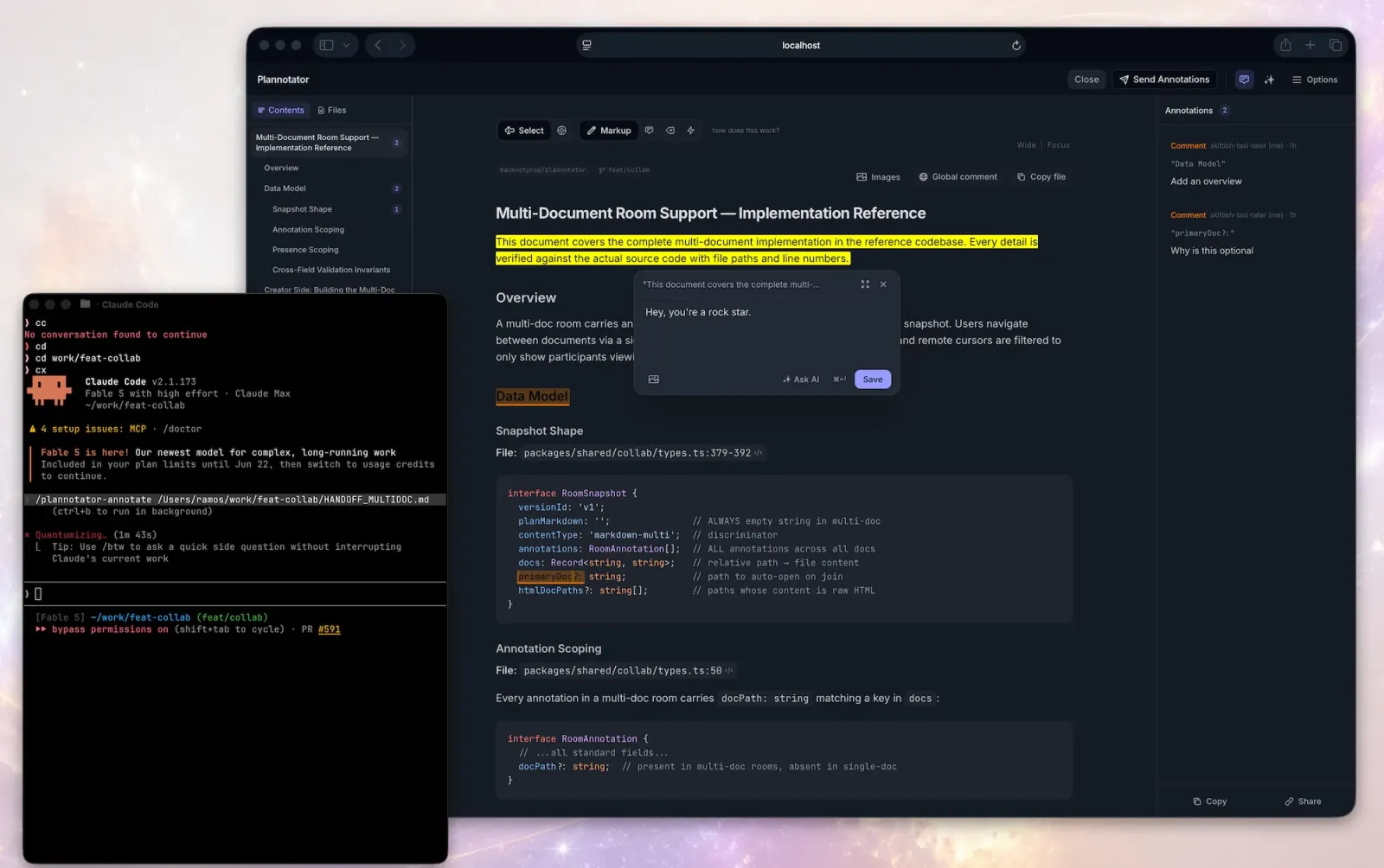
Every Plannotator feature serves one purpose: turning your opinion about a document into something the agent can act on in its next turn.
- Plan interception: on Claude Code the
PermissionRequesthook catchesExitPlanMode, a local server reads the plan out of the hook input, and the browser opens the review UI. Approve and the agent continues; deny and your annotations go back as structured feedback, so the revised plan arrives with a diff against the old one. No command needed. - Diff review:
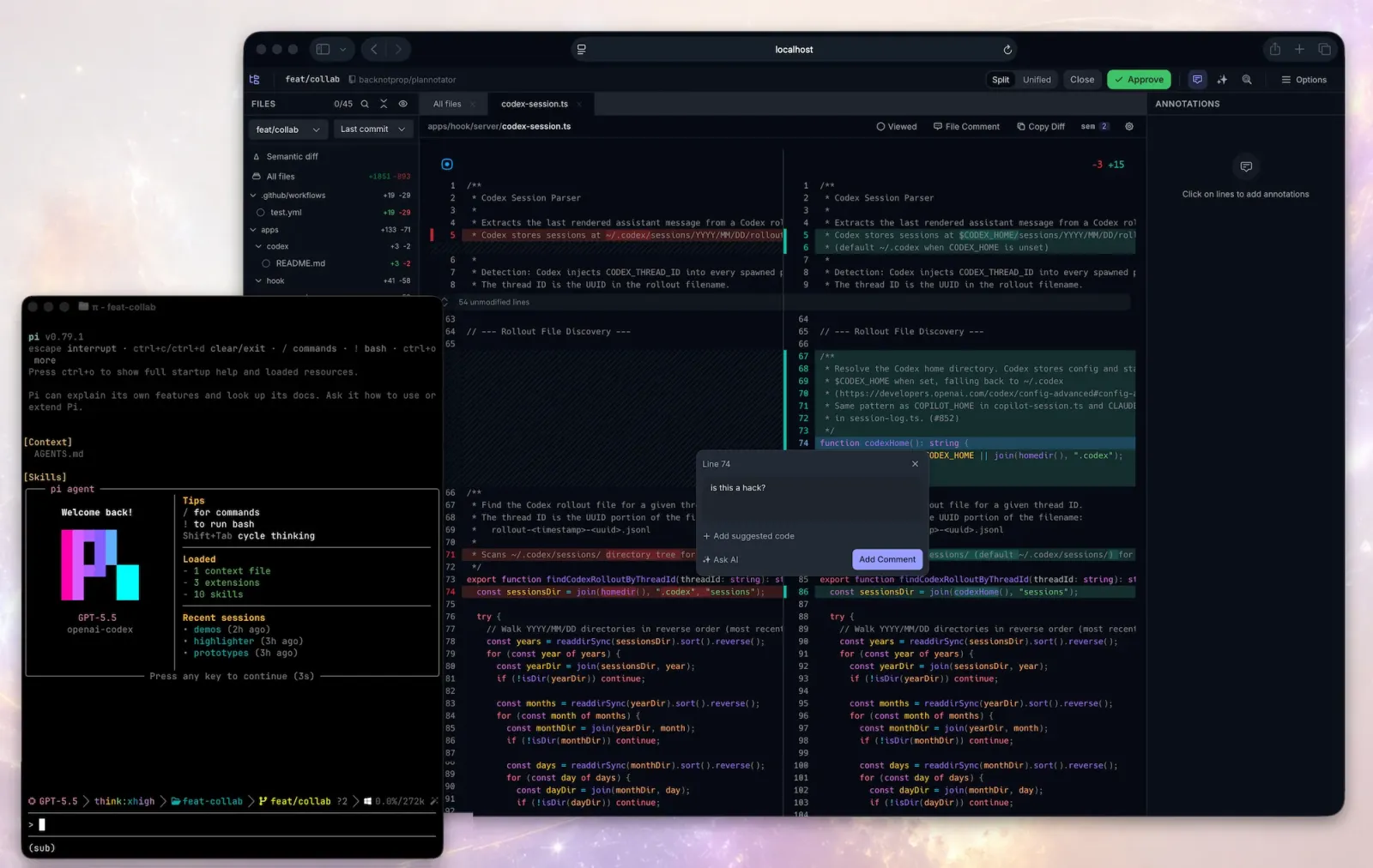
/plannotator-reviewcapturesgit diff HEADin a diff viewer, and also takes a GitHub PR or GitLab MR URL, orplannotator review --gitbutlerfor an active GitButler workspace. Git is not the only backend: GitButler, Jujutsu (jj) and Perforce (p4) are all named in the README. - Annotations as input: in the review surface you can mark a passage for deletion, leave an inline comment, or write a replacement; on a diff you comment on lines, attach suggested code, and stage or unstage files while you are there. Approving sends
LGTM; rejecting sends structured notes back to the agent (the README does not specify the format). - Guided review: press
Guide(orCmd/Ctrl+Shift+G) and an agent sorts the diff into chapters, the heart of the change first, each with a short overview beside the real diff. On a large change that beats scrolling from line one. - HTML and local sites:
/plannotator-annotate report.html --render-htmlannotates rendered HTML, andplannotator annotate http://localhost:5173opens a running frontend through a local proxy with hot reload intact. The six self-contained HTML skills in effective-html, which we covered in October, produce exactly the artifacts this view is built to mark up.
Where it runs
Plannotator is not another hosted web app, and its deployment model matters more than a feature list.
- A local process plus a browser: each hook invocation starts a server on a random port and serves a single-file HTML app, then goes away. Because the port changes every time, UI settings are stored in cookies rather than localStorage.
- Remote and containers: an SSH session switches to a fixed port of
19432; inside a devcontainer or Docker you setPLANNOTATOR_REMOTE=1andPLANNOTATOR_PORT, then forward the port. - Where the data goes: plans, annotations, drafts and config sit in
~/.plannotator, relocatable withPLANNOTATOR_DATA_DIR. The feedback archive is on by default and keeps review text and quoted excerpts but not the diff; the privacy page says plainly that nothing prunes the directory, so records stay until you delete them or setPLANNOTATOR_FEEDBACK_HISTORY=0. - Network edges: once a day, for each tool you use, it sends an anonymous ping to
ping.plannotator.aicarrying the tool name, version and age in weeks but no identifier;NO_ANON_PING=1turns it off. The homepage says “no usage telemetry” while the privacy page describes the daily ping — they disagree, and the privacy page is the accurate one. - Sharing is optional: small plans are compressed into the URL fragment (compressed, not encrypted — anyone with the full link can read it); larger ones are encrypted with AES-256-GCM before upload, and the hosted paste service deletes the ciphertext after seven days while the key stays in the fragment.
PLANNOTATOR_SHARE=disabledturns the whole thing off.
Typical use cases
- Make the agent show its plan first: hand a task to Claude Code, annotate the plan, then let it run. Cheaper than reviewing 20 changed files and rolling back. The author’s January 3, 2026 blog post says the project started from exactly that gap: agents write plans, but the interface for reading and editing one lagged behind.
- Several sessions in a day: with agents running in parallel, each one eventually waits on a decision.
plannotator inboxcollects those requests into one local window so a session is not held open while you are away; Claude Code, Pi and OpenCode connect through plugins, and other agents through MCP. - Reviewing someone else’s large PR:
/plannotator-review <PR URL>opens the full diff view; guided review gives you chapters first, and your comments can go to your own agent session or back to the author. - A designer or PM reading a prototype: send a plan or an HTML artifact as a link, let them annotate in the browser, then import their feedback for the agent. This is the collaborative edge of the tool; the team layer, Workspaces, is still a waitlist.
Quick start
The installer drops the binary, detects the agents you already have, and configures hooks, skills and slash commands for each:
curl -fsSL https://plannotator.ai/install.sh | bash
If you want only the binary, add --minimal: it puts plannotator in ~/.local/bin and touches nothing else. Then try three commands from inside your agent to see what it does:
/plannotator-last                  # annotate the agent's last reply
/plannotator-review                # review your current diff, PR-style
/plannotator-annotate report.html  # annotate a file, folder or URL
Plan review needs no command at all; the browser opens the next time your agent proposes a plan. Finishing steps differ by client, and the README table is the accurate one. The rows that surprise people:
| Client | What is left to do after the installer |
|---|---|
| Codex | Nothing: it runs off Codex’s experimental Stop hook; commands become $plannotator-* skills |
| Claude Code | After the installer: /plugin marketplace add backnotprop/plannotator, then /plugin install plannotator@plannotator, restart |
| Pi | Skip the installer: pi install npm:@plannotator/pi-extension, start with --plan |
| Droid | Commands only, no plan interception yet |
| Gemini CLI | Configured automatically, requires Gemini CLI 0.36.0 or newer |
Summary
Plannotator is for people who use a coding agent every day and actually read its plans. It swaps “let me describe which sentence I want changed” for “let me mark it”, and the shape of the feedback is what cuts the rework. It also suits anyone reviewing a pull request without pushing the branch anywhere first. It does not suit a workflow where you never read the plan and just check the result: an extra window is then just an extra step.
The license is Apache-2.0, with MIT offered as an alternative in the README, so either applies. It is written in TypeScript and had 12,742 stars on 2026-11-17. Compared with OpenCodeReview, which we covered on November 15, it takes the opposite side of the same problem: that tool has AI write the review comments for a human to skim, while Plannotator has the human write them for the AI to execute. Which one you want depends on whose eyes you trust.
Three things to know before you install it. Remote mode listens on 0.0.0.0 with no login, so anyone who can reach the port can use it, and the README itself says to keep that port off untrusted networks. Client support is uneven: Droid still has no plan interception, and everything else rides on each agent’s hooks, which an agent upgrade can break. And while the release side is more careful than most — a SHA256 sidecar on every binary, SLSA provenance since v0.17.2, a CycloneDX SBOM checked with Grype before anything is published — the verification is opt-in: a normal install does not run --verify-attestation.