Agent frameworks#Benchmark#Device control
Agent-S: An Open Framework for Computer Use Agents
Simular's open-source agent that works desktop and web apps from screenshots, clicking and typing with no per-app APIs. README reports 72.6% on OSWorld.
Project facts
GitHub Ecosystem- License
- Apache-2.0
- Language
- Python
- Stars
- 12,576
- Data checked
- 2026-10-10
Snapshot figures reflect the check date and may change over time.
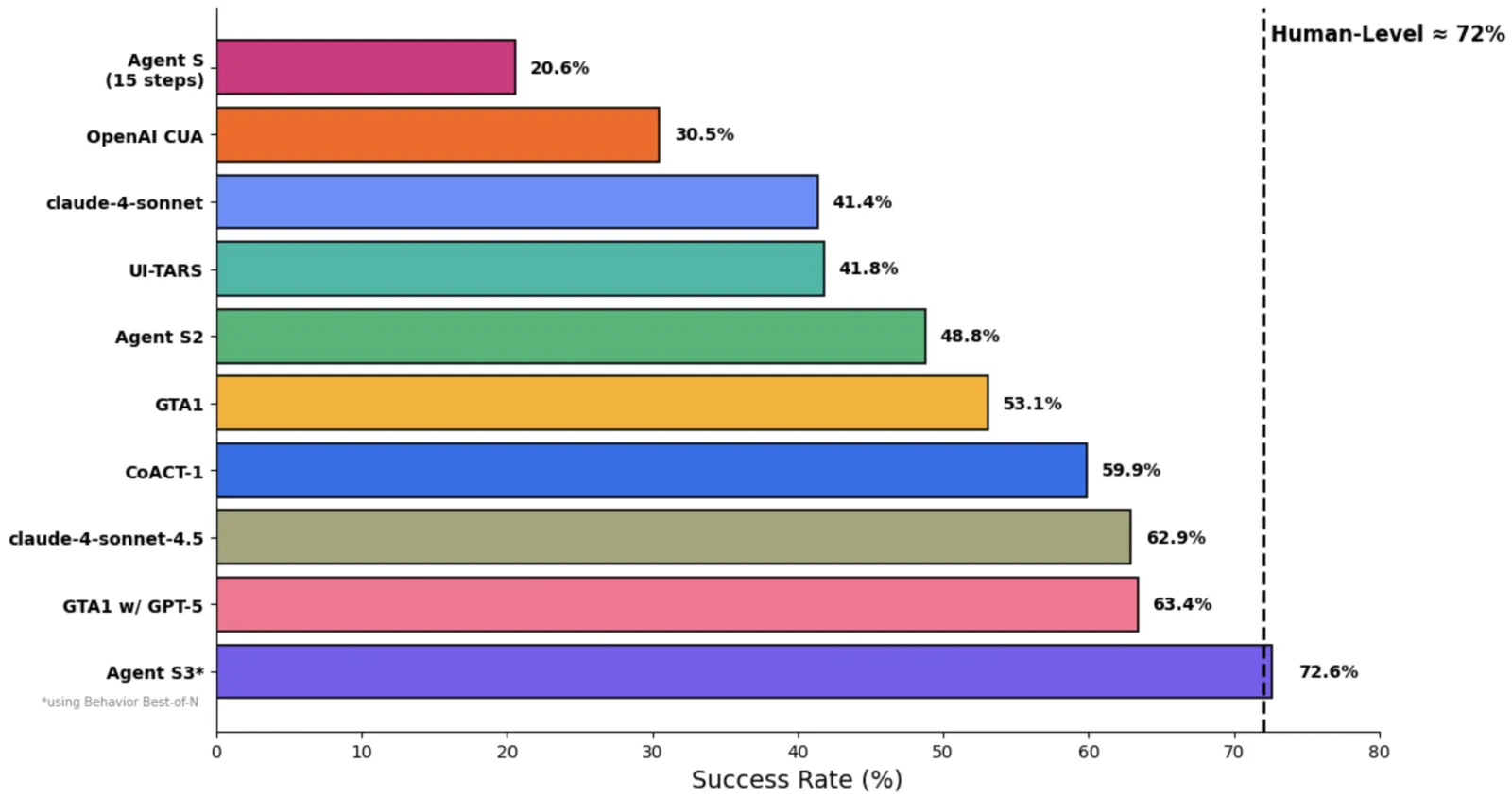
Getting an AI agent to click buttons and fill forms usually means writing a connector or script for every app, and rewriting it each time the interface changes. Agent S, from Simular, takes a different route. You give it a task in plain English, it looks at the screen, and it clicks, types and scrolls through ordinary desktop and web apps without any API integration. The repository has 12,576 stars as of 2026-10-10 and ships under Apache-2.0. The current version, Agent S3, reports 72.6% on OSWorld in its README, above the roughly 72% human level on that benchmark.
Core features
- Screenshot-driven, step by step: Each step takes a screenshot as input. A main model plans the next action, and OSWorldACI turns that action into executable Python that drives the real desktop.
- A grounding model finds the controls: The main model names the element it wants, and a grounding model maps that description to screen coordinates. The README recommends UI-TARS-1.5-7B and asks you to set its output resolution with
--grounding_widthand--grounding_height, for example 1920 by 1080. - Behavior Best-of-N: The agent runs several trajectories for the same task and keeps the best one. The README credits this step with lifting Agent S3 on OSWorld from 66% to 72.6%.
- Reflection on by default: A reflection agent reviews failed steps and helps the worker agent recover. You can switch it off with
--enable_reflection. - Optional local code environment: When enabled, the agent can run Python and Bash through a
call_code_agentaction for spreadsheets, bulk file edits and scripting. It is off by default.
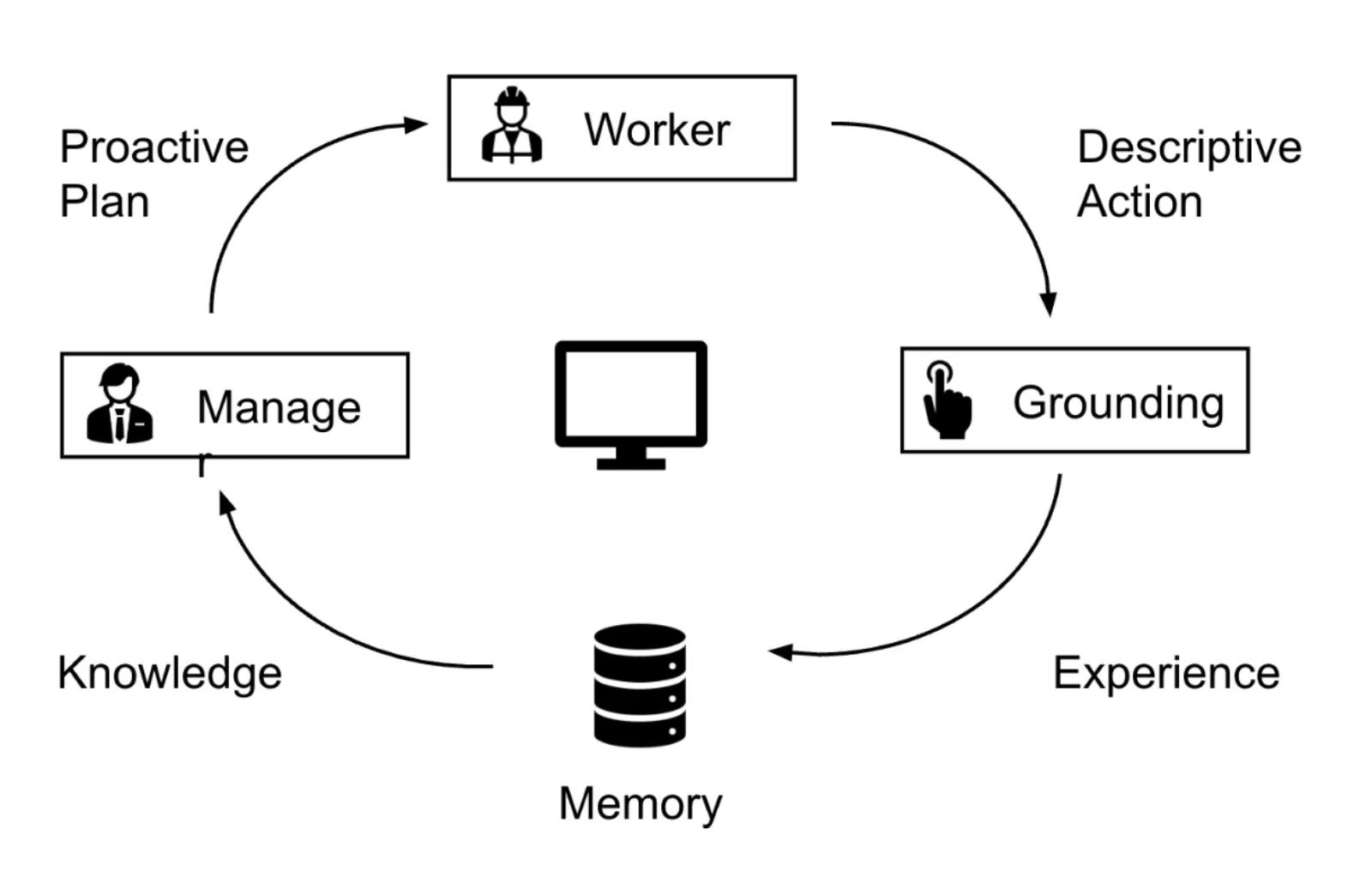
The diagram shows Agent S2, the previous generation. The README says Agent S3 is simpler, faster and more flexible than it.
Benchmarks
The README’s comparison, all measured by the project:
| Benchmark | Agent S3 alone | With selection |
|---|---|---|
| OSWorld | 66% (100-step setting) | 72.6% (Behavior Best-of-N) |
| WindowsAgentArena | 50.2% | 56.6% (best of 3 rollouts) |
| AndroidWorld | 68.1% | 71.6% |
The OSWorld chart also lists GTA1 w/ GPT-5 at 63.4% and Agent S2 at 48.8%. The README does not give the test hardware or dates. The numbers show that the selection step helps, but no third party has reproduced them yet.
Typical use cases
- Repetitive desktop work: Someone who moves the same data between a browser, a spreadsheet and email every week can describe the routine in one sentence and spot-check the result.
- Agent research: Teams can use OSWorld as a baseline and compare their own method against Agent S3. The repo includes OSWorld deployment notes, and the paper was accepted to TMLR 2026.
- Cross-platform GUI experiments: Run the agent on macOS, Windows or Linux to test grounding and planning, then compare results with the WindowsAgentArena and AndroidWorld numbers in the paper.
Quick start
pip install gui-agents
brew install tesseract   # macOS; pytesseract needs it
agent_s \
    --provider openai \
    --model gpt-5-2025-08-07 \
    --ground_provider huggingface \
    --ground_url http://localhost:8080 \
    --ground_model ui-tars-1.5-7b \
    --grounding_width 1920 \
    --grounding_height 1080
Start your grounding model server first and point --ground_url at it. Put the main model’s key in an environment variable such as OPENAI_API_KEY. Once the command starts, the agent takes control of the current screen, so try it in a virtual machine or on a test account first. To embed it in your own program, the README’s gui_agents SDK section shows how to wire AgentS3 and OSWorldACI together.
Summary
Agent S suits developers and researchers who have some engineering experience and want to keep models and data under their own control, including anyone trying to reproduce OSWorld results. It is a poor fit for someone who wants a finished product with no setup. If you only need an agent working inside your signed-in browser, BrowserSkill covers that narrower job. The README points those users to Simular’s hosted Sai agent and API. The project is Apache-2.0, written in Python, and was last pushed on 2026-10-08.
A few things to weigh first:
- The agent controls your real mouse and keyboard, and the README warns to use it with care. The local code environment runs arbitrary code with your user permissions, so enable it only in a trusted setting.
- You host the grounding model yourself. The README recommends UI-TARS-1.5-7B, and any hosted inference endpoint bills you directly.
- The performance numbers come from the project’s own tests, and no third party has reproduced them. Sai’s 73% on OSWorld 2.0 is also a vendor report.
- The design targets a single-monitor screen, and the repository has 55 open issues. Read the existing discussions before you start.