BrowserSkill: let AI agents work in your logged-in browser
Tencent's open-source bridge, June 2026: agents work in a separate Agent Window inside your signed-in Chrome, borrowing tabs only after asking. MIT licensed.
Project facts
GitHub Ecosystem- License
- MIT
- Language
- TypeScript
- Stars
- 8,519
- Data checked
- 2026-10-10
Snapshot figures reflect the check date and may change over time.
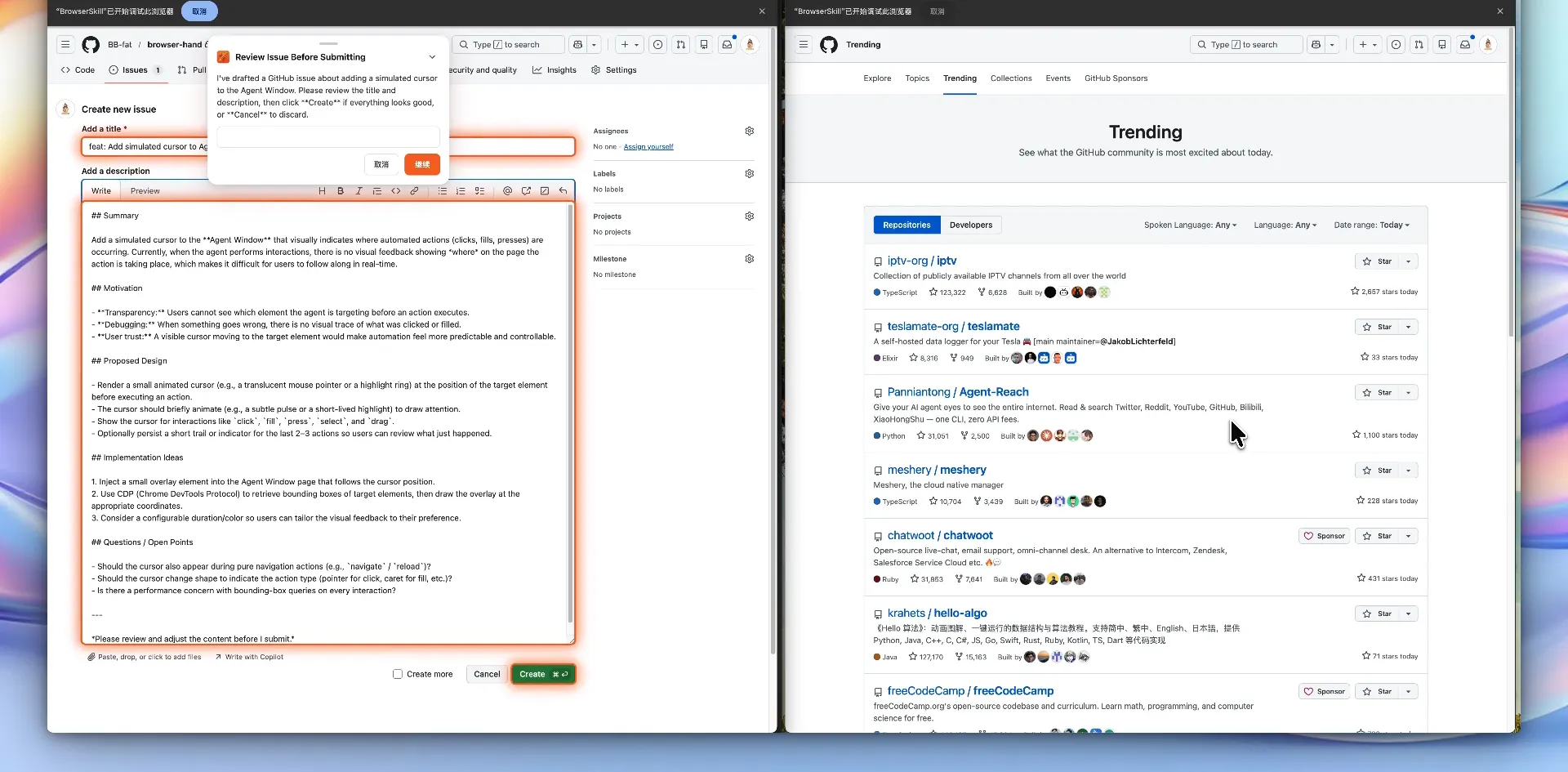
When you ask Claude Code or Cursor to work a website, both usual routes hurt: a fresh Playwright instance has no login state, so everything needs signing in again, and handing your daily browser to an automation protocol means the agent fights you for the same tabs. BrowserSkill, open-sourced by Tencent in June 2026 under MIT (about 8,500 stars as of October 10, 2026), takes a third path: each task runs in its own visible Agent Window, an existing tab is borrowed only after a confirmation prompt, and human-only steps like CAPTCHAs and logins get handed back to you.
Core features
- A separate Agent Window: every task runs in its own visible window you can watch and interrupt at any moment. The window shares the selected profile’s login state, so the agent never signs in anywhere.
- Borrow, then return: controlling a tab you already have open triggers a confirmation by default, and the tab goes back to its original window when the task ends. That switch lives in the extension settings, out of the CLI’s reach.
- Ask a human: for logins, CAPTCHAs, or payment confirmations the agent raises a help request through the extension and resumes once you are done; turn the setting off and the request is never sent.
- Website debugging with evidence: start capture, reproduce the bug, and the tool lines up requests, response bodies, console output, form values, and page changes on one timeline, with request rewriting, mocks, same-origin replay, and JSON export.
- Remote pairing: when the agent runs on a server, your local extension dials out over authenticated WSS, so your machine needs no inbound port; remote mode cannot upload or download files yet.
- Named browsers and full-page capture: give each browser a name and bind a session to it, and capture full-page screenshots from background tabs — the original scroll position comes back afterwards.
Typical use cases
- Let an agent walk a form flow inside your company intranet while you handle only the CAPTCHA and the final submit.
- Debug a failing save on localhost: the agent starts capture, reproduces it, reads the response body and console, and hands you an evidence bundle.
- Full-page screenshots and bulk reads of signed-in pages, all without touching the window you are working in.
- An agent on a cloud server paired with the browser at your desk: logins stay local while the model runs remotely.
Quick start
curl -fsSL https://raw.githubusercontent.com/Tencent/BrowserSkill/main/install.sh | sh
bsk install-skill
bsk doctor
The CLI ships with its daemon, and bsk install-skill installs the matching skill file for your agent (Claude Code, Cursor, Codex, OpenClaw, and more). Install the extension from the Chrome or Edge store and enable the local connection in its popup. Once bsk doctor passes and the extension shows Connected, tell a fresh session to “use browser-skill to open example.com and summarize the page” and watch the Agent Window appear; harnesses with slash commands can also invoke /browser-skill directly.
Summary
BrowserSkill fits developers who already drive shell-based agents and want them working with real login state. Compared with launching a controlled instance through Playwright MCP, it skips the login dance entirely — and inherits the profile’s powers with it. The Agent Window is not a security sandbox: the agent acts with the permissions of your signed-in sites, so vet the tasks and the model you give it. Under the hood it is a Rust bsk CLI plus a TypeScript extension talking to a loopback daemon, with no mandatory cloud service and no telemetry; the daemon updates itself while idle, the operation audit is off by default (records land in BSK_HOME/audit), and debugging evidence is kept for 30 days. Known secrets are filtered from debugging evidence, though no redaction is guaranteed to catch everything.