Developer tools#Coding agent#Runtime
agentplay: replay a coding agent session as a map and timeline
agentplay turns local Claude Code, Codex and Cursor transcripts into a radial map plus a playable timeline. Apache-2.0, no data leaves your machine.
Project facts
GitHub Ecosystem- License
- Apache-2.0
- Language
- Python
- Stars
- 316
- Data checked
- 2026-10-26
Snapshot figures reflect the check date and may change over time.
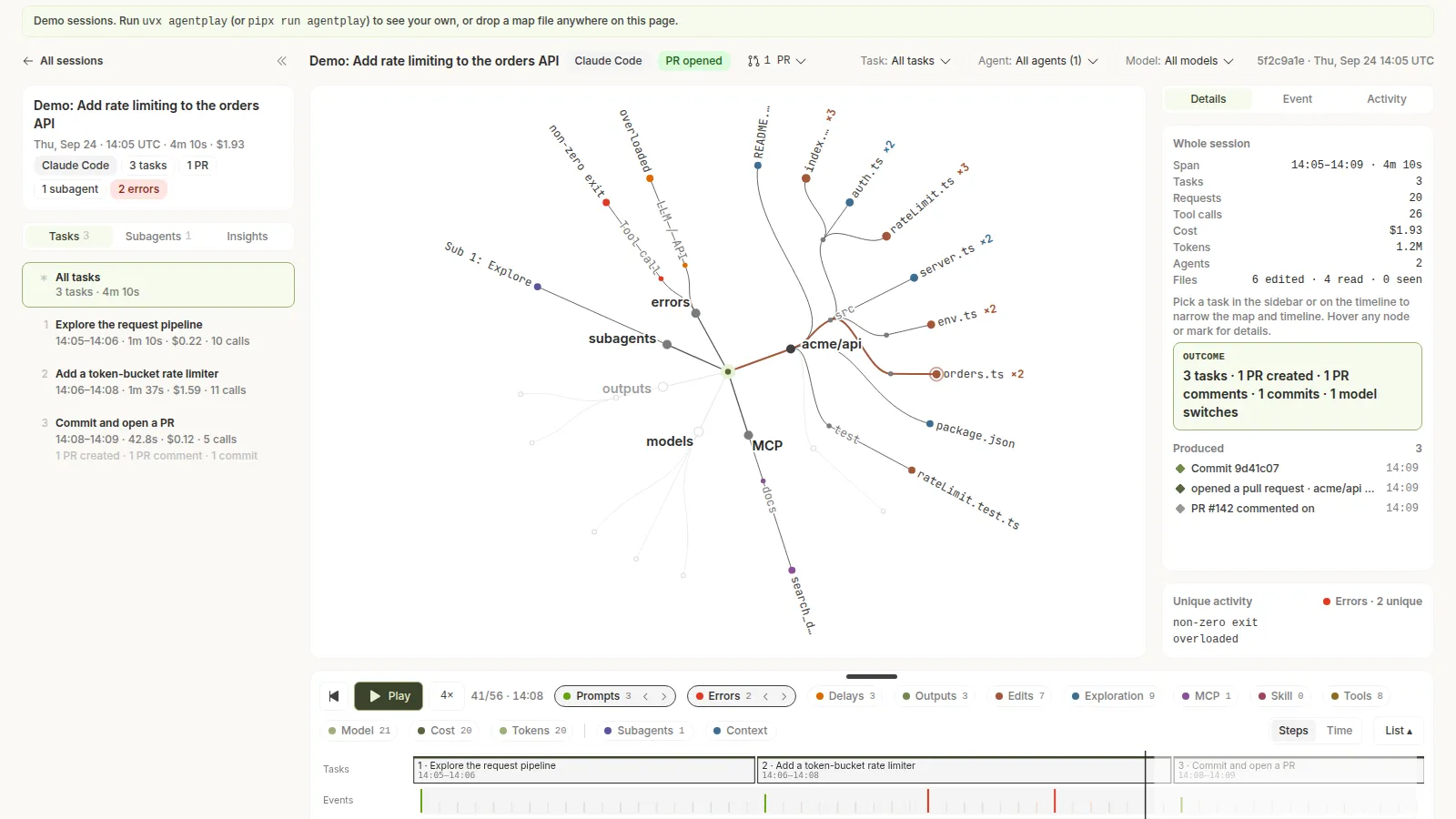
Your coding agent’s transcripts already record everything: which files it read before editing, which commands it retried, which MCP servers failed, where the context window filled up, which subagents came back empty. That data sits in ~/.claude, ~/.codex, ~/.cursor and similar folders, and almost nobody looks at it. agentplay, an Apache-2.0 Python tool from Entelligence, turns each session into a radial map plus a playable timeline so you can see what the agent actually did. The repository was created on October 14, 2026, has 316 stars, and was still receiving pushes today.
Core features
- A radial session map: repos, directories and files (split into seen, read and edited), shell verbs, MCP servers and tools, skills, subagents, web hosts, error classes, models, and the outputs it produced — commits, PRs and tickets — laid out as one tree.
- A timeline you can play: 1x, 4x or 16x playback, switching between a step axis and wall-clock time. Lanes cover prompts, errors, delays, outputs, edits, exploration, MCP, skills, tools, model, cost, tokens, subagents and context size, with compactions marked.
- Tasks and an agent lens: a session is split into tasks, usually one per prompt; pick a task, a model or a single subagent and the whole explorer re-scopes to it.
- Error ranking: the Errors tab groups every error by class and ranks them by the longest run of the same failing command; click a row to seek the replay to that moment.
- Nine agents out of the box: Claude Code, Codex (CLI and IDE), Cursor, GitHub Copilot CLI, Copilot in VS Code, OpenCode, Kiro, Gemini CLI and Antigravity CLI. Claude Code has the highest fidelity — read straight from JSONL including hooks, compactions, stop reasons and latency.
- No dependencies, no uploads: nothing beyond the Python standard library at runtime, and
uvx agentplay@latestruns it in one command. Session data never leaves your machine, and a map contains no prompt text, tool inputs or outputs, file contents or command arguments — a shell command is recorded as its verb only (git log, nevergit log --author=…).
Typical use cases
- Debugging a session that went wrong: when the agent edits the wrong file, the map’s read list tells you what it had actually looked at, far faster than scrolling thousands of lines of JSONL.
- Chasing tool and MCP failures: which MCP server kept failing, which command was retried a dozen times — the Errors panel ranks them for you.
- Seeing where the money went: the token, cost and context-size lanes plus compaction markers show exactly which step blew up the context window.
- Sharing a session:
agentplay exportwrites a single map file, and rebuilding with--path-mode dirs_onlykeeps only directory-level paths so it is safe to hand to a colleague. - Fitting existing workflows: for reviewing the code the agent produced, pair it with PR-Agent; for a ready-made Claude Code engineering setup, see ECC.
Quick start
- You need Python 3.11 or newer, then run
uvx agentplay@latest(orpipx run agentplay, orpip install agentplay). - It finds the agent sessions already on your machine, builds redacted maps incrementally, and opens a local viewer at
127.0.0.1:7317. Later runs only rebuild sessions whose transcript changed. - Useful subcommands:
agentplay buildbuilds maps only,listshows built sessions,export <session>writes one map,importadds a teammate’s maps,agentsreports which agents were found. - To keep it fully offline, set
AGENTPLAY_NO_NETWORK=1before launching; that also hides the viewer’s optional email signup.
Summary
agentplay’s value is turning “what did the agent do” from a log into something readable: the map answers what it touched, the timeline answers how it got there, and the error ranking answers where it got stuck. Apache-2.0, no runtime dependencies, and data that stays local make it easier to try than most observability products. The limits are stated plainly too: outside Claude Code, subagents do not get their own lanes; Cursor records no tokens; and an exported map needs its path mode checked before it is shared publicly.