d2r-mobile: run the Switch Diablo II natively on iPhone
d2r-mobile is an open-source layer that runs the Switch Diablo II program natively on iPhone, iPad and Apple-silicon Mac at 60 fps. MIT; bring your own files.
Project facts
GitHub Ecosystem- License
- MIT
- Language
- C
- Stars
- 4,060
- Data checked
- 2026-10-20
Snapshot figures reflect the check date and may change over time.
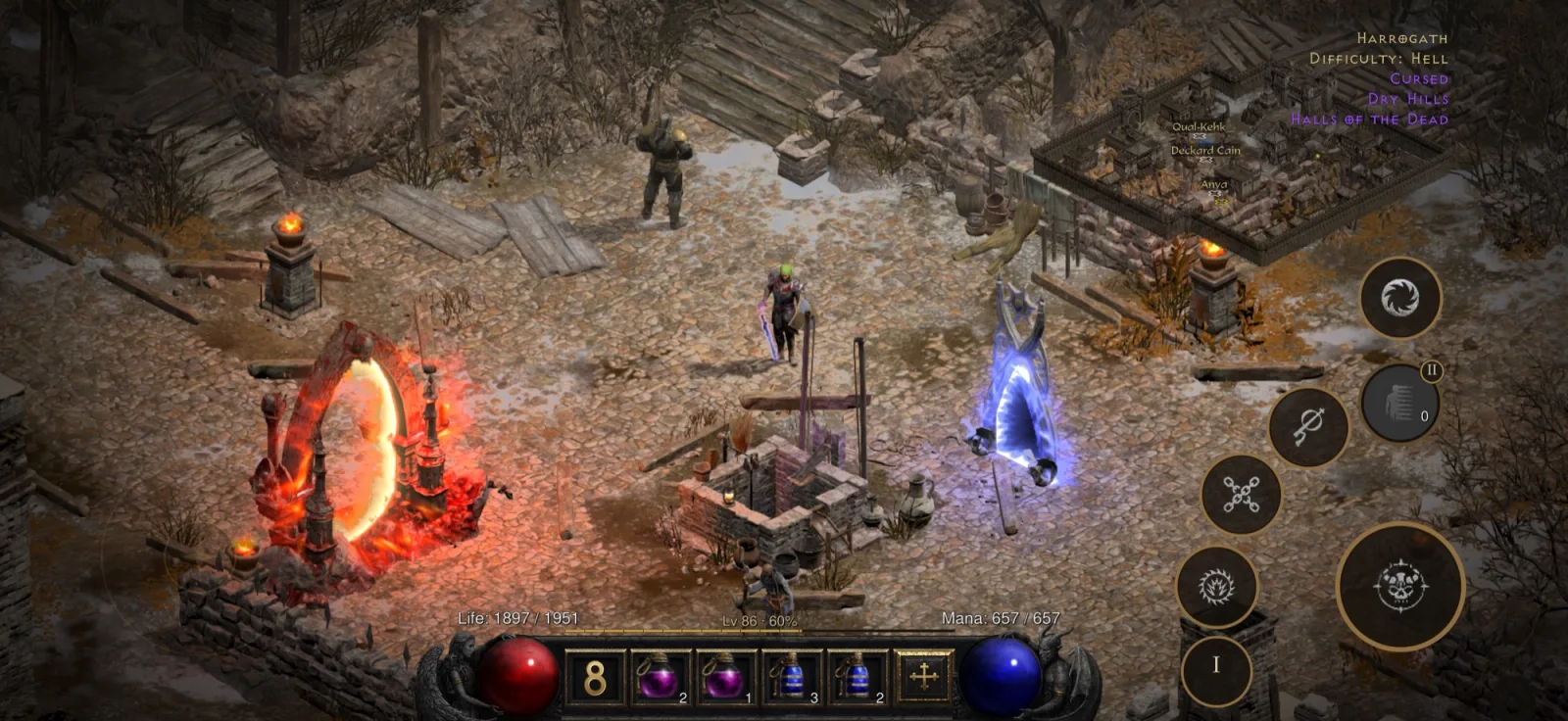
An emulator cannot run the Switch release of Diablo II: Resurrected — Switch and iPhone use the same class of ARM processor, but their system interfaces differ. d2r-mobile does no CPU emulation at all. It runs the game’s own aarch64 program directly on iPhone, iPad and Apple-silicon Mac, rewriting only the handful of instructions that cannot run unchanged under Apple’s kernel and leaving every other byte exactly as shipped, while reimplementing the graphics API on Metal. The project claims a steady 60 fps, about one second from the main menu into a game, a full touch control scheme, and Chinese support. The repository is MIT, its primary language is C, and on October 20, 2026 it had 4,060 stars and 1,127 forks. You bring your own game files.
Core features
- Native execution, no CPU emulation: Only the few instructions that cannot run under Apple’s kernel (thread-pointer registers, system calls, timers) are rewritten; the rest of the program stays byte-for-byte as shipped. Every class, every Runeword, Terror Zones, bosses, drop rules and quest flow therefore match the original.
- The graphics API reimplemented on Metal: Shaders are translated offline from the game’s originals, with no emulation layer in between. The project’s own figure is about 3.8 W whole-device draw at 60 fps.
- Controls rebuilt for fingers: A complete touch scheme, edge-to-edge iPhone and true full-screen iPad display, controller support and a power-saver mode.
- More than the original content: On top of the base game there are Greater Rifts, an Endgame Boss Rush, Elysium mode and a Kill Board, plus storage organisation and one-tap Runewords.
- Multiple devices and languages: iPhone / iPad need iOS 26 or later (iOS 18–25 with the older-API build), Apple-silicon Mac needs macOS 26 or later (macOS 15–25 likewise), and Apple TV 4K (3rd generation, A15) has a community port that is still a developer preview. The interface supports English, Chinese and Spanish.
- Testing and verification are part of the project: Unit tests for the host and graphics layers, an equivalence check for every rewritten instruction, scripted regression for the touch interface, and on-device smoke tests. The three commands the author gives are
make -C dm/host/tests run,make -C dm/gfx/tests runanddm/verify/regress.sh.
Typical use cases
- Playing Diablo II on your phone: Carry your Switch progress to the phone and farm or run Greater Rifts from the sofa, without sitting in front of a Switch.
- Running the original on an Apple-silicon Mac: Keyboard, mouse or gamepad, and it starts on a double-click.
- Developers studying how to port a Switch game to iOS: The project publishes the whole pipeline — rewriter, host, graphics layer, iOS shell and verification tooling — and community ports have already been built on it.
- Anyone playing offline: Online play is out of scope, so the game is fully offline.
Quick start
You need an Apple-silicon Mac with Xcode, and your own Switch game files in the workspace. The core flow is three steps:
# 1. Put your game files in ~/dm-work/data/switch/<version>/Update/{ExeFS,RomFS}
# 2. Prepare the workspace: check tools, rewrite the game program, translate shaders to Metal
./setup.sh
source ~/dm-work/build/cache/dm/venv/bin/activate
# 3. Fill in signing details and build
cp dm/ios/local.env.example dm/ios/local.env
cd dm/ios && ./run.sh build
Without a Mac you can download a content-free “shell”, add your own game files with the packaging tool, and install it with a sideloading tool; the author says this works end to end on Windows, with only the sideloading signing step still untried. For signing, a paid developer account gives you everything, while a free Apple ID works too — but with no iCloud save sync, and the app must be re-signed and reinstalled every 7 days.
Summary
It suits people who own the Switch release of Diablo II: Resurrected and want to keep playing on an iPhone, iPad or Apple-silicon Mac, and developers who want to read through a full Switch-to-iOS port pipeline. It does nothing for anyone without the game: the project ships no game content, and providing your own files is the precondition.
What to know first: an A14 / M1 chip or later is required, because the graphics layer needs Metal 3. A16 and earlier devices need an extra Legacy Device Pack, and 4 GB devices such as the iPad mini 6 run but with very tight memory — the author measured a few minutes of Act I at 50–58 fps on one, with constant system memory warnings, and busy scenes may be ended by the system. Online play is out of scope and the game is fully offline. Only the Switch release with the Reign of the Warlock expansion is supported. On the legal side, be clear about this: the project provides only tools and an install shell, distributes no game content, and expects files you legally own. C, MIT, 4,060 stars.
Community ports of other Switch games have already been built on this pipeline. For 3D work in the browser instead, see Pascal Editor, covered earlier here.