Databasus: self-hosted database backups with verified restores
Databasus is a self-hosted database backup manager: physical, incremental and point-in-time backups for PostgreSQL, each one verified by a real restore.
Project facts
GitHub Ecosystem- License
- Apache-2.0
- Language
- TypeScript
- Stars
- 8,690
- Data checked
- 2026-09-29
Snapshot figures reflect the check date and may change over time.
If you run your own servers, you have probably written a database backup script: pg_dump plus a crontab line that drops a file somewhere every night. The hard part is not writing it — it is knowing whether it ran, whether the file is intact, and whether it will actually restore the day you need it. Databasus pulls all of that into a web dashboard: an open-source (Apache-2.0), self-hosted backup manager written in TypeScript, focused on PostgreSQL physical, incremental and point-in-time recovery, with logical dumps for MySQL, MariaDB and MongoDB. Chinese tech blog 科技君 covered it on September 29, 2026.
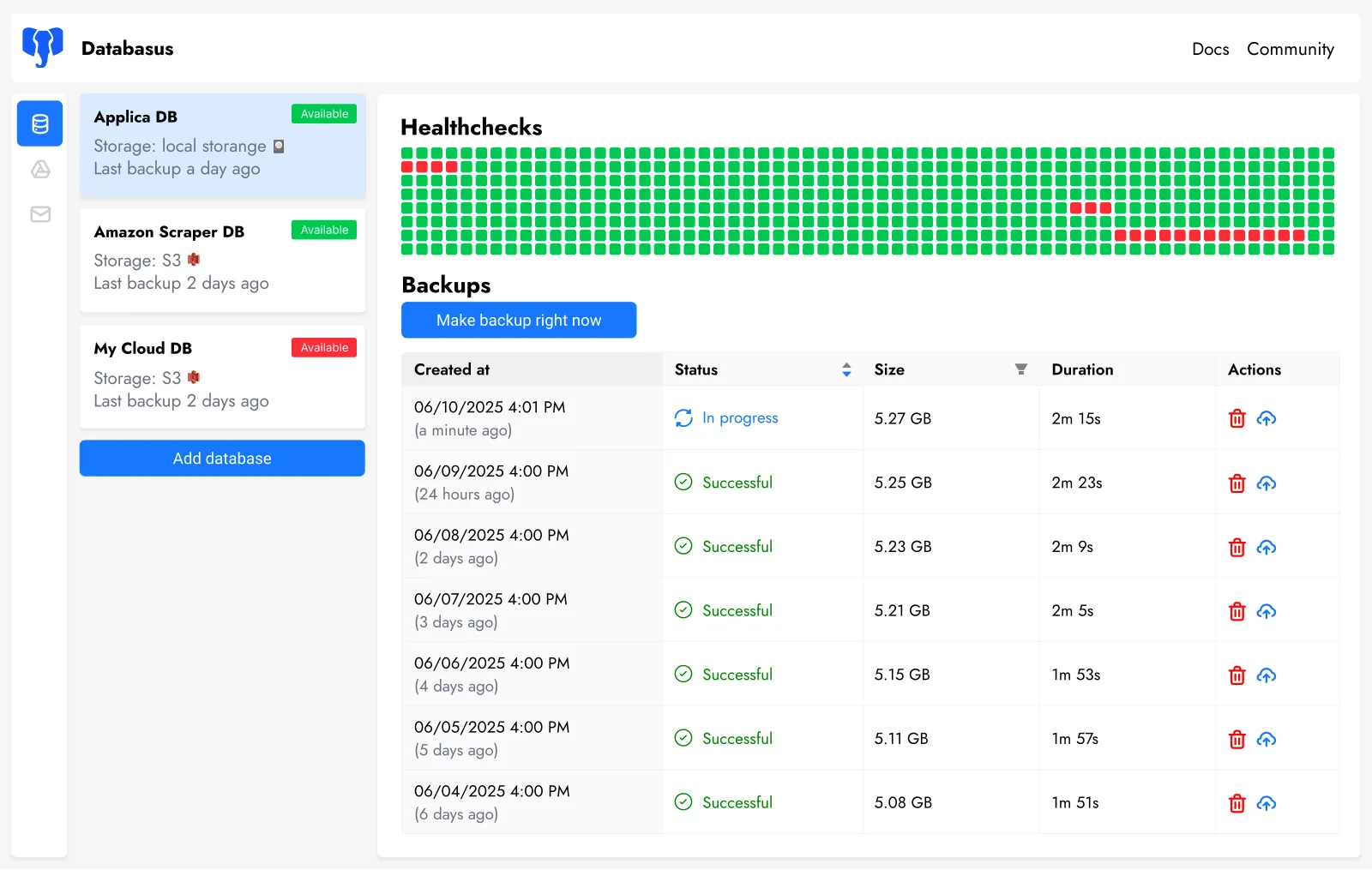
Core features
- Restore verification: takes a backup, spins up a throwaway database container, runs the restore for real, checks the result and reports every table with its row counts, then cleans up. Runs on a schedule or right after each backup; a Verified badge in the backup list keeps “the file exists” and “it restores cleanly” from looking the same.
- Physical backups and PITR: a live database is not a folder you can sync with Syncthing — files copied mid-write come back as garbage. Databasus uses PostgreSQL’s native backup mechanism for consistent file-level copies, stores only changed blocks in incremental backups, and streams WAL so you can push the data to any point in the day. Physical backups need PostgreSQL 17 or newer per the docs; older versions fall back to logical dumps.
- Scheduling and retention: hourly, daily, weekly, monthly or cron; retention by time period, by count, or GFS tiers (daily, weekly and monthly kept independently), with per-backup and total size caps.
- Storages and encryption: local disk, S3-compatible storage, Cloudflare R2, Google Drive, NAS, SFTP and more as destinations; backup files encrypted with AES-256-GCM.
- Loud failures: email, Telegram, Slack, Discord, Teams or webhook notifications on success and failure, with separate alerts for verification results.
- Team features: workspaces to group databases by project, viewer / member / admin roles, and audit logs for every change.
Supported engines (per the README, checked 2026-09-29):
| Database | Backup type | Versions |
|---|---|---|
| PostgreSQL | physical + logical | 14–18 (physical needs 17+) |
| MySQL | logical only | 5.7, 8.0, 8.4, 9, 26 |
| MariaDB | logical only | 5.5–13 |
| MongoDB | logical only | 4.2+ |
Typical use cases
- A solo developer with two or three VPSes running PostgreSQL or MySQL, replacing a pile of hand-rolled cron scripts with one dashboard that shows what ran and what failed. If you followed our indie low-cost stack onto self-hosted infrastructure, backups became your job that day — this tool covers that layer.
- An order-taking PostgreSQL database: full backup overnight, WAL streaming through the day, so you recover to the minute before the bad
DELETEinstead of to last night. - Teams shipping backups to S3 or R2: every backup gets restored in a temp container automatically, and the report lands in Slack — you find out a backup is broken before you depend on it.
Quick start
On any machine with Docker (official floor: 1 CPU core, 500 MB RAM, 5 GB disk):
docker run -d \
  --name databasus \
  -p 4005:4005 \
  -v ./databasus-data:/databasus-data \
  --restart unless-stopped \
  databasus/databasus:latest
Open http://localhost:4005 and sign up — the first account on an instance is its admin — then follow the wizard to add a database and pick a schedule, storage, retention and notifications. Beyond plain Docker there is an install script, Docker Compose and a Helm chart; if Docker Hub rate-limits you, the same image lives at ghcr.io/databasus/databasus. Point it at a test database first and walk the whole backup → verify → restore loop before touching production.
Summary
Databasus fits anyone self-hosting a few long-lived databases who has been burned by a silently failing cron job; restore verification answers “will it restore”, not just “did a file appear”. The project is TypeScript under Apache-2.0, with 8,690 GitHub stars as of 2026-09-29. Three caveats: physical backups and PITR need PostgreSQL 17 or newer, so older versions get logical dumps only; restore verification means deploying an extra agent with its own Docker, CPU, RAM and disk; and if you encrypt backups, guard the secret.key in the data directory — lose the key and the backups become data you cannot get back.