Zerobyte: Restic backups with a web UI
Zerobyte is a self-hosted backup tool built on Restic. It schedules encrypted backups from local folders, NFS, SMB or SFTP to S3, Azure or rclone remotes.
Project facts
GitHub Ecosystem- License
- AGPL-3.0
- Language
- TypeScript
- Stars
- 7,302
- Data checked
- 2026-11-10
Snapshot figures reflect the check date and may change over time.
If you already run restic directly, scheduling, retention, and checking whether last night’s job really finished usually come down to scripts you maintain yourself. Zerobyte is a backup automation tool built on Restic. Restic still handles encryption, compression, deduplication, and retention. Zerobyte adds a web interface that organizes backups into volumes (what to back up), repositories (where the data goes), and backup jobs (when they run and with which options). On November 10, 2026, the GitHub repository showed 7,302 stars, and the latest release was v0.44.2.
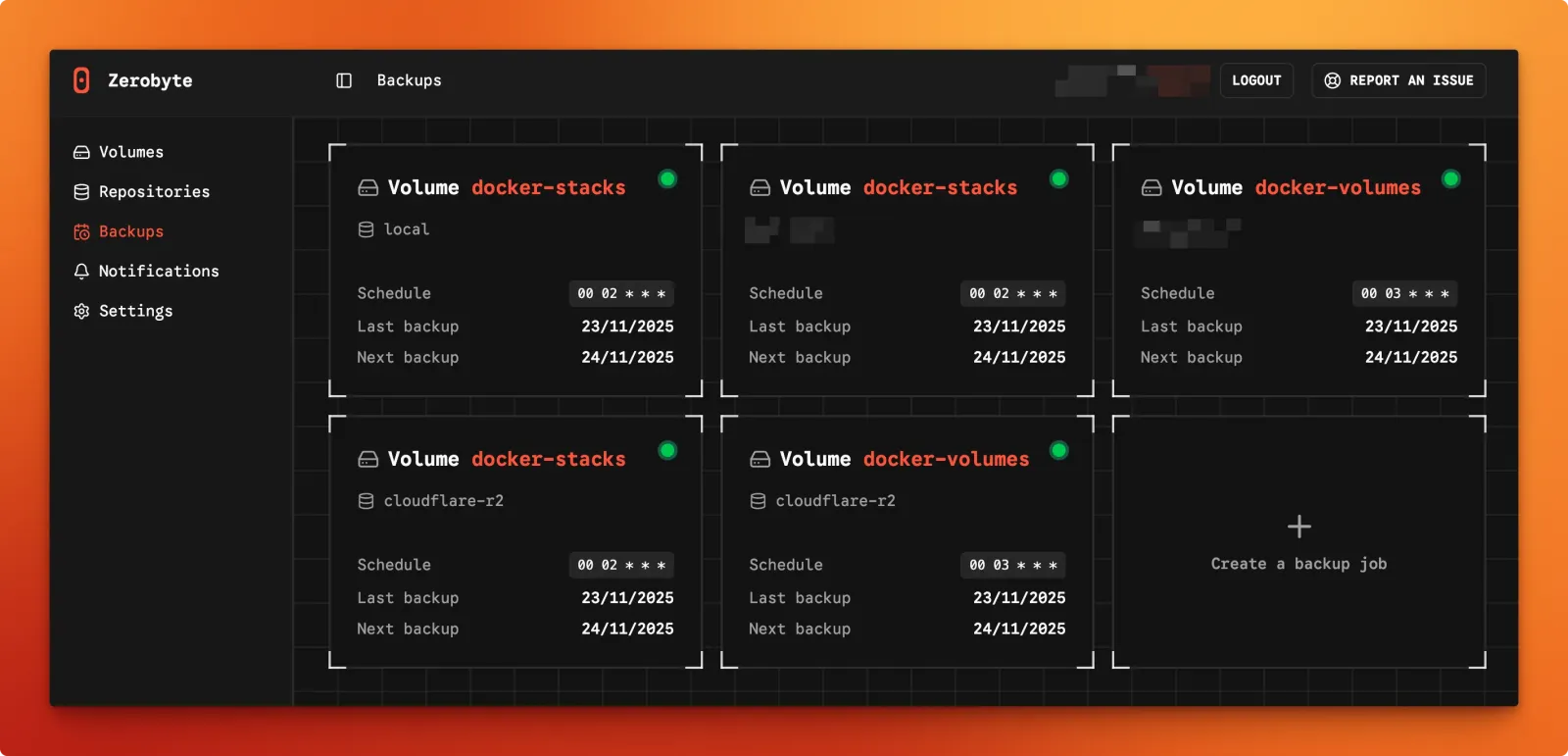
The screenshot comes from the project README. Each card is one backup job, and its schedule is shown as a cron expression, so 00 02 * * * means 02:00 every day. The dates on the cards do not reflect a live system.
Core features
- Several kinds of source: a volume can be an NFS, SMB, WebDAV, or SFTP share, or a local directory. The README defines a volume as the source data you want to back up and monitor.
- Several kinds of destination: repositories can use S3-compatible storage (the README lists Amazon S3, MinIO, Wasabi, and DigitalOcean Spaces, among others), Google Cloud Storage, Azure Blob Storage, or any of the 40+ providers reachable through rclone.
- Schedules and retention: a job sets how often it runs and which snapshots to keep. The README’s example keeps daily backups for seven days and weekly backups for four weeks. Scheduling depends on the
TZsetting in the container, which the README calls crucial for accurate schedules. - Progress and alerts: the Backups page shows progress and status for each job. Jobs can call webhooks before and after a run, and notifications can go to ntfy, Slack, Discord, Pushover, or Telegram.
- Tunable Restic options: a job can add custom Restic flags, such as
--read-concurrency 1or--exclude-larger-than 10G. TheGOMAXPROCSvariable caps the threads Restic uses, which the README suggests for reducing CPU pressure during backups.
Typical use cases
- A home server or NAS owner who copies an SMB or NFS share to S3-compatible storage every night, using the README’s retention example.
- Someone managing several machines who turns each data directory into a volume, sends them all to one storage backend, and checks in one web page whether each job ran.
- A person who already uses rclone: the README explains how to mount the rclone config directory into the container, so backups can go to Google Drive, Dropbox, or OneDrive.
Quick start
The README starts from a compose.yaml that sets APP_SECRET (generate it with openssl rand -hex 32), BASE_URL, and TZ. Once the file is ready, run this in its directory:
docker compose up -d
Then open http://<your-server-ip>:4096. The README’s example compose file also includes the SYS_ADMIN capability and a /dev/fuse device, so check them against your setup before you change them. Do not point /var/lib/zerobyte at a network share; the README warns of permission problems and a strong performance penalty.
Summary
Zerobyte suits self-hosters who have several backup sources and want one web interface over their Restic jobs. It is a weaker fit for someone backing up one machine who prefers shell scripts, or for a team that needs fine-grained permissions.
The README gives three warnings worth reading before you deploy. The project is still in version 0.x, and major changes can arrive from one version to the next. Backup operations have no fine-grained RBAC; authenticated organization members are treated as trusted operators. And the README advises against exposing the instance to the internet. If you must, bind the port to 127.0.0.1 and reach it through an authenticated tunnel.
Community reviews, including a bitdoze write-up and a restic forum thread, compare Zerobyte with Backrest, another Restic web interface. Their view is that Zerobyte fits many volumes and sources managed centrally, while Backrest suits one operator who wants a compact interface close to the data. These are reviewers’ opinions, not project claims.
Zerobyte is licensed under AGPL-3.0 and written in TypeScript. Running it unmodified for yourself adds no license obligations. If you modify it and offer it to others over a network, you must provide the modified source. For a related self-hosting tool that syncs files rather than backing them up, see Syncthing.