Documents#Coding agent#Image editing
DrawAI: turn generated images and paper figures into editable SVG and PPT
DrawAI rebuilds bitmap figures, diagrams and slide screenshots as separate text, shape and connector objects, then exports editable SVG and PPTX.
Project facts
GitHub Ecosystem- License
- Apache-2.0
- Language
- Python
- Stars
- 152
- Data checked
- 2026-10-18
Snapshot figures reflect the check date and may change over time.
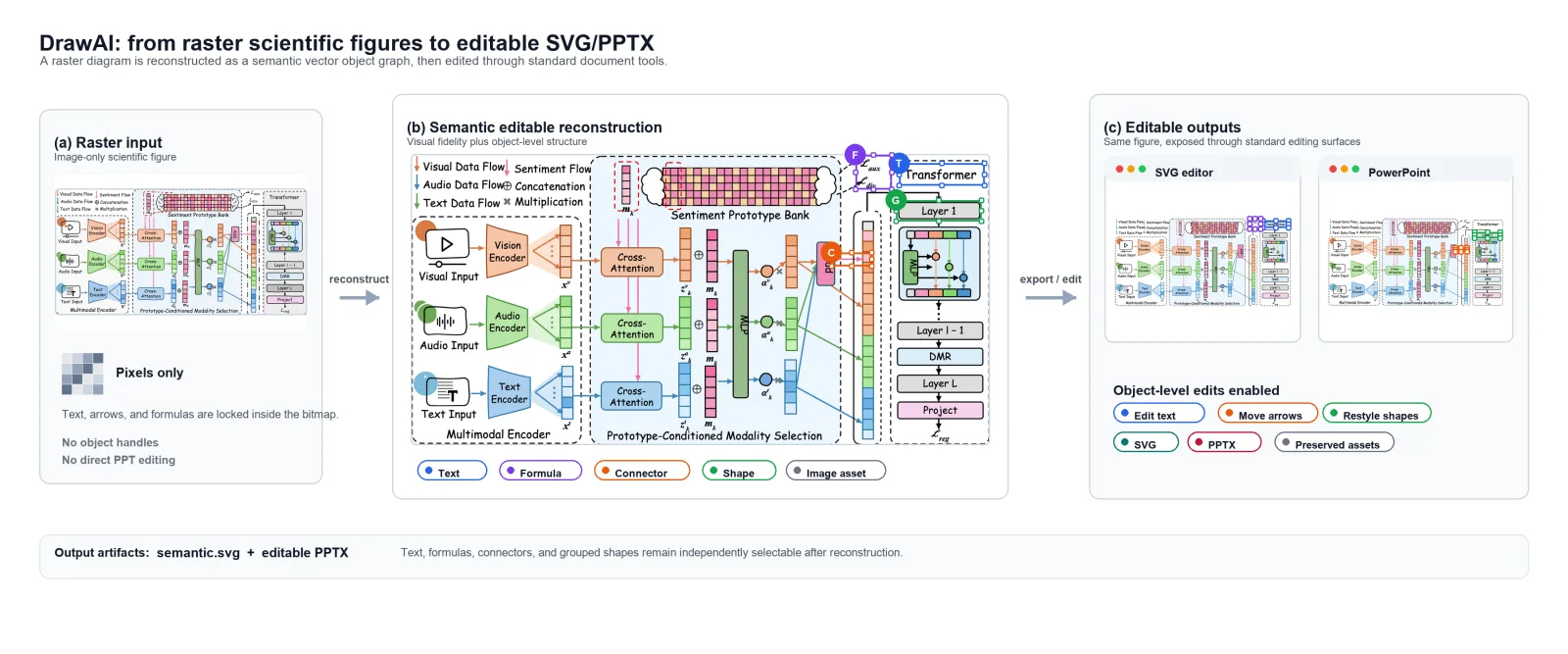
A diagram from GPT-Image-2 or Nano Banana looks fine until one label has a typo, and the only fix is regenerating the whole image. Paste a screenshot into a deck and you cannot nudge a single arrow, because a bitmap has pixels instead of objects. DrawAI, recommended by GitHubDaily on October 18 (Apache-2.0, Python, about 152 stars as of 2026-10-18), goes the other direction: it reconstructs the bitmap into a structured object graph and exports SVG and PPTX you can keep editing. The promise the README makes is specific — the exported deck uses PowerPoint’s own shapes and pictures, not the original image pasted in whole.
Core features
- Separate objects, not one flattened picture: text, formulas, connectors, shapes and grouped nodes each become independent objects in the rebuilt SVG. The repo’s evaluation figure marks one sample as 52 editable text and formula elements plus 11 regions preserved as raster assets, and states plainly that those assets are flagged non-editable rather than passed off as vectors.
- Native PowerPoint shapes: PPTX export always runs through the built-in native-shape converter, which turns SVG primitives, text and local images into PowerPoint DrawingML. The project deliberately dropped whole-SVG embedding and external converter options; the payoff is that you select, retype, recolor and move objects directly in the deck.
- Three surfaces, one configuration:
drawai setup --agent codex(or--agent claude) installs it as an agent skill;drawai setup --enable workbenchplusdrawai workbenchstarts a local browser workbench on127.0.0.1:8890with batch conversion and per-stage progress; the CLI addsdrawai image generate,drawai presentation exportanddrawai flow. - Inspectable runs: every run lands in
runs/<date>/<time>_<name>/with the outputs pluspipeline_summary.json, per-elementelement.jsonandasset_package.json, andsvg_validation_report.json/svg_to_ppt_export_report.json. You can see which stage failed and which element survived only as a bitmap. - A paper and a benchmark: the accompanying paper, DrawAI: Agentic Benchmark and Workflow for Making Raster Images Editable (arXiv:2608.00548, August 2026), ships with the DrawAI-Bench-Lite dataset on Hugging Face for measuring how well a reconstruction actually holds up.
Typical use cases
- Fixing a typo in generated artwork: correct the label in SVG or PowerPoint instead of rerolling the image and losing the composition.
- Touching up a paper figure: moving one arrow, changing a palette or shortening a module title before submission beats redrawing the figure.
- Reusing someone else’s slide: reconstruct a screenshot into shapes and text boxes, then restyle it to your own template.
- Clearing a backlog: the workbench converts in batches and reports progress per task, which suits cleaning up dozens of archived images at once.
Quick start
uv tool install --python 3.12 .
drawai setup
drawai doctor
drawai setup --agent codex          # or --agent claude
drawai setup --enable workbench
drawai workbench                     # opens http://127.0.0.1:8890/
A source install needs Node.js 20.19+ or 22.12+ to build the frontend. Prebuilt wheels skip that requirement at runtime. There is also a hosted demo if you want to see the output first. Configuration lives in ~/.drawai unless DRAWAI_HOME points elsewhere.
Summary
DrawAI is for people who work with paper figures, technical diagrams and exported slides: it converts a view-only bitmap into editable objects and keeps the intermediate artifacts that let you check the result, which is more than most conversion demos offer. Four limits matter before you rely on it. The project was created in June 2026 and has a three-digit star count, so validate it on copies before production use. PSD export is still marked TODO; only SVG and PPTX exist today. Reconstruction quality depends on source resolution and complexity, with dense small type and hand-drawn shapes as known weak spots — the benchmark’s existence is itself evidence that this remains an open problem. And when an external image or vision model is involved, the figure is sent to that service, so check licensing and data boundaries before feeding it unpublished or commercial material. The repository is Apache-2.0 and primarily Python; third-party models, weights and fonts keep their own licenses.
Compared with GenOffice, which reads and writes Office files natively, DrawAI handles the case where the input already arrived as a picture. The two can chain: reconstruct the figure with DrawAI, then assemble the document with ordinary Office tooling.