LosslessCut: trim video in seconds without re-encoding
LosslessCut wraps FFmpeg stream copy in a cross-platform GUI: trim camera, drone or lecture footage in seconds with no re-encode and no quality loss.
Project facts
GitHub Ecosystem- License
- GPL-2.0
- Language
- TypeScript
- Stars
- 44,361
- Data checked
- 2026-10-08
Snapshot figures reflect the check date and may change over time.
Your drone, GoPro or lecture recorder fills up with tens of gigabytes, and trimming ten seconds off the front means opening an editor, importing, and waiting through a re-encode that costs quality. LosslessCut, an open-source project by Norwegian developer mifi, wraps FFmpeg’s stream-copy mode in a cross-platform GUI: a cut is a direct data-stream copy instead of a re-render, so trimming takes seconds and the output quality is identical to the source. The repo had 44,361 stars as of October 8, 2026; v3.69.0 shipped on June 4.
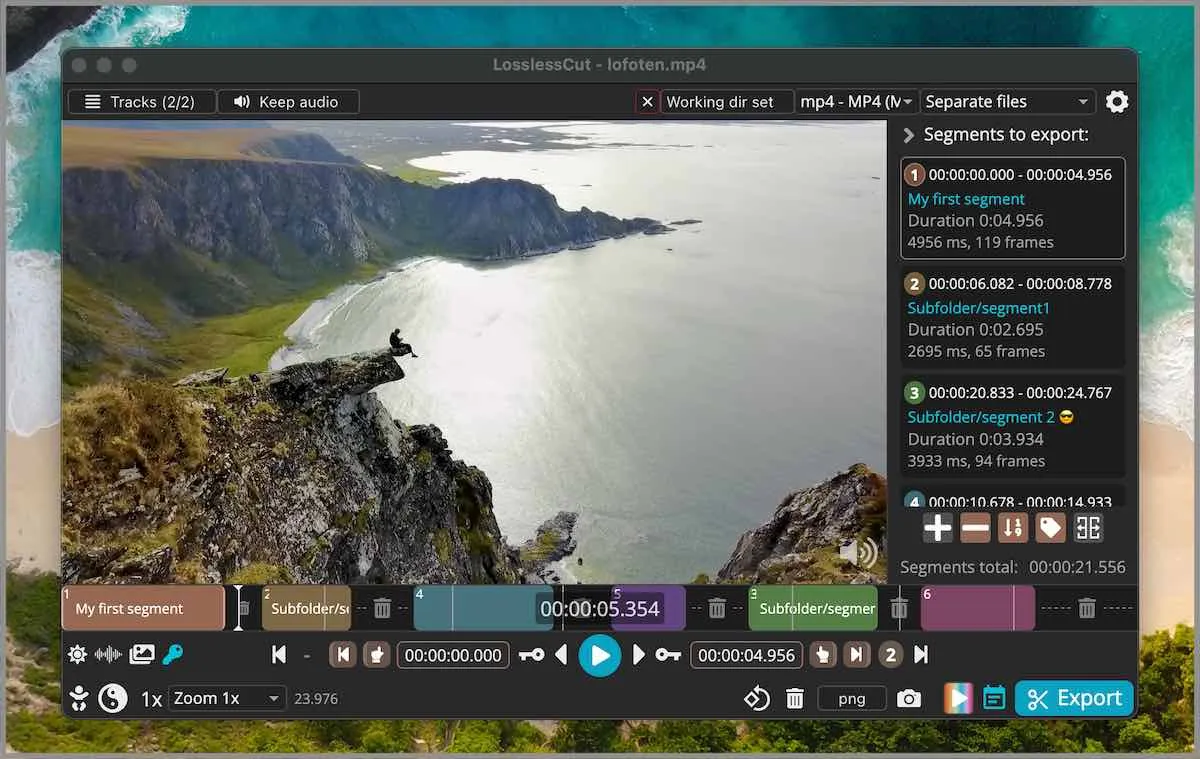
Core features
- Lossless video cutting: the region between your in and out points is stream-copied, not re-encoded — fast, and the picture comes out untouched where a normal editor re-renders every cut.
- Lossless merge and rearrange: segments with matching codec parameters (say, everything from one camera) concatenate and reorder directly; remuxing MKV to MP4 skips transcoding too.
- Track-level editing: combine video, audio and subtitle tracks across files, drop tracks you don’t need, extract audio, and edit metadata, chapter marks and rotation flags.
- Detection helpers: automatic black-scene, silent-audio and scene-change detection, keyframe-snapped timeline jumping, and a map view for the GPS track embedded in DJI footage.
- Automation hooks: a basic CLI and an HTTP API, plus import/export for CSV/EDL, DaVinci and Final Cut chapter marks, so it slots into batch workflows.
Typical use cases
- Rough-cutting camera, GoPro or drone footage: drop the dead takes and reclaim tens of gigabytes in one pass.
- Removing ads and intros from recordings, converting TS to MP4 along the way.
- Attaching external audio and subtitle tracks, pulling the music out, or fixing a wrong rotation flag without opening an editor.
Quick start
On macOS:
brew install --cask losslesscut
Or grab the DMG, AppImage or Windows 7z from the releases page. Drop a video in, mark in and out points with the I / O keys, hit Export, and a new file appears in seconds. The paid Mac App Store and Microsoft Store builds are functionally identical — buying one is a good way to fund the maintenance.
Summary
For large files that only need physical cuts, LosslessCut has little competition; it is not the tool for effects, transitions or color work — it pairs well with Recordly, which handles the look of screen recordings. GPL-2.0, written in TypeScript (Electron), maintained by one person. Two limits to know up front: cut points snap to keyframes, so frame-exact trims need the experimental smart cut (which partially re-encodes); and preview playback depends on what Chromium decodes natively, so HEVC and friends need an FFmpeg-generated low-res preview — the export still reads the original file, so nothing about the cut is lossy.