Audio#Video editing#Image editing
VSR: AI erases hardcoded subtitles and paints the background back in
VSR finds hardcoded subtitles with PaddleOCR, then inpaints the background with LAMA, STTN or ProPainter. Local and lossless, Apache-2.0.
Project facts
GitHub Ecosystem- License
- Apache-2.0
- Language
- Python
- Stars
- 13,360
- Data checked
- 2026-10-20
Snapshot figures reflect the check date and may change over time.
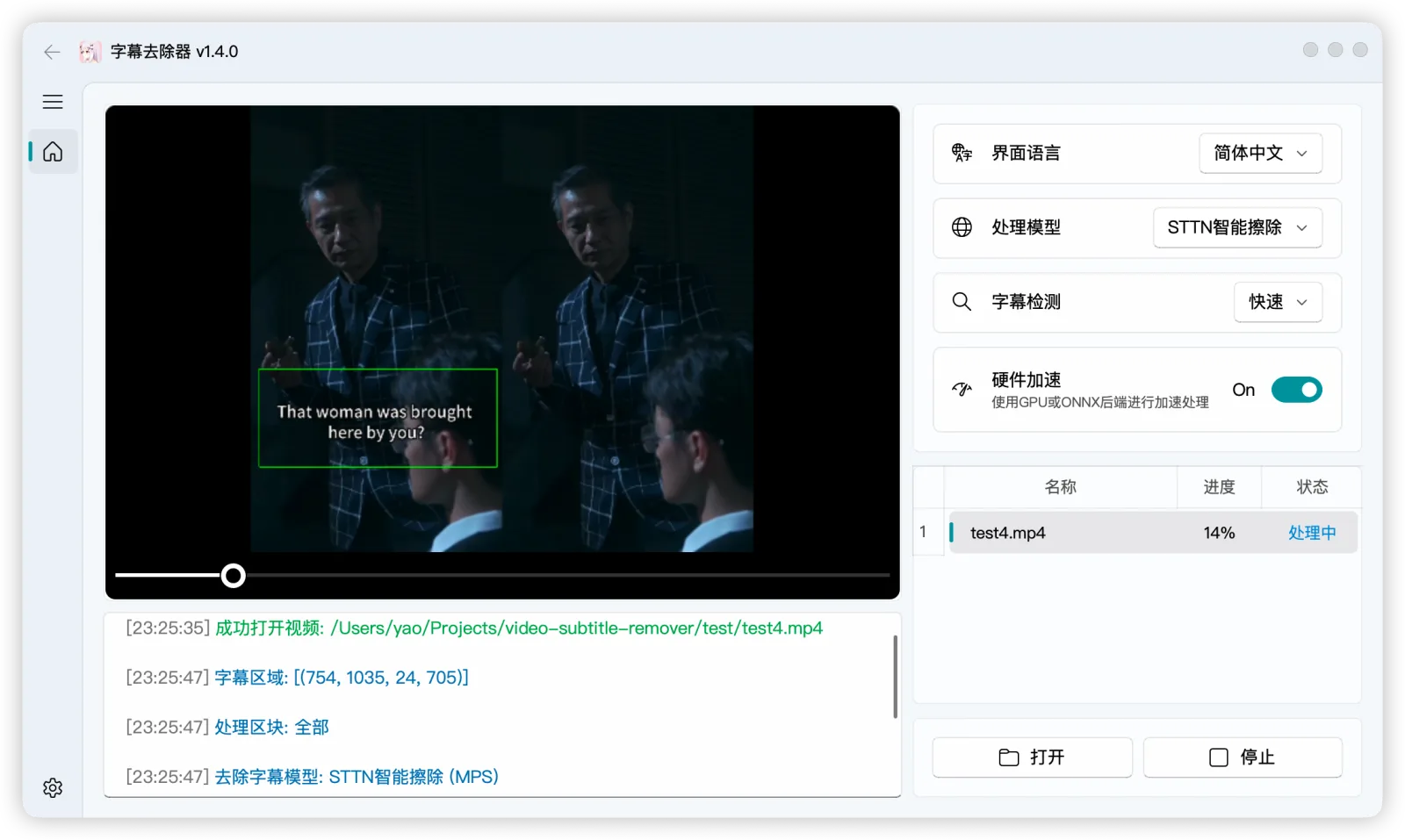
Subtitles burned into a video leave a mark behind whether you crop them or blur them. Video-subtitle-remover (VSR) takes a different route: PaddleOCR locates the subtitles, then an image inpainting model reconstructs the background they covered, and the output keeps the original resolution instead of smearing or mosaicking that strip. It runs entirely locally with no third-party API, and supports Windows, macOS, Linux and Docker. The project is Apache-2.0, its primary language is Python, and it had 13,360 stars on October 20, 2026.
Core features
- Locate first, then inpaint: PaddleOCR finds the hardcoded subtitle region, and the repair step can use STTN, LAMA, ProPainter or OpenCV, with
sttn-autoas the default. The approach shifts from deleting text to repainting the picture, so plain or static backgrounds come out nearly seamless. - Lossless resolution: The output keeps the source video’s resolution rather than downsampling or smearing.
- Two scopes: You can pass a subtitle position and process only that strip, or omit it and remove all text across the whole video automatically.
- Works on images too: Multi-select images for batch watermark-text removal.
- Prebuilt packages by GPU: Windows builds come in CPU, DirectML (non-NVIDIA) and CUDA 11.8 / 12.6 / 12.8 variants, chosen by the GPU’s compute capability; the Docker images are split by 10/20/30-series, 40-series, 50-series and AMD/Intel as well.
- Pairs with VSE: If you need to extract subtitles first, it works with the same author’s video-subtitle-extractor.
Typical use cases
- Re-cutting or re-uploading video: Swap in your own subtitles or dub without cropping the bottom of the frame.
- Removing hardcoded subtitles from downloaded footage: It runs locally, so the material is never uploaded.
- Batch watermark removal on images: The same inpainting models handle stills.
- Dataset cleanup: Strip text from video so a model does not learn from subtitles.
Quick start
The easiest path is to download a prebuilt package and run it. On Windows pick by GPU: vsr-windows-directml.7z for non-NVIDIA cards, vsr-windows-nvidia-cuda-11.8.7z for 30-series and older, vsr-windows-nvidia-cuda-12.6.7z for 40-series and vsr-windows-nvidia-cuda-12.8.7z for 50-series. Or use Docker:
# NVIDIA 40-series GPU
docker run -it --name vsr --gpus all eritpchy/video-subtitle-remover:1.4.0-cuda12.6 \
  python backend/main.py -i test/test.mp4 -o test/test_no_sub.mp4
The command line also takes an inpainting mode: --inpaint-mode {sttn-auto,sttn-det,lama,propainter,opencv}, defaulting to sttn-auto. Building the environment yourself needs Python 3.11+ and PaddlePaddle 3.0.0.
Summary
It suits people who need to remove hardcoded subtitles or image watermarks without uploading the material to an online service. It does not suit anyone expecting a one-click perfect result: quality depends heavily on the footage — plain or static backgrounds come out nearly clean, while complex textures, large motion or wide occlusion can still leave repair marks.
A few things to know. The repository was last pushed on June 30, 2026, with no commits since, so it is at a finished stage rather than actively developed. A GPU is needed for acceptable speed, and CPU mode is much slower. The Windows builds are split by CUDA version, and the wrong one simply will not run. Python, Apache-2.0, 13,360 stars. For the other end of video work, Huashu Motion, covered earlier here, generates motion design; this removes subtitles from what already exists.