MicYou: Turn an Android phone into your PC microphone
MicYou turns an Android phone into a PC microphone over Wi-Fi, USB or a browser scan, with AI noise suppression built in — a fix for mic-less Mac minis.
Project facts
GitHub Ecosystem- License
- GPL-3.0
- Language
- Rust
- Stars
- 4,244
- Data checked
- 2026-10-09
Snapshot figures reflect the check date and may change over time.
A Mac mini has no microphone. Neither does a Mac Studio. If you take calls at one, the options are a headset you never take off or yet another USB mic — while the Android phone on your desk already has a perfectly good microphone idle all day. MicYou, an open-source tool written in Rust (4,244 stars on GitHub as of October 9, 2026), puts that phone to work: its app captures audio and streams it over Wi-Fi or USB to a desktop server, which exposes it as a system microphone through BlackHole. The official docs put Wi-Fi latency at 80–200 ms, which covers calls, streaming and voice-over work.
Core features
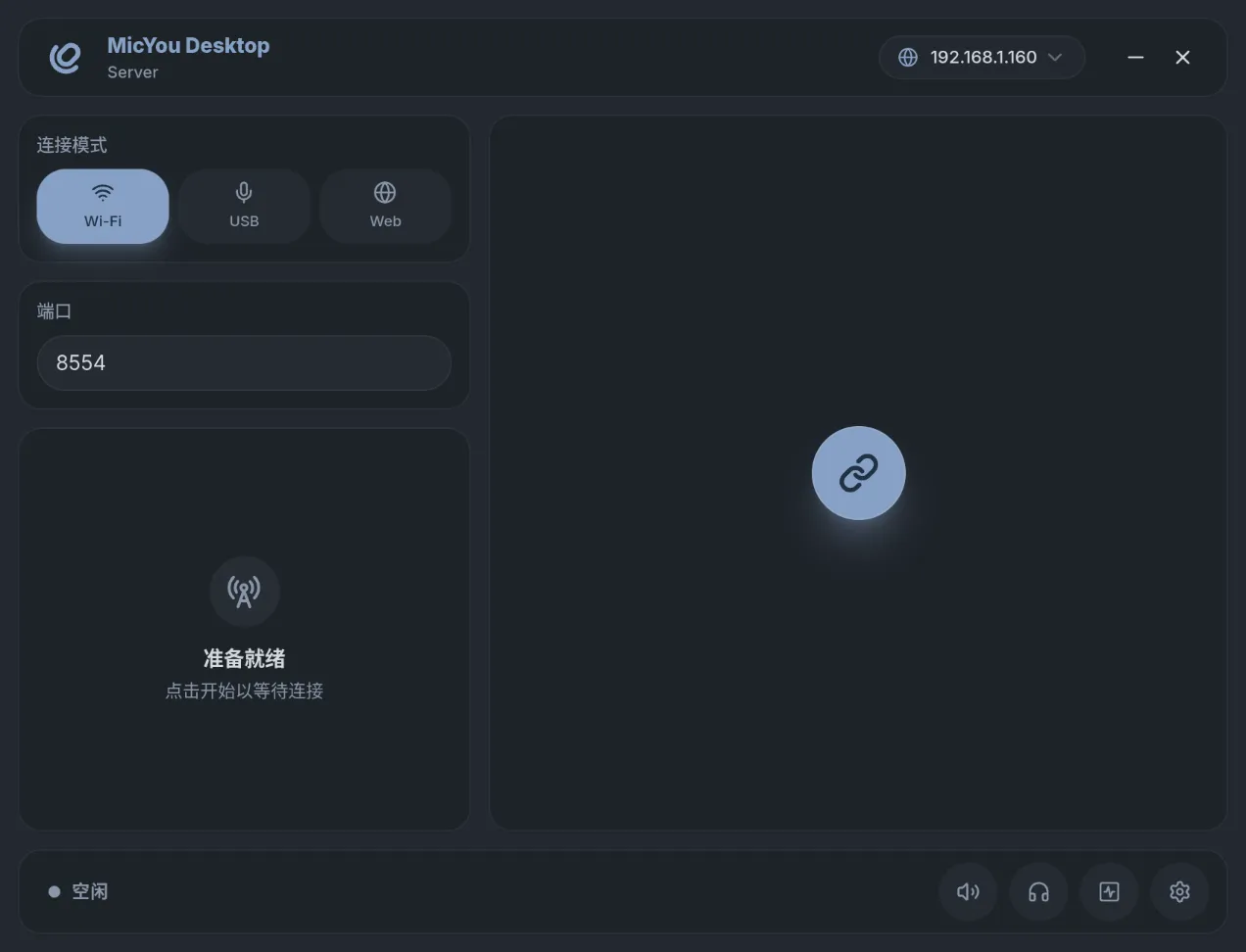
- Three ways to connect. Wi-Fi on the same network; USB through ADB, rated at 50–100 ms in the official docs and the steadiest of the three; or Web mode, where the desktop shows a QR code and any phone browser becomes the capture device — no Android app required.
- A local audio pipeline. AI noise suppression runs on PureVox and echo cancellation on AEC7, two 48 kHz lightweight models open-sourced by a2heng, alongside dereverberation, an equalizer, automatic gain control and voice activity detection. Everything stays on your machines.
- GUI, CLI or TUI. The desktop app is built on Tauri 2 and Vue 3, and ships a low-overhead CLI plus a terminal dashboard that share the same config — a headless box works fine.
- The link is measurable. Volume, bitrate, latency, jitter, packet loss and buffer level update live, with one-click mute and monitoring.
- A plugin marketplace. Native and WASM runtimes take DSP nodes, soundpads and control extensions from inside the app. Version 2.1.0 split the core into a standalone micyou-core crate and added experimental IPv6.
Typical use cases
- Calls on a Mac mini, Mac Studio or desktop tower: park the phone next to your keyboard and you have a close-talk mic, far clearer than what the room picks up.
- Streaming and course recording: select the virtual mic in OBS and the phone becomes a wireless lav that survives you walking around.
- A dead built-in mic on an older machine: same Wi-Fi, two apps, and you are back on calls in minutes.
- Gaming voice chat over the USB cable, immune to Wi-Fi spikes.
Quick start
On macOS (a Mac mini, say), install the BlackHole virtual audio driver first and reboot:
brew install blackhole-2ch --cask
# for the USB route, add ADB:
brew install --cask android-platform-tools
Grab the v2.1.0 DMG (Apple Silicon only for now) and the Android APK from Releases. The app is unsigned, so Gatekeeper will object on first launch: approve it under System Settings → Privacy & Security, or run xattr -r -d com.apple.quarantine /Applications/MicYou.app. Put both devices on the same Wi-Fi, pick Wi-Fi mode on each, and they find each other. Then select BlackHole as the input device, and pick it in your call or recording app. Windows and Linux go through VB-CABLE and PipeWire instead; the official docs walk through each.
Summary
Turning a phone into a PC microphone is an old idea — WO Mic and DroidCam have done it closed-source for years — but MicYou stands out by being open (GPL-3.0 with a plugin exception), by leaning on a low-overhead Rust core, and by shipping noise suppression, echo cancellation and link monitoring in the free pipeline. The project started in February 2026, has published 30 releases, and has been featured by HelloGitHub and Trendshift, so maintenance is quick. The catches are real: an unsigned macOS build, a mandatory reboot after installing BlackHole, no Intel DMG yet, and Wi-Fi latency of 80–200 ms — fine for calls, not a studio mains replacement. For more phone-plus-desktop pairings, Escrcpy covers the screen-mirroring side.