Automation#Web scraping#Browser automation
Moli Browser: a Rust headless browser that renders for agents on demand
Moli Browser is a Rust headless browser for agent page extraction and automation. It reads the DOM by default, rendering layout only for geometry or pixels.
Project facts
GitHub Ecosystem- License
- Apache-2.0
- Language
- Rust
- Stars
- 23,067
- Data checked
- 2026-11-09
Snapshot figures reflect the check date and may change over time.
When an agent is fetching pages or running browser tasks, many requests need the DOM, text or a JavaScript result — not a freshly laid-out page painted into pixels. Moli Browser is Lexmount’s open-source headless browser, written in Rust: it reads the browser runtime directly by default, then builds layout and pixels when a task asks for geometry, screenshots or screencast frames. It supports Linux, macOS and Windows, with CLI, CDP, WebDriver Classic and WebDriver BiDi served by the same browser kernel.
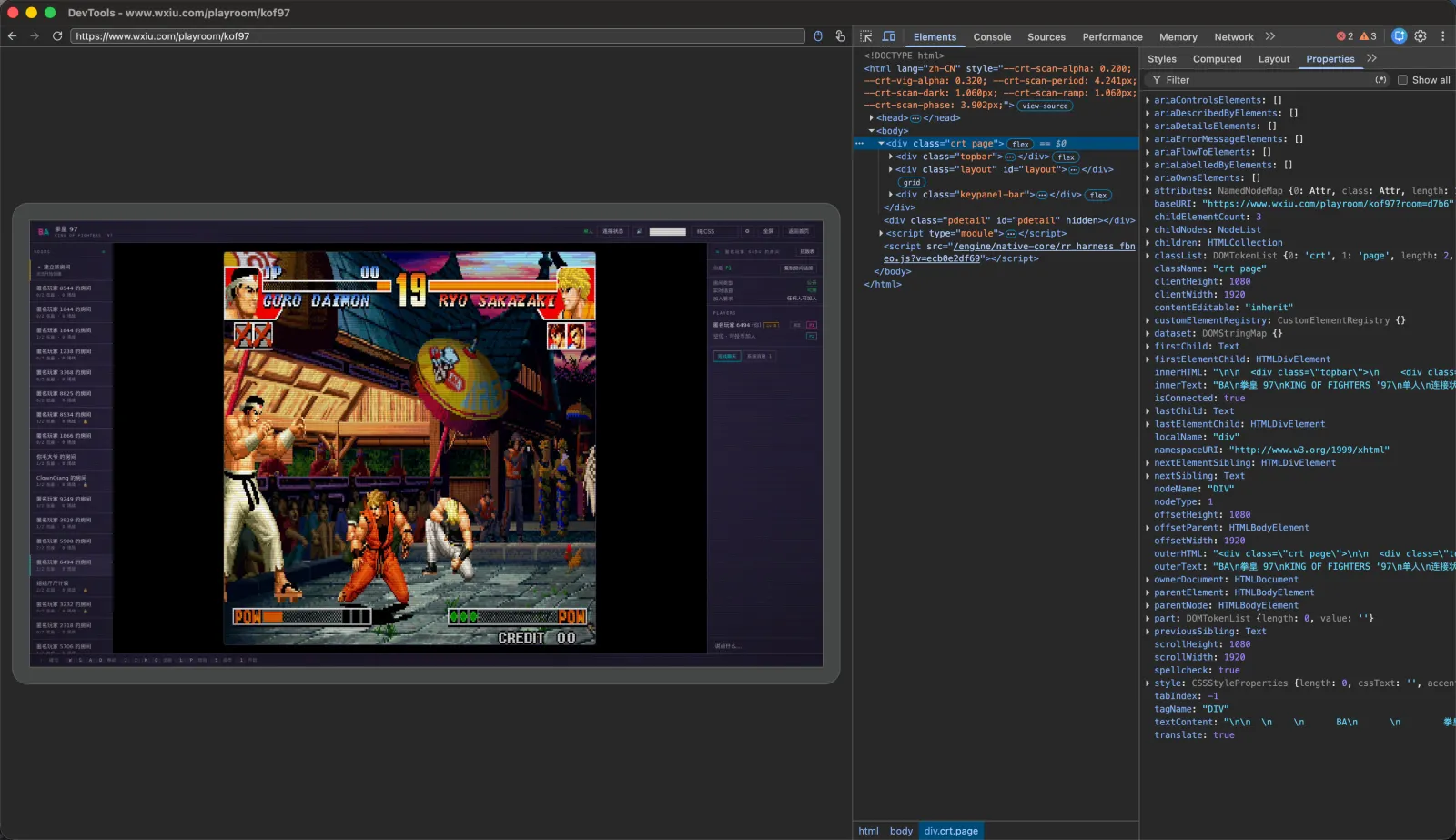
The project demo shows Moli rendering a page and exposing it to DevTools. Its intended role is still a headless browser for agents, rather than a desktop browser that a person keeps open and uses interactively.
Core features
- DOM-first extraction:
moli fetch --dump markdowncan return Markdown, HTML, JSON or a semantic tree. Reading the DOM, running JavaScript, and inspecting network or storage state do not trigger real layout and paint by default. - Layout and pixels on demand: add
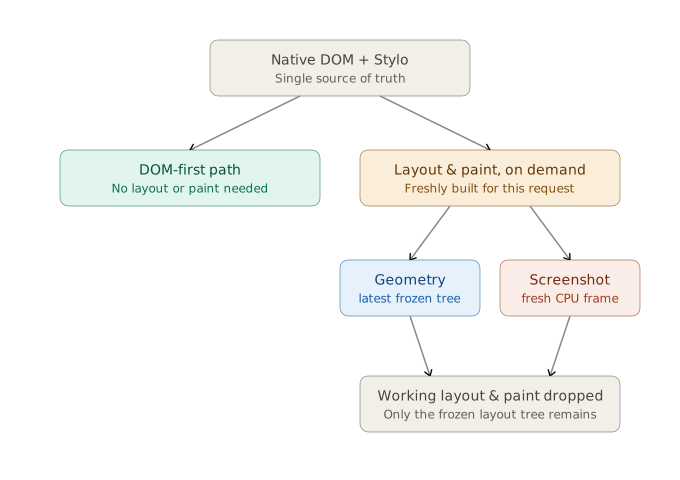
--layoutfor real element geometry, hit testing, coordinate input, screenshots and screencast. A screenshot is rebuilt from the current DOM and styles; Moli does not maintain a persistent GPU compositor or window. - Three protocols from one kernel:
moli serveexposes CDP, WebDriver Classic and WebDriver BiDi. The README includes a Playwright CDP connection example, without a separate ChromeDriver or GeckoDriver installation. - A standalone browser runtime: Moli is not a Chromium wrapper. Its Rust stack combines HTML parsing, V8 JavaScript, Servo/Stylo styles, Taffy and Parley layout, and CPU software rendering.
- Cross-platform operations: Linux, macOS and Windows are supported. Options cover profiles, cookies, HTTP cache, proxies, timeouts and private-network policy; optional image, font, audio, video and other resource families can be enabled for a task.
Benchmarks
The project README presents two different evaluations. Its mixed crawl covers 192 public sites in Chinese and English, counting a page only when it yields useful content after JavaScript runs. Lexbench measures comparable browser automation tasks. Their measures and task sets differ, so they should not be collapsed into a single claim that Moli is simply faster than Chrome.
| Project-reported test | Moli | Comparison |
|---|---|---|
| Useful pages in 192-site crawl | 103 / 192 (53.6%) | Chrome Headless: 101 (52.6%); Lightpanda: 85 (44.3%) |
| Median RSS in mixed crawl | 73 MiB | Chrome Headless: 773 MiB; Lightpanda: 40 MiB |
| Lexbench comparable-task pass rate | 81.88% (1,071 / 1,308) | Chrome: 99.85%; Lightpanda: 53.29% |
| Peak PSS in sample agent workload | 102.46 MiB | Chromium: 348.82 MiB |
These figures come from the project’s README; the full methodology is in the Lexbench five-engine report, where the 81.88% result is for Moli 0.1.1 in the August 13, 2026 evaluation. Results from different test sets and versions describe a resource/compatibility trade-off on selected tasks, not a guarantee for an arbitrary site or automation script.
Typical use cases
- Crawling for a knowledge base: extract page text, Markdown or a semantic tree at scale, without continuously maintaining rendered pixels for jobs that only need content.
- Browser agents and automation frameworks: use CDP, WebDriver BiDi or Playwright while keeping DOM access and optional screenshots in one local browser process.
- Self-hosted evaluation: run a headless browser on Linux, macOS or Windows, then enable real layout only for tasks that need it.
Quick start
The Linux and macOS installer and first fetch command below are copied from the project README:
curl --proto '=https' --tlsv1.2 -fsSL \
  https://github.com/lexmount/moli/releases/latest/download/moli-installer.sh | sh

moli fetch \
  --dump markdown \
  --wait-until done \
  https://example.com
For a screenshot, add --layout --dump screenshot. For an automation endpoint, run moli serve; moli serve --layout enables real geometry and screenshots. Windows installers and the full option list are in the official repository.
Moli’s on-demand rendering flow keeps the browser’s capabilities but defers real layout and paint until requested. The working tree used to produce a visual result is released afterward, unlike a continuously retained rendering tree.
Summary
Moli Browser is a fit for developers running a self-hosted browser in an agent or crawling pipeline where most work is DOM-first. It speaks standard automation protocols and can produce screenshots when needed. Its boundaries matter: there is no GUI window, GPU compositor or persistent multi-frame paint state, and the project does not target pixel-level Chrome parity, Canvas, WebGL or media playback. It is written in Rust and licensed under Apache-2.0; the README also offers MIT as an option. The project’s benchmarks are useful for choosing what to test, but validate your own sites and scripts before relying on them. For a visible browser with shared login state and human takeover, compare ego lite; for extraction-first browsing, see Lightpanda.