Spotifast: a native Rust Spotify desktop client without a browser engine
Spotifast is a cross-platform Rust Spotify client with no browser engine, typically 100–250 MB of RAM, plus Connect and a Winamp mini player. Premium required.
Project facts
GitHub Ecosystem- License
- MIT
- Language
- Rust
- Stars
- 8,423
- Data checked
- 2026-10-18
Snapshot figures reflect the check date and may change over time.
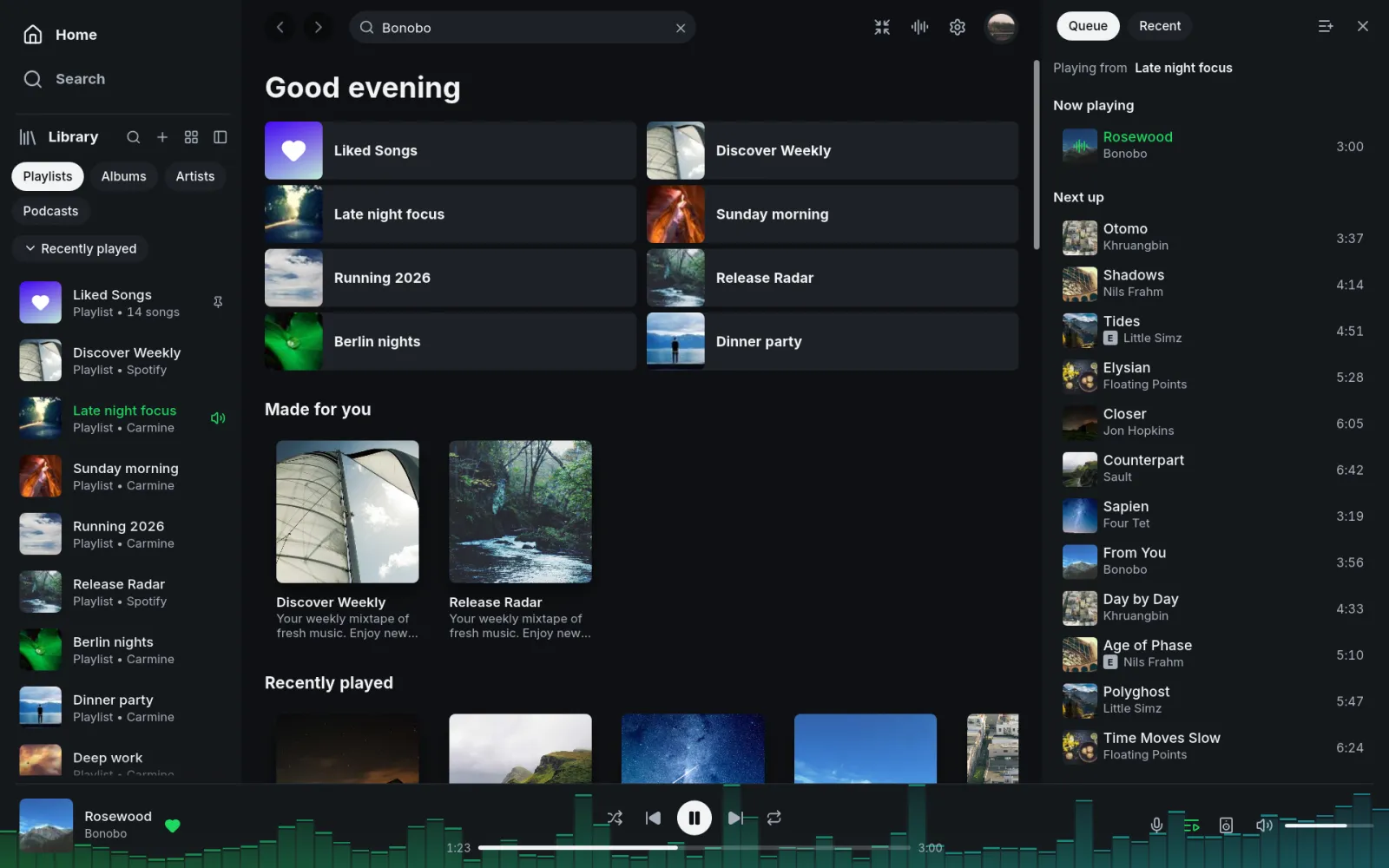
If Spotify’s desktop client feels heavy, or you want a music player with a true mini mode, equalizer and visualizer, Spotifast offers another route. Built with Rust, egui and librespot, it runs on Linux, macOS and Windows without an embedded browser engine. The maintainers say it typically uses 100–250 MB of memory and starts in under a second; Frontier Now has not independently measured those figures. As of October 18, 2026, the repository has 8,423 stars and an MIT license.
Core features
- Library and catalogue search: browse playlists, Liked Songs, albums, artists and podcasts; search the catalogue and edit playlists you own. Spotifast uses Spotify’s Web API for account and catalogue data, with librespot providing playback.
- Spotify Connect and local playback: play on the computer or control other Connect devices, including Google Cast speakers and groups. Playback requires Spotify Premium. Free accounts can browse and search but cannot play music through Spotifast.
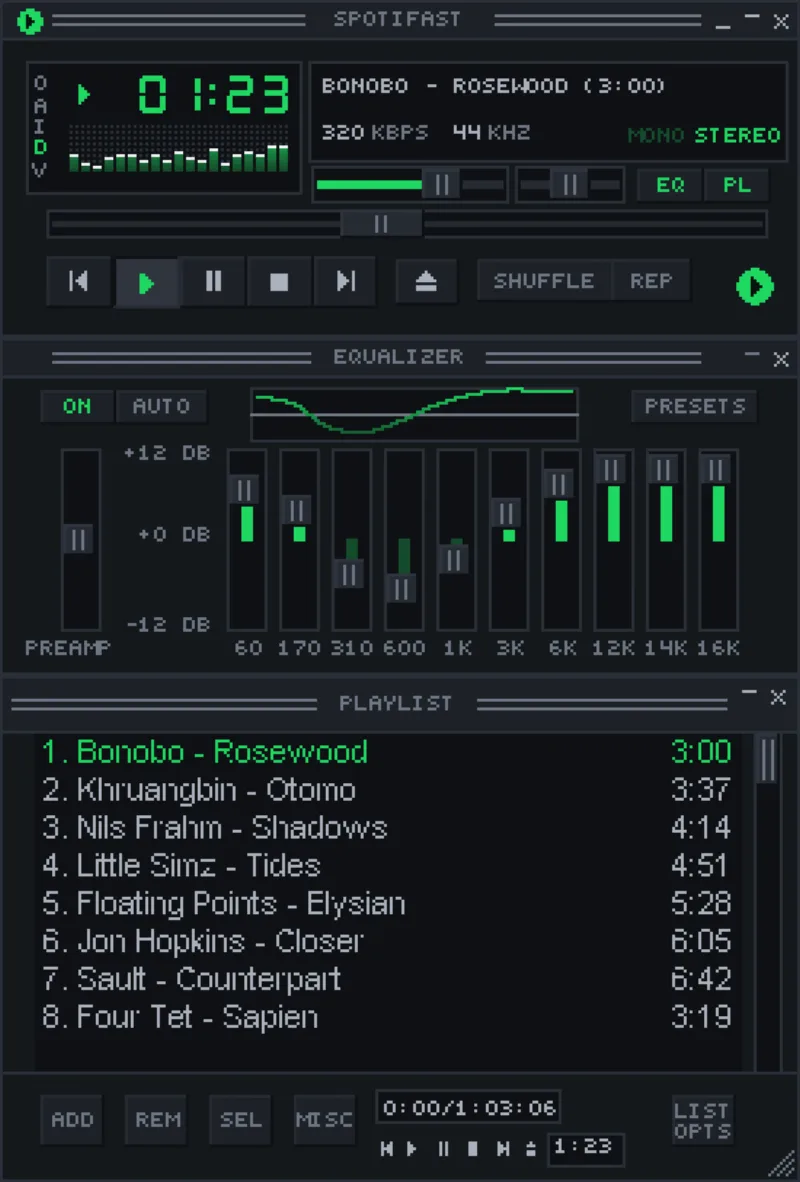
- A Winamp 2 mini player: use
.wszskins, an equalizer, playlist and animated sound display; macOS switches modes withCmd+Shift+M. Spotifast Winamp mini player - MilkDrop visualizations: more than 10,000 presets download on first use. Open the visualizer in a separate window or full-screen. It is included on Linux, macOS and Windows Intel/AMD builds, but not in the Windows ARM download.
- Desktop and local-file controls: keyboard shortcuts, media keys, system tray and launch-at-login are available when supported by the desktop environment. Local files listed in your playlists can play from a folder you select in Settings; the README specifies 44.1 kHz files.
Typical use cases
- Premium users looking for a lighter desktop client: the README gives a typical 100–250 MB memory range and a sub-second startup claim. If resource use is the reason to switch, measure it against your own library and devices.
- People who move playback between speakers or rooms: Spotify Connect lets the desktop app control other devices, including Google Cast speakers.
- Listeners who miss classic mini players: Winamp 2 skins, an equalizer, playlists and MilkDrop bring those desktop controls back.
- Users checking account and privacy boundaries: sign-in happens on Spotify’s own website, so the client does not receive the password. The official FAQ says it is not aware of confirmed account bans caused by normal Premium playback through Spotifast or other clients using librespot; that is not an endorsement from Spotify. Read the project’s Spotify API and policy notes before relying on it.
Spotifast is independent and is not affiliated with Spotify. It does not provide Premium or enable playback for Free accounts; available features remain bounded by Spotify’s Web API and librespot. Compared with Spotube, another cross-platform Spotify client, Spotifast emphasizes a native desktop feel, Connect controls, and its Winamp/MilkDrop components.
Quick start
On macOS, install with Homebrew:
brew install --cask crmne/tap/spotifast
On Arch Linux, use yay -S spotifast-bin; Windows and other Linux packages are on the download page. On first launch, choose Sign in with Spotify and authorize in the browser. To play on this computer, complete the separate playback authorization. Free accounts can still browse and search, but cannot start playback.
Summary
Spotifast suits Spotify Premium subscribers who want a lightweight native desktop player, Connect controls, and the option of a Winamp mini player or MilkDrop visualizer. Playback, Cast and MilkDrop support vary by platform; notably, Windows ARM builds omit MilkDrop. Spotify’s APIs and service rules also limit what a third-party client can do. The project is MIT-licensed and primarily Rust, with 8,423 GitHub stars as checked on October 18, 2026.