Kagi Mail opens public beta at $99 a year
Kagi opened the Kagi Mail public beta on November 23: @kagimail.com addresses, unlimited aliases, 50GB and a calendar, $99 a year after a 60-day trial.
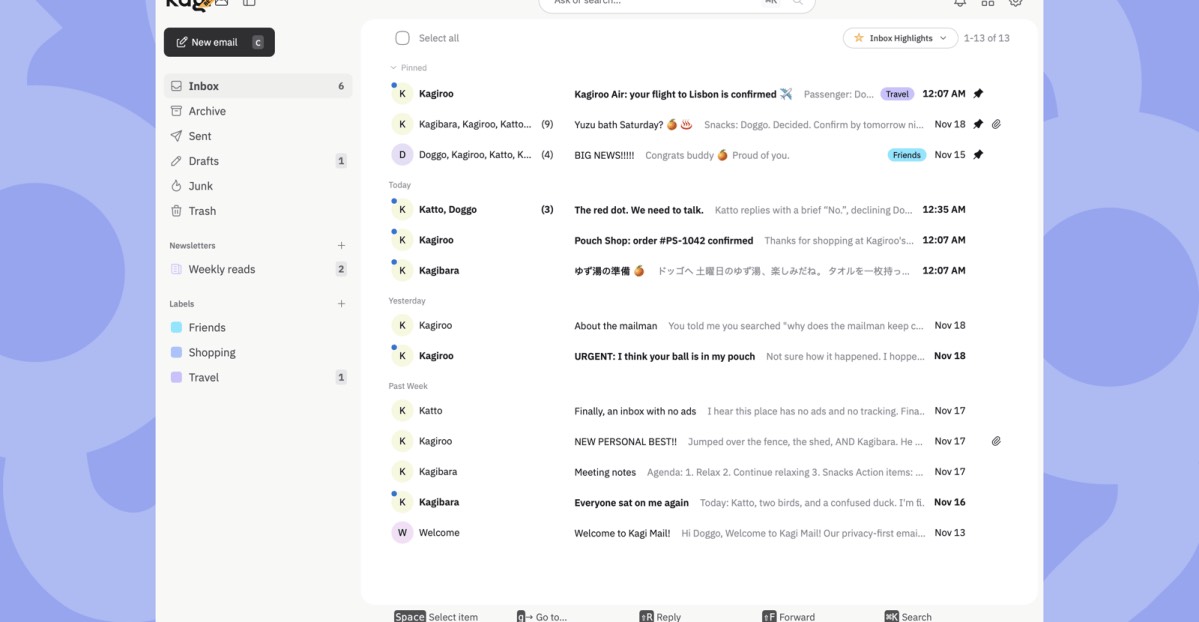
Kagi Mail is a paid email and calendar service that Kagi opened to the public on November 23, 2026. It gives you a @kagimail.com address, unlimited aliases, your own domains, 50 GB of storage and a built-in calendar. After a 60-day trial it costs $99 a year or $9 a month, both plus sales tax; anyone already paying $25 a month for Kagi Ultimate gets it without paying again.
Key points
- The public beta opened on November 23 with no invite needed. Kagi’s own post calls it a public beta and gives no general-availability date.
- The backend is Stalwart, an open-source mail server, and the service speaks IMAP4, SMTP, JMAP, Sieve and CalDAV. POP3 is not supported. The web client is Kagi’s own JMAP app.
- There is no end-to-end encryption. Mail is encrypted in transit and at rest, but the service reads message bodies to run highlights, questions and natural-language rules, and the FAQ says full E2EE is not planned.
Background
Kagi sells subscriptions, mainly for search, in tiers at $5, $10 and $25 a month; the $25 Ultimate plan bundles unlimited search with Premium AI, and the company also ships Orion, its own browser. Mail is the last piece of its argument that you can leave Google without leaving a hole in your day. The announcement puts it plainly: if you already swapped Google Search for Kagi and Chrome for Orion, your inbox is probably the last big piece of your digital life still at Google. The product page thanks testers from an earlier closed beta.
The company is also shrinking its surface. On October 2 it said it would stop developing Orion for Linux and Windows and open-source both, concentrating the small team on macOS and iOS. Mail arrived from the same team in the same quarter, which makes headcount a fair question rather than a cheap shot.
The facts
Kagi Mail’s terms, prices and limits below come from the announcement, the product page and the help-center FAQ, checked on November 24, 2026.
| Item | Detail |
|---|---|
| Address | @kagimail.com, plus unlimited custom domains |
| Aliases | Unlimited; no separate fair-use fine print published |
| Storage | 50 GB, the only capacity ceiling Kagi states |
| Calendar | Built in: repeating events, invites, email reminders, multiple calendars, CalDAV sync; no tasks |
| Protocols | IMAP4, SMTP, JMAP, Sieve, CalDAV; no POP3 |
| Price | 60-day free trial, then $9/month or $99/year, both plus tax |
| Bundling | Included in Ultimate at $25/month; AI features draw on its Allowance |
| Encryption | In transit and at rest; no E2EE, no PGP |
| Migration | Product page promises Gmail import “in a few clicks”; one-click export |
| Roadmap | Contacts Q1 2027, full Assistant integration Q1 2027, native apps Q3 2027 |
| After leaving | Six months of mailbox access: 60 days send and receive, then four months read and export |
Pricing has three doors and they are easy to mix up. Ultimate subscribers sign in with their existing Kagi account and pay nothing extra. Everyone else, including Kagi customers on cheaper plans, starts a 60-day trial and then subscribes separately at $9 a month or $99 a year. The Verge’s report gives the annual price; the monthly figure sits in the help-center FAQ. Tax is added on top of all of them.
The AI is optional by design. Inbox Highlights list who is waiting on a reply, what is due and what needs review, each linking back to the original message. Previews add a one-line summary per email and a map of long threads showing who joined and where the conversation split. Rules are written as sentences (“Receipts go in Receipts”) with per-rule permissions, so a rule can read message content or merely skip the inbox. Ask answers plain-language questions with links to the source email, including text inside scanned PDFs and photos. Newsletters get their own view. One switch turns all of it off, and Sieve filters keep working without a model involved. Kagi states repeatedly that the AI does not write replies for you.
Privacy claims here are the checkable kind. Remote images are proxied through Kagi and most tracking pixels are stripped, and the help docs say this applies to every connected client, not just the web app. New senders are held until you approve them, suspicious senders trigger a phishing warning, and verified senders show a logo. The promises are no ads, no profiling, no selling and no sharing. The gap is encryption: the FAQ says reading mail is what makes highlights and answers possible, so there is no E2EE and no PGP, though you can layer your own encryption through a third-party client such as Thunderbird.
Migration and exit got less attention than the inbox tour. The product page closes with “Moving from Gmail? Import everything in a few clicks.” The help docs describe a one-click export alongside standard protocols, and they spell out the six-month window after cancellation: 60 days of sending and receiving, then four months of read-only access and export before deletion on a set schedule.
What others say
The Verge framed the launch as another Google alternative and flagged the two dates that matter for anyone switching: contacts arrive in Q1 2027, native mobile apps in Q3 2027, and until then you use the mobile web app or a third-party client. Kagi names Fastmail and Tuta as services it respects, and the post opens with the question it says the team asked itself more than once: does the world need another email service?
Hacker News supplied the pushback. The announcement thread was posted at 17:17 UTC on November 23 and had 390 points and 300 comments when we checked at 06:15 UTC the next day. Three arguments repeat. Encryption comes first: storing mail unencrypted means trusting that the provider does not scan it and that nobody changes that policy later, which is an odd place for a privacy-first service to stand. Price comes second, with commenters comparing Fastmail at $60 a year and Migadu at $19 a year against $99 for a product that is still in beta; others answer that Ultimate subscribers effectively get it free. Company risk comes third, with readers asking what happens if Kagi is acquired and pointing out that email is the recovery channel for bank, brokerage and medical accounts. The domain drew complaints too, on the grounds that kagimail.com is awkward to say out loud.
Import is still a vendor claim. The product page promises Gmail migration in a few clicks and the help docs describe one-click export, but nobody outside Kagi has tested either on a messy mailbox, so how much survives the move is an open question.
Our take
For anyone already on Kagi Ultimate, Kagi Mail is close to a free decision: the same monthly bill now covers a mailbox and a calendar, no trial needed. The readers who should think harder are the ones willing to pay yearly for no ads, working IMAP and data they can take with them. Their benchmark is Fastmail, not Gmail. Kagi’s difference is not the feature count. It is that the AI can be switched off, the protocols are open, and the mailbox works in Apple Mail, Thunderbird or any IMAP, JMAP or CalDAV client, with Sieve rules that never touch a model. That is a stronger argument than the AI inbox.
The costs are real. No E2EE is an architectural choice, not a bug on a list: as long as highlights and answers need to read message bodies, the provider can read them, and flipping the AI switch off does not change that. You are moving to a host that does not run ads, not to one that cannot see your mail. Completion is the second issue: no contacts, no native mobile apps, shared mailboxes still promised. The public beta label is honest about this. Team capacity is the third, given that the same company dropped Orion on Linux and Windows last month; mail is infrastructure that needs people for years.
There is also a new attack surface. Kagi Mail exposes a read-only MCP endpoint in Labs, so assistants such as Claude Code and Codex can search and read mail but cannot change, delete or send. Read-only is the right minimum, yet once a model can read a whole inbox, a prompt injection stops affecting one message and starts affecting the mailbox; the Manus Gmail integration broken by a single email is the case for putting the guardrail in the right place rather than counting switches. Against that, blocking remote images by default and screening unknown senders lines up well with the economics of phishing kits that rewrite mail from inbox feedback, which counts in Kagi’s favor.
How to try it
To try Kagi Mail, sign up at kagi.com/products/mail, or sign in with an existing Kagi account; the 60-day trial starts from Start free trial in General settings. To run without AI, switch off Highlights, Previews, rules, natural-language search, translation and proofreading in one place; Triage keeps sorting mail from new senders. To use your own client, connect over IMAP or JMAP using the server settings in the help docs; POP3 will not work. Developers who want an assistant on the mailbox can enable MCP in Kagi Mail Labs, which is read-only and requires an OAuth sign-in.
What to watch
Kagi Mail’s published dates are contacts and full Assistant integration in Q1 2027, native mobile apps in Q3 2027. Shared mailboxes are “coming soon” with no date, and there is no general-availability date at all. Three signals are worth tracking: how well the Gmail import holds up on a real, messy mailbox, whether a new domain like kagimail.com can keep deliverability up, and whether the beta adds privacy detail beyond the encryption caveat it has already published.