Design#Video generation#Coding agent#Motion graphics
animate: a Claude Code skill that draws short videos in code
animate is a Claude Code skill that draws short videos in canvas code, renders one MP4, and ships seven built-in art styles — no video model in the loop.
Skill details
npx skills add cth9191/animate --skill animate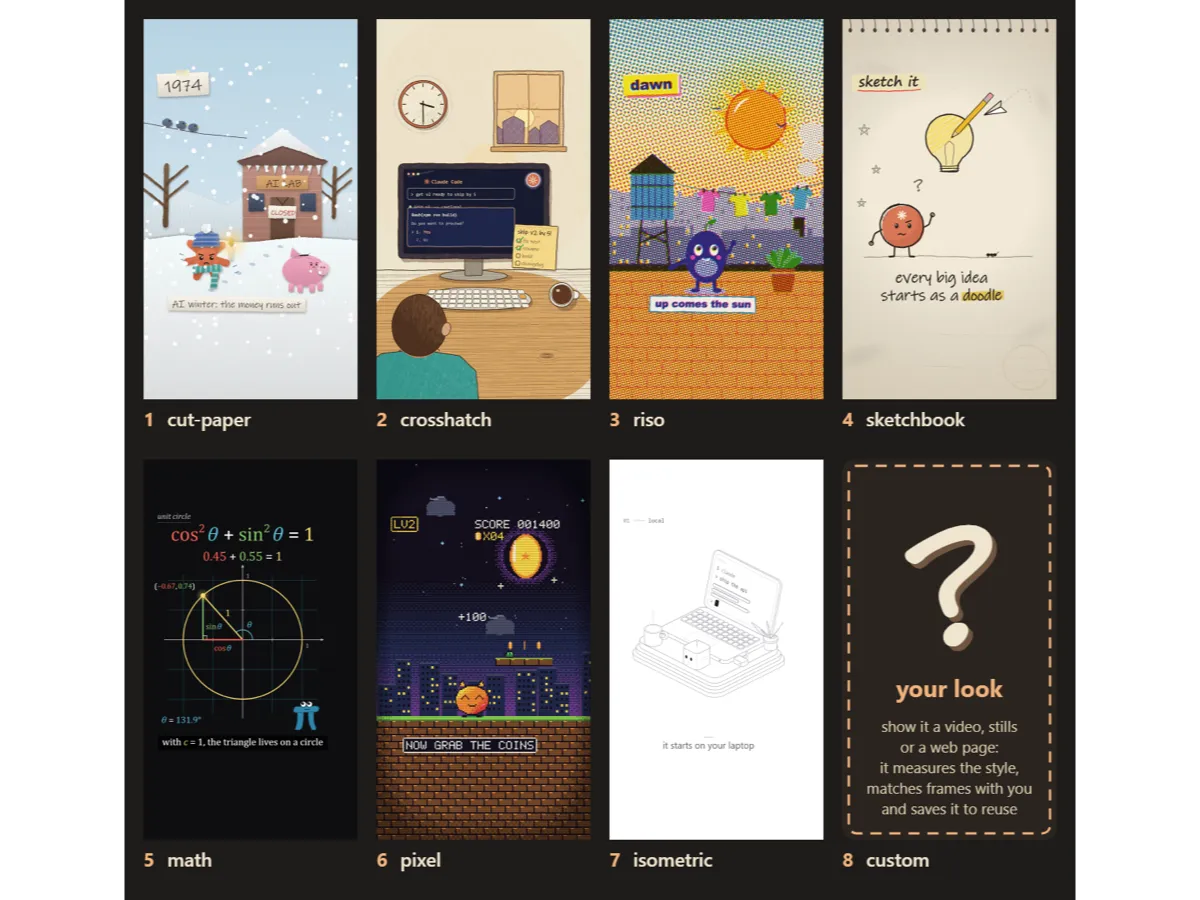
Two common ways to make a video with a coding agent both cost you something. A video generation model bills per attempt and re-rolls the whole shot when you nudge one detail; a template tool like Remotion assembles assets, but the visuals aren’t yours to control. animate, from cth9191 (MIT, created October 4, 2026, 580 stars and 93 forks as of October 13, 2026), takes a third route: every frame is drawn by code — one <canvas>, a headless browser stepping through frame by frame, ffmpeg muxing the result into a single MP4, with no video model anywhere in the loop.
The order it works in
What sets animate apart is that it doesn’t rush to render. The SKILL.md puts “no animating before the storyboard is approved” first among its non-negotiables, and gives the reason plainly: a wrong story or look costs you a full build.
The run opens with one round of questions — subject, formats, voice, the look, a hero, your music, your product — and a style gallery to pick from. After that come three check-ins:
- Story check — it picks a format and lays out a numbered beat table, each beat with its time, what happens, the bridge into the next beat, and what the sound is doing (where the silence sits, where the loudest hit lands)
- Look check — it draws the 2 to 4 most different beats as full-size frames; you thumbs up or reject each one
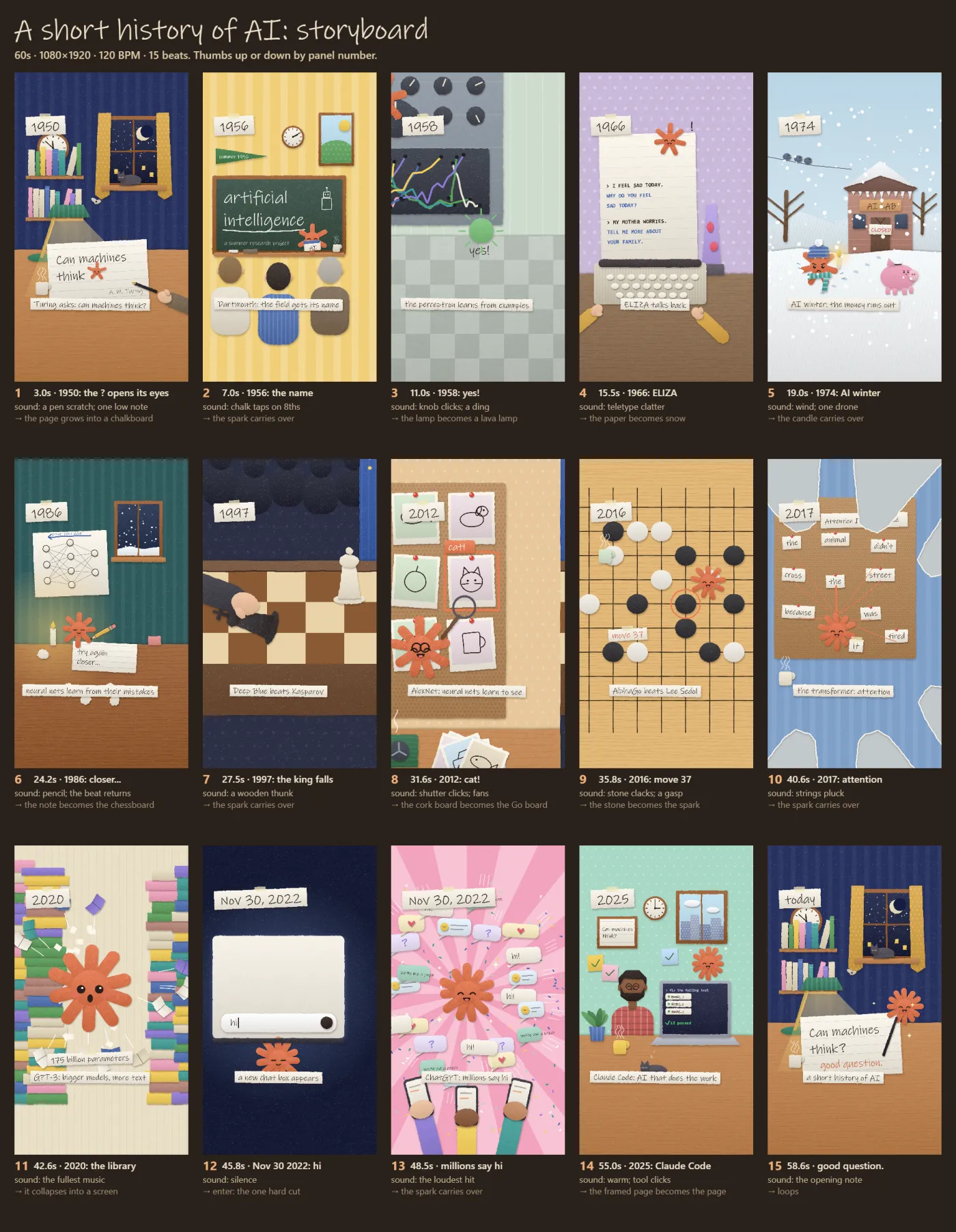
- Storyboard check — every beat as a key frame, with sound and the transition into the next; you thumbs up or down by panel number
Only then does it build, and delivery comes with measured checks rather than “looks good.” Below is the output of step 3 for the repo’s own 60-second example, A short history of AI: 15 beats, each panel stamped with its time, title and sound note.
Seven styles, and your own
Seven styles ship in the box. Each is a pluggable kit: the story grammar, timing, sound and renderer stay the same, and the style only supplies the drawing kit.
| Style | What it looks like |
|---|---|
| cut-paper | torn paper, drop shadows, crayon, patterns, characters with faces |
| crosshatch | sketchy ink that boils every 2s, hatch and pencil shading, warm paper and navy “inside the machine” worlds |
| riso | a three-ink risograph print: halftone screens at their own angles, overprints, deliberate misregistration |
| sketchbook | graphite and one accent colour on a sketchbook page, hand lettering |
| math | a manim-style math explainer: black stage, axes and graphs, colour-coded variables, smooth easing |
| pixel | drawn at the true low resolution, upscaled nearest-neighbour, with a bitmap font |
| isometric | precise isometric line art: constant hairlines, white faces hiding what’s behind, rounded slabs, one dark accent |
The eighth slot isn’t a style, it’s yours. Hand it a video, stills or a web page and it measures the references — palette, line weight, texture, motion, cut rhythm — draws one or two matched frames for you to approve, then saves the result as styles/<name>/ so every later piece reuses it. Reference media stays on your machine: never committed, never copied for its code, and the artist isn’t named in published output unless you ask.
What it constrains
- Single file. The whole video compiles into one
index.html. No image, audio or video files in the code, nodata:URIs, no URLs, no web fonts —tools/build.mjsenforces it. Your own screenshots and logos, and one music track, are the only two opt-in exceptions - Deterministic. All randomness is seeded (
RNG(...));Math.random()and wall-clock time are banned. The same code re-run is frame-for-frame identical - Every fact on screen is web-checked and listed with its source in the brief. Never claim “first” without one
- “Done” is measured.
tools/review.mjschecks whether cuts land on the beat grid, the story arc’s loudness, hero anchoring, and whether the loudest moment follows the silence — then prints contact sheets - Every format from one piece. 9:16, 1:1, 4:5 and 16:9 are laid out for each shape, not cropped out of a single render
Who it’s for
It suits people already working in Claude Code who need a 20-second-to-one-minute explainer, launch clip or little story, and who’d rather not pay per frame. The repo is young — created October 4, 2026, one open issue — so treat it as an early tool and leave room for rework.
Three things to know up front. First, the prerequisites aren’t light: Node 18+, Playwright’s Chromium and ffmpeg on your PATH, and the skill stops to ask you to install whichever is missing; voice-over needs either the ElevenLabs connector or your own recording, and word-level timing wants Python with faster-whisper installed locally. Second, it documents what hasn’t been proven. The “Honesty about what’s proven” section at the end of the SKILL.md admits that of the 8 story formats, only F2 (chronology joined by shape morphs) and F4 (mission) have each produced a piece that passed every check; that isometric has so far only its demo and hasn’t carried a full piece; and that the WebGL motion-design style the README teases is not a shipped style yet. Third, the three check-ins cost you something. This is not a one-prompt video generator.
Two neighbours worth knowing: huashu-art-motion also draws with canvas code, going for 35 art styles and 9 narration grammars; animate ships fewer styles but bakes the confirm-before-rendering order and a beat-level storyboard into the flow, and ships that honest list of what’s verified. If you only want to turn a project into a 20-second launch video, brag is the shorter path.