text-to-lottie: agents write Lottie, then check every frame in Skia
Diffusion Studio's MIT agent skill for Lottie animations: the agent writes Lottie JSON and checks it frame by frame in a bundled Skia Skottie player.
Skill details
npx skills add diffusionstudio/lottie --skill text-to-lottie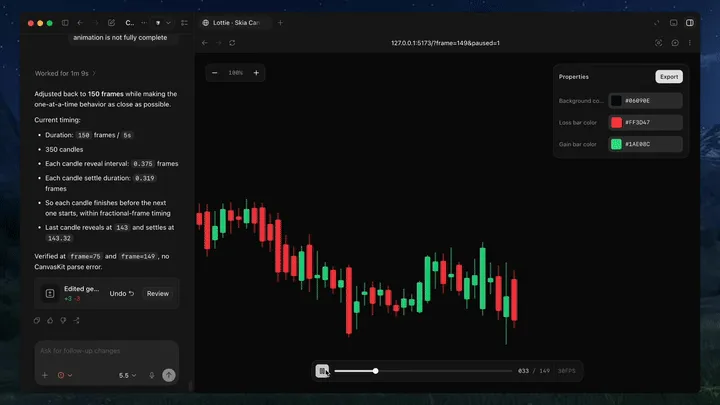
Ask an agent for a Lottie file cold and it often looks plausible in the JSON and then fails in a player: a blank canvas, layers in the wrong order, linear easing everywhere. text-to-lottie is an agent skill from Diffusion Studio, MIT-licensed, with about 5.5k stars on October 8, 2026. You install it in Claude Code, Codex or another agent that supports skills. The agent isn’t finished when the JSON is written. It has to look at the result in the Skia Skottie player that ships in the same repo.
This frame comes from the repo’s README demo. On the left the agent reports “back to 150 frames, candles revealed one at a time”; on the right is the animation it wrote, checked at frame=149 with no CanvasKit parse error.
The order it works in
The text-to-lottie SKILL.md is a thin control plane, and the substance sits in references/, loaded by task type rather than all at once. Any new, edited or fixed scene starts with player-contract.md. After that the table routes: a logo reads recipe-logo.md, and typography, loaders and icons, UI microinteractions, lower thirds, data and stats, product promos and SVG-to-animation each have their own recipe. Any prompt that says premium, clean or minimal also pulls in design-taste.md. The workflow is five steps: route the task, resolve the target scene file, decide the background policy, write lottie.json (plus controls.json when useful), and verify.
Scenes live at public/projects/<project>/<scene-N>/lottie.json. Before overwriting an existing scene the agent re-reads the file on disk, because slot edits in the UI write back to the source.
What it constrains
- One renderer: no hand-rolled viewer and no switching to
lottie-webto verify. Skia Skottie is the judge. - A verification list: parse the JSON, confirm the scene shows up at
/__context, then open?frame=Nin the browser at the first frame, the midpoint andop - 1. It looks for blank canvas, missing assets, layer order, cropping and text overflow. - Restraint by default: for premium, clean or minimal prompts it subtracts. The chrome budget is zero cards, borders or dividers, with one background tone and one divider weight and color.
- Background by use: full-frame pieces get a background layer with a
bgColorslot. Logos, icons, loaders, lower thirds and SVG-derived assets default to transparent. - Easing with a reason: no default linear motion, and easing follows the behavior, with the focal element strongest.
Quick start
Per the README, install the skill and then ask your agent to use it:
npx skills add diffusionstudio/lottie
The README’s example prompt asks for a Lottie from an SVG path, revealed along its natural direction, with an Apple-style gradient, ease-in-out timing, a transparent background and the original geometry kept. If the player project is missing, the SKILL.md says to run npx degit diffusionstudio/lottie my-animation, then npm install and npm run dev. Vite defaults to port 3030, but use whatever port the terminal prints. The JSON plays in lottie-web or in the iOS, Android, Flutter and React Native Lottie players, and imports into After Effects for more work.
The README’s prompt tips are worth following: ground the request in an SVG, real data or a screenshot; use motion terms like ease-in-out; write camera moves like a camera operator; ask for the controls you want, since by default you usually get only a background color; and state the frame rate and length.
Unlike a video skill such as srt-whiteboard-animation, which ends in an MP4, text-to-lottie ends in vector JSON that drops into a web page or an app, scales cleanly and keeps editable slots.
Who it’s for
It suits front-end and mobile developers, and designers who need logo animation, loaders, success or error feedback and UI microinteractions. For a sense of how to word motion prompts, see the motion showreel prompt.
Know the limits first. Verification only covers Skottie, which supports a subset of Lottie, so another player may render it differently. The skill ships svg-compatibility.md for SVG pitfalls, and you should still preview in your target player before release. The agent must be able to start a local dev server and open a browser to look at frames, so a chat-only setup won’t work. The repo’s last push was July 25, 2026, and the README gives no success-rate figures, so results depend on your task.