agent-desktop: a Rust CLI that drives Mac apps through the accessibility tree
agent-desktop is a Rust CLI for macOS: it reads the OS accessibility tree and operates elements by stable refs, cutting dense-app snapshots by 78–96% tokens.
Project facts
GitHub Ecosystem- License
- Apache-2.0
- Language
- Rust
- Stars
- 1,788
- Data checked
- 2026-10-12
Snapshot figures reflect the check date and may change over time.
The mainstream approach to desktop automation is screenshot plus vision model: find the coordinates, click them. It is expensive, brittle, and one screen of Slack or VS Code eats half a model’s context. agent-desktop, open-sourced in February 2026 (a single Rust binary, Apache-2.0, 1.8k stars as of 2026-10-12), takes the other road: no pixel guessing, just the operating system’s accessibility tree, which exposes the app’s real UI structure, operated through stable references.
Core features
- Accessibility tree with stable refs: a snapshot hands out references in depth-first order (like
@s8f3k2p9:e1), andclick @e12 --snapshot s8f3k2p9acts by ref; refs hold within one snapshot, so actions are safe to retry. - Six-point actionability preflight: visibility, stability, enabled state, supported action, policy, and editability all pass before execution; by default it never steals focus or moves the real mouse, keyboard, or pasteboard.
- Two-tier observation that saves tokens:
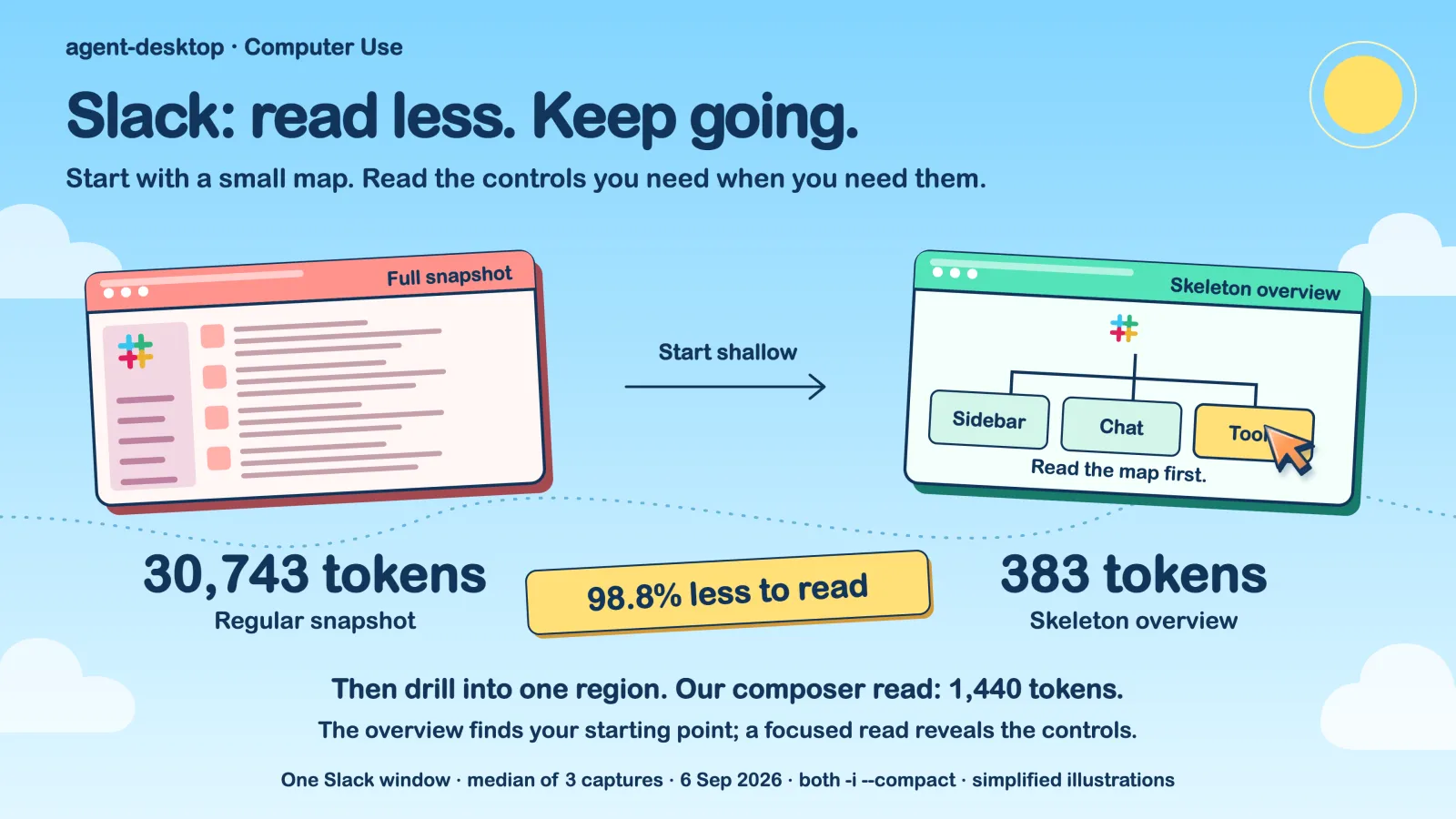
--skeletonreturns a shallow three-level overview with children_count on truncated containers, then you drill through safe drill refs; the project claims 78–96% token reduction on dense apps, with a Slack snapshot dropping from 30,743 tokens to 383. - 58 command names, 54 operational commands: beyond snapshot, click, type, and key presses, there are session recording and trace replay —
trace show --limit 500for the action timeline,trace export --out run.htmlfor a readable report. - Built for multiple agents:

AGENT_DESKTOP_AGENT_IDgives each worker a stable ID, so several subagents can observe and act in one shared session, with a cursor overlay traveling a human path (90–320 ms) to show each one’s intent. - A second backend for Chromium apps:
launch --cdpopens a CDP port for Playwright, Puppeteer, or agent-browser to drive web contents, while native menus, dialogs, and windows still go through the accessibility path; CDP needs a fresh launch — pointing it at an already-running target returns ACTION_FAILED.
The token saving is not a slogan; the README shows the comparison: the same Slack screen costs 30,743 tokens as a full accessibility-tree snapshot and 383 as a shallow overview with targeted drilling.
Typical use cases
- Orchestrators of multi-agent harnesses: give researcher and builder subagents their own IDs and let them observe and click in Xcode or Finder in parallel, without stealing focus, with intent visible on screen.
- Anyone reviewing a long run afterwards:
session start --screenshotsat the start, then replay the whole timeline with trace to find which click missed. - Agent authors driving Electron apps:
agent-desktop launch "Obsidian" --cdpfor the port, hand the web layer to the CDP toolchain, and keep refs for native UI.
Quick start
npm install -g agent-desktop        # downloads the prebuilt binary automatically
npx agent-desktop snapshot --app Finder -i
Before the first real run, agent-desktop permissions --request: macOS needs Accessibility permission, and screenshots additionally need Screen Recording. The command above lists Finder’s interactive elements with refs and a snapshot_id; from there, agent-desktop click @e3 --snapshot s8f3k2p9 clicks a button and agent-desktop type @e5 --snapshot s8f3k2p9 "quarterly report" fills a field. On dense apps, take the --skeleton overview first and drill down rather than shoving the whole tree at the model.
Summary
agent-desktop fits agent developers and harness authors who treat the desktop GUI as an action space. Three boundaries matter: it only observes and executes, and calls no model — “which one” belongs to the calling agent, which is both why it saves tokens and where it stops; its platform support table shows Yes only for macOS, with Windows and Linux all Planned and source builds requiring macOS 13.0+ and Rust 1.89+; and the --cdp endpoint binds to 127.0.0.1, reachable by any local process running as your user while it stays open. Apache-2.0, written in Rust. For the full screenshot-versus-structure comparison, read our five routes to agent browser control; in the ten Jev use cases roundup, this is the project that never calls Jev.