Audio#Open source#MCP#Speech to text#Desktop app#Social media automation#Short video#Video editing#Highlights#Local-first
AutoClip: turn long videos into post-ready clips, locally
AutoClip is an open-source video clipper for long-form material: feed it an interview, podcast, lecture or gaming VOD and it mines the subtitles for an outline, scores segments for highlight-worthiness and cuts clips you approve before anything renders. Unlike cloud clipping services, cutting and rendering stay on your machine with your own model keys — fully offline via Ollama. It ships as a desktop app, a Docker stack and a CLI/MCP pipeline, with export presets for Douyin, Shorts and Bilibili.
Project facts
GitHub Ecosystem- License
- MIT
- Language
- Python
- Stars
- 8,997
- Data checked
- 2026-09-28
Snapshot figures reflect the check date and may change over time.
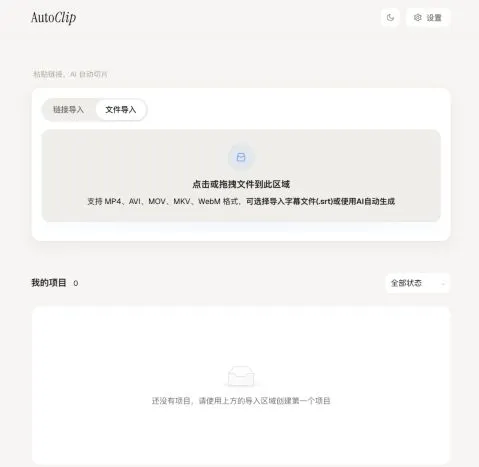
Trimming a one-hour podcast down to two or three postable Shorts usually means scrubbing the timeline for quotable moments, noting timestamps and losing an evening in an editor. AutoClip hands the first half to a model: import a local file, a YouTube or Bilibili link (SRT welcome), and it builds an outline from the subtitles, lays out a topic timeline, scores each segment for highlight-worthiness, then cuts everything above the bar into clips and suggested collections. Nothing renders until you confirm, and the results stay editable in a shared editor. The boundary it draws is the interesting part: cutting and rendering never leave your machine, and the model is yours to pick — Qwen, DeepSeek, GLM, or a fully local Ollama setup. The README’s privacy FAQ spells out exactly which route sends what where.
Core features
- Highlight mining from subtitles: the default route pulls an outline, topic timeline, highlight scores and clip titles out of the subtitles — built for interviews, podcasts, lectures and stream replays. No subtitles? faster-whisper transcribes locally first and downloads the voice model on first run.
- You confirm before it cuts: an import is only processed once you confirm its production type, and unconfirmed imports are recoverable; clips, collections and their order are all adjusted by hand in the shared editor.
- Visual game analysis (opt-in): since v1.4.0 you can wire up your own multimodal model and explicitly enable the paid visual pre-screening to detect discrete events in gameplay recordings and draft editable highlights. Subtitle analysis stays the default, and the README is upfront that output still needs human review of boundaries and copy.
- Platform export presets: built-in presets for Douyin, Xiaohongshu, YouTube Shorts and Bilibili, with burned-in subtitles and title cards.
- Publishing automation: since v1.3.2, finished clips can be published or scheduled in-app — overseas platforms go through Upload-Post (your account), Bilibili takes a one-time cookie paste in settings; covers are generated automatically, or you can export only and skip publishing.
- Any model you like: pick Qwen, OpenAI, Gemini, DeepSeek, Doubao Seed, Kimi, GLM or Grok in settings, or run Ollama / LM Studio locally; OpenAI-compatible endpoints accept a custom Base URL. There’s a CLI for batch runs, and
autoclip mcpexposes the same pipeline to MCP clients over stdio.
Typical use cases
- Podcast and interview hosts: one episode becomes a few subtitled clips, exported straight through the Shorts or Douyin presets into a publishing queue.
- Lectures and stream replays: the topic timeline slices hours of footage into chunks — start with the highest-scoring segments.
- Gaming streamers: visual analysis drafts highlights from recorded gameplay, for anyone willing to configure a multimodal model and review what comes out.
- Developers and heavy users: batch footage through the CLI, or plug the pipeline into your agent stack over MCP.
Quick start
Shortest path: grab the v1.4.0 desktop installer — a .dmg for Apple Silicon Macs or a -setup.exe for Windows x64, with Python and FFmpeg bundled. Install, then pick a provider, paste your key and test the connection in settings before importing anything. To self-host, use Docker:
git clone https://github.com/zhouxiaoka/autoclip.git
cd autoclip
cp env.example .env   # edit .env: choose LLM_PROVIDER and add your key
mkdir -p data logs uploads
docker compose up -d --build
The web UI lands on localhost:3000, with API docs at localhost:8000/docs. The CLI wants Python 3.10+ and FFmpeg; once installed per the repo’s CLI / MCP guide:
autoclip doctor --provider ollama
autoclip run talk.mp4 --provider ollama --json
autoclip export PROJECT_ID --preset shorts
doctor checks your model setup, run processes the video and returns a project ID, export renders it through the Shorts preset, and autoclip mcp exposes the same pipeline over stdio.
Summary
AutoClip fits creators with steady source material who care where their footage goes and what their API bill looks like — videos never upload to a third-party clipping service, and model costs settle against your own keys. If you want zero-config, fully automatic output, the bring-your-own-key and confirm-before-cutting steps will wear you out. It’s MIT-licensed, mostly Python with a Tauri desktop shell, created in July 2025 and actively maintained — v1.4.0 shipped on 2026-09-27. Caveats worth knowing: the default route is subtitles only; visual game analysis costs extra multimodal tokens, and the README itself says outputs need human review and promises nothing about ad performance; the Windows installer’s own notes say installation, import and saving are still awaiting real-machine verification; and it’s a hobby project where the maintainer openly says replies may take a while.