Creative#Text to speech#Social media automation#Video editing
OpenCreator: an open-source creator workspace on the Codex engine
OpenCreator (formerly KrillinAI) reuses Codex CLI as its engine: 12 creator tools for video translation, dubbing, thumbnails and copy. Desktop app ships Codex.
Project facts
GitHub Ecosystem- License
- Apache-2.0
- Language
- TypeScript
- Stars
- 13,033
- Data checked
- 2026-10-14
Snapshot figures reflect the check date and may change over time.
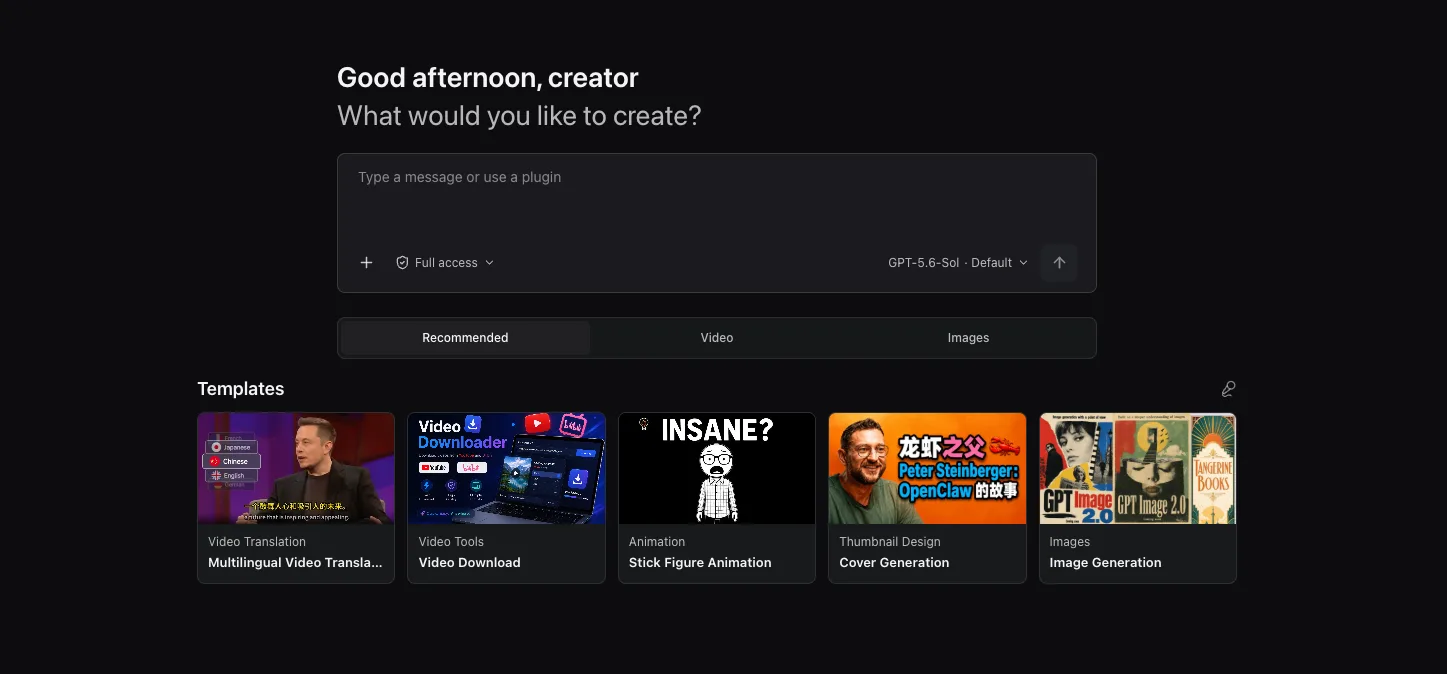
Every solo creator runs a chain of disconnected tools: a downloader, a subtitle editor, a dubbing service, a video cutter, a thumbnail generator — glued together by hand. OpenCreator (formerly KrillinAI; TypeScript, Apache-2.0, about 13.0k stars as of 2026-10-14) puts that chain in one workspace: visual tools, reusable Skills and an Agent share a room where scripts, video, images, voice, translation and editing all happen locally. Its smartest decision is not building another Agent engine — Codex CLI is the execution core, so models, reasoning, tool calls, Skills and MCP all carry over.
Core features
- Twelve creator tools, ten available today: video translation (14 source languages to 101 targets, cloud or local Whisper transcription, LLM subtitle segmentation, alignment and terminology, bilingual subtitles with dubbing or a custom voice sample, landscape and portrait compositions, SRT/audio/video export); video download from ten platforms (YouTube, Bilibili, X, TikTok, Douyin, Xiaohongshu, Reddit and more — some sources need platform cookies); thumbnail generation; image generation with GPT Image; article writing with Markdown/HTML/PDF export; Xiaohongshu posts; short-video scripts; stick-figure animation; smart dubbing; video generation with Seedance. Auto Clips and the digital avatar are still in development.
- Codex native: there is no second execution engine to maintain — the Codex agent loop, model catalog, Skills and MCP configuration work as is; language models follow the Codex catalog or your own OpenAI-compatible endpoint, and image, video, voice and transcription services are configured per account in Settings.
- Ready-to-use desktop app: the installer bundles Codex CLI, and first launch scans your local Codex setup — a working ChatGPT sign-in or API key is reused directly. The web build runs from source with the same frontend.
- Conversation and workspace in sync: describe a task in natural language, then step into the visual tools to fine-tune subtitles, shots and audio — one shared state machine keeps both sides current, so nothing needs repeating.
- Versioning and memory: every revision creates a new version while keeping earlier settings and outputs; global, project and thread memory come with summaries and reproducible run-input snapshots.
- Local by default: data, attachments and logs stay on your machine, with approvals and redacted diagnostics; the UI ships in Simplified Chinese, English and Swedish.
Typical use cases
- A one-person creator running multi-platform distribution: translate one video into bilingual subtitles and dubbing, cut landscape and portrait versions, then generate the thumbnail and social copy in the same workspace.
- A developer already using Codex CLI: local config is detected and reused, so creative and coding tasks share one agent and one model account.
- A team running multilingual channels: terminology tables, subtitle styles and voices become reusable templates, and every revision stays traceable.
Quick start
Grab the desktop installer from Releases (macOS Apple Silicon/Intel, Windows x64) — no Node.js needed. First launch starts the local runtime, prepares a default project and scans your Codex configuration; confirm “Use local Codex and continue” and you’re set. For the web build you need Node.js 22+, pnpm 9.15 and a working Codex CLI login:
git clone https://github.com/krillinai/OpenCreator.git
cd OpenCreator
corepack enable
pnpm install
pnpm web:dev
Open http://127.0.0.1:19861/ — the dev server starts the local daemon on demand and injects a temporary runtime token through a same-origin proxy.
Summary
For creators and localization teams stuck chaining tools by hand; for pure video translation, VideoLingo stays lighter and focused on Netflix-grade subtitles, while OpenCreator is the whole-workspace bet. TypeScript, Apache-2.0, 13,033 stars and 1,396 forks as of 2026-10-14, with commits landing the same day — development is active.
Three things to know first: model tasks need a ChatGPT sign-in or API key, and image, video and voice run on third-party services billed to your own accounts; Auto Clips and the digital avatar are in development, so set expectations accordingly; and some download sources require your own platform cookies — the compliance line for downloading public videos is yours to draw. For generating a full video from scratch instead of translating existing ones, MoneyPrinterTurbo covers “one prompt, one video” while OpenCreator covers “the whole pipeline in one workspace”.