Developer tools#Virtualization
Device Hub Pro: Android emulators and iPhones side by side on a Mac
Device Hub Pro is an MIT-licensed macOS app that runs Android emulators, iOS simulators and phones side by side, with settings, capture and logs in one window.
Project facts
GitHub Ecosystem- License
- MIT
- Language
- Swift
- Stars
- 128
- Data checked
- 2026-10-22
Snapshot figures reflect the check date and may change over time.
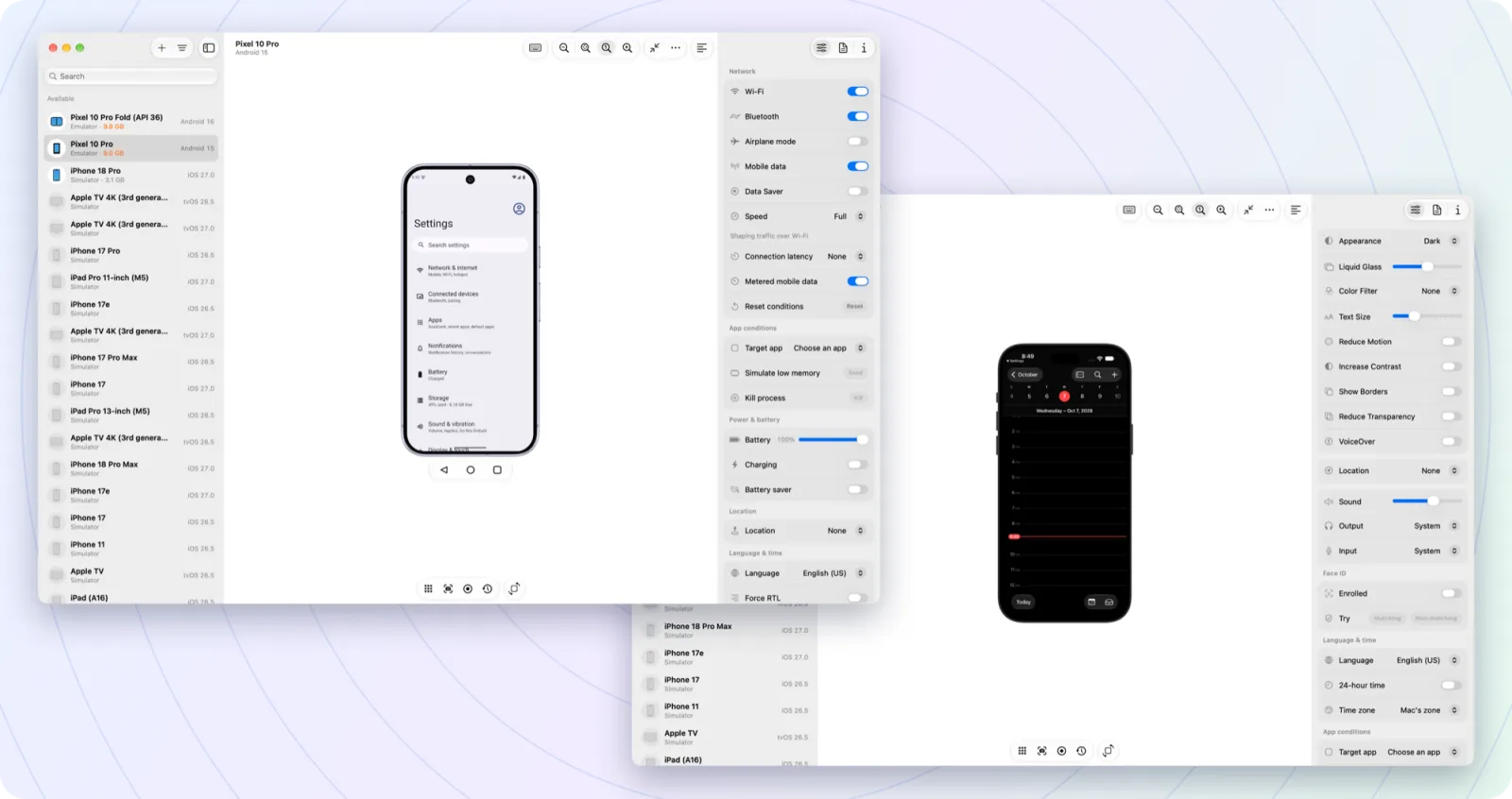
Testing an app usually means juggling three windows: an Android emulator, an iOS simulator and a physical phone. Changing one network setting means hunting through each one. Device Hub Pro puts those devices in a single list. It is an MIT-licensed, open-source macOS app written in Swift. The repository was created on October 6, 2026, and the latest release, v1.2.0, shipped on October 22.
Core features

- One device list: The sidebar shows running devices, installed AVDs and iOS simulators, with filters for all devices, simulators and physical devices.
- Mirror and control: The README says mirrors run at up to 60 fps, and you can click, type, rotate and press hardware buttons.
- Settings in one place: Dark mode, text size, network, battery, location and language live in the Controls panel, and changes are read back from the device.
- Capture: Screenshots, screen recordings, logs and crash reports open next to the device. Logs can be filtered by app, level or text.
- App management: Drag an installer into the window to install it, then launch, clear data or open deep links.
- No Android Studio required: On first launch the app downloads Google’s official command-line tools, platform-tools and the emulator into
~/Library/Android/sdk, after you accept Google’s license. If the Mac has no Java runtime, it offers to install Eclipse Temurin. - Wireless Android phones: Pair a phone by QR code and keep it on Wi-Fi.
Typical use cases
- A mobile developer shipping both Android and iOS builds: Keep a Pixel emulator and an iPhone simulator open together and check a style change on both.
- Someone who does not want Android Studio: If you only need an emulator to look at the app, this installs the toolchain for you.
- A tester reproducing a bug: Logs, screenshots and crash reports sit beside the device while you work.
- A demo to an audience: Put several devices side by side and show the screen change when a setting changes.
If you want a virtual machine for another operating system on a Mac rather than phone emulators, see vphone-cli.
Quick start
- Download the latest
.dmgfrom Releases and drag the app to Applications. - Open it. Updates arrive inside the app.
- If no
adbis found on first launch, a “Set up Android tools” card appears. Choose Install Android Tools… to fetch the command-line tools, platform-tools and the emulator. If you already have Android Studio, choose Locate SDK… and point it at the existing SDK folder. - Once the tools are in place, the app offers to create the first emulator. The sidebar’s ”+ ▸ Browse Catalog…” lists Pixel models, and missing system images download inside the app.
Summary
Device Hub Pro suits developers who test on both Android and iOS from a Mac, especially those who want a quick emulator without opening Android Studio. It runs only on macOS, and it requires an Apple silicon Mac with macOS 15 or later. Windows and Intel Macs are out of scope.
A few things to know first. Touch and keyboard input in iOS simulators needs Xcode 27, which requires macOS 26.6 or later; with an older Xcode the simulator is view-only. The README states that some iOS features use private Apple interfaces, including simulator touch, iPhone fast input and the live view. Each can be turned off, but a macOS or Xcode update may break them for a while. Connecting a physical iPhone requires pairing it in Xcode and turning on Developer Mode. The app asks for Local Network, Camera, Microphone and the Desktop, Documents and Downloads folders, and the README says it asks only when a feature needs them, not at launch.
The project has no accounts, analytics or telemetry, according to the README. As of October 22, 2026, the repository had 128 stars, was created on October 6, 2026, is not archived, and its latest release is v1.2.0 from October 22. The license is MIT. We checked the README, the features document, the LICENSE file and the repository metadata, and we did not install or run the app on a Mac.