Developer tools#Device control#Virtualization
vphone-cli: Run a virtual iPhone on an Apple Silicon Mac
vphone-cli boots real, pre-patched iOS on an Apple Silicon Mac through Apple's research-VM path, with snapshots, clones and a local automation API.
Project facts
GitHub Ecosystem- License
- MIT
- Language
- Swift
- Stars
- 15,061
- Data checked
- 2026-10-09
Snapshot figures reflect the check date and may change over time.
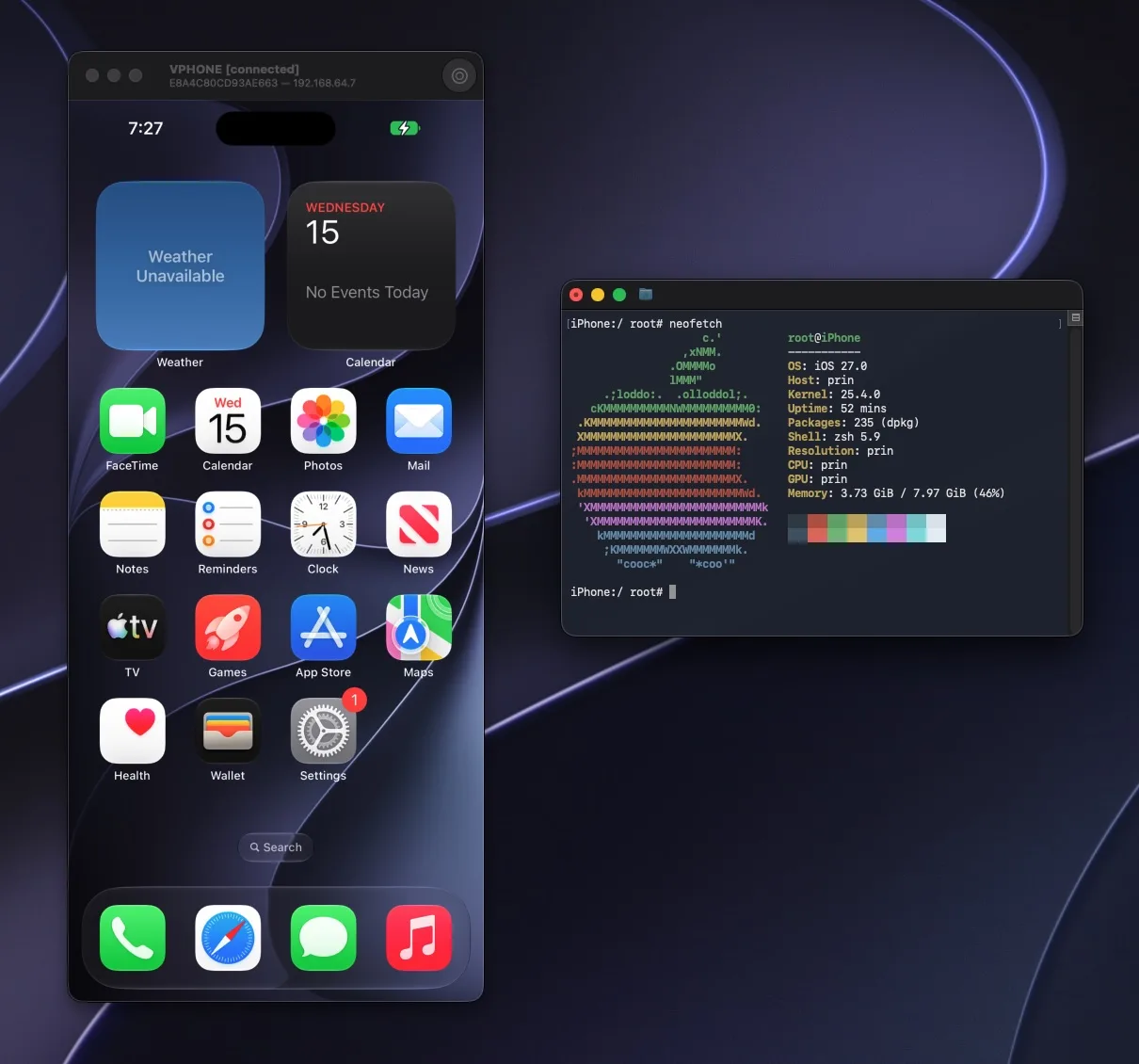
The iOS Simulator is a different animal from a real device — different kernel, different sandbox — and keeping a sacrificial iPhone around for security research is its own chore. vphone-cli, an MIT-licensed Swift project by Lakr (GitHub: Lakr233) created on 2026-02-26 with 15,061 stars as of 2026-10-09, takes another route: it uses Apple’s own Virtualization.framework and the PCC (Private Cloud Compute) research-VM path to boot genuine iOS on an Apple Silicon Mac. The firmware ships pre-patched and gets restored onto a virtual disk; the only host change is one debugging restriction in SIP, which otherwise stays on. The project credits wh1te4ever’s public super-tart vphone research notes as its starting point. Version 2.8.0 landed on 2026-10-08, the project’s 30th release.
Core features
- Genuine iOS: boots through Apple’s Virtualization.framework plus the research-guest path (the host needs macOS 15 or newer; you run
csrutil allow-research-guests enablein Recovery), restoring iPhone firmware onto a 64 GB virtual disk by default. The project publishes its firmware patch inventory, and verified pairings — iPhone 17 (iPhone17,3) on iOS 26.6.2 and 27.0 — boot to the lock screen and answer a probe. - Graphical window: drive the virtual iPhone’s screen from the Launchpad app — install apps, browse files, take screenshots and recordings. iPadOS guests work too (iPad mini A17 Pro verified).
- Snapshots and clones: save a stopped VM’s disk state and revert at will; export VMs to .tzst archives, import them elsewhere, clone in place. Everything lives in
~/.vphone/. - Automation API: pass
--api-listen 127.0.0.1:8765at launch to open a local HTTP and WebSocket interface, answered by the vphoned daemon installed inside the guest. The token rotates each launch (pin it withVPHONE_API_TOKEN); tokenless and web-origin requests are rejected. - Agents can do the setup: the repo ships a vphone-guest-control skill plus a paste-ready prompt, so Claude Code or Codex can check the host, install Launchpad and VPhone.bundle, and stop to ask whenever an admin password or a Recovery-mode change is needed. Recent commits carry Claude’s co-author line — the project dogfoods agents.
- No runtime dependencies: distributed as a notarized Launchpad plus VPhone.bundle. Nothing else to install at runtime — no Xcode, Python or Homebrew.
Typical use cases
- Security research and reverse engineering: a disposable, snapshot-able iOS environment; install the roothide package bootstrap and apt, ssh, git and the usual shell tooling come with it.
- Automated testing: wire the automation API into CI or local scripts and loop install-boot-screenshot runs without queueing for a physical device.
- Give an agent a phone: pair it with a screen-driving tool and a coding agent can tap through a virtual iPhone that you can clone freely and roll back when the experiment ends.
Quick start
You need a physical Apple Silicon Mac on macOS 15 or newer (it will not run inside a macOS VM), disk space — each VM takes a 64 GB virtual disk by default, firmware on top — and a network connection for signing tickets. First relax one restriction from macOS Recovery (SIP stays on; only the debugging restriction is lifted):
csrutil enable --without debug
csrutil allow-research-guests enable
After rebooting, download the notarized vphone-launchpad-<version>-notarized.zip from the latest release, install the helper under Host Setup, click Download and Install under Core Bundle, then create a machine under Machines — Launchpad downloads the firmware, patches it, restores the system and boots. From a terminal, the CLI drives VMs:
vphone-cli vm list
vphone-cli vm launch myphone
vphone-cli vm export myphone --out myphone.tzst
Or paste the setup prompt from the README into Claude Code and let it follow the vphone-guest-control skill.
Summary
Made for security researchers, reverse engineers and test engineers who need a real iOS environment, and for anyone who wants an agent to get its hands on an iPhone. If you want iOS as a daily system or for mobile gaming, look elsewhere — graphics performance and radios are not design goals. MIT license, written in Swift. Three things to know before you start:
- The host security posture changes: two csrutil commands in Recovery plus a reboot. SIP stays enabled, but its debugging restriction is lifted.
- Firmware pairings are a short verified list: iPhone 17 on iOS 26.6.2 or 27.0 with the cloudOS 26.4 beta image is what has passed end to end. Newer cloudOS releases dropped the vphone600ap device identity the guest needs, and
fw preparerefuses them; iPhone 17 Pro models on iOS 27 need an extra shared-region patch. - Disk usage adds up: 64 GB per VM by default, plus firmware. 2.x cannot start VMs created by 1.x, so read the release notes before upgrading.
Where phone-harness drives your physical iPhone through iPhone Mirroring, vphone-cli virtualizes one you can snapshot at will; OpenMausBot takes the give-an-agent-a-machine idea to a full desktop computer.