System utilities#File management
ExifCleaner: drag photos in and strip their metadata
ExifCleaner is an MIT-licensed desktop app that strips metadata from images, videos and PDFs in batches on macOS, Windows and Linux, with no network access.
Project facts
GitHub Ecosystem- License
- MIT
- Language
- TypeScript
- Stars
- 2,778
- Data checked
- 2026-10-22
Snapshot figures reflect the check date and may change over time.
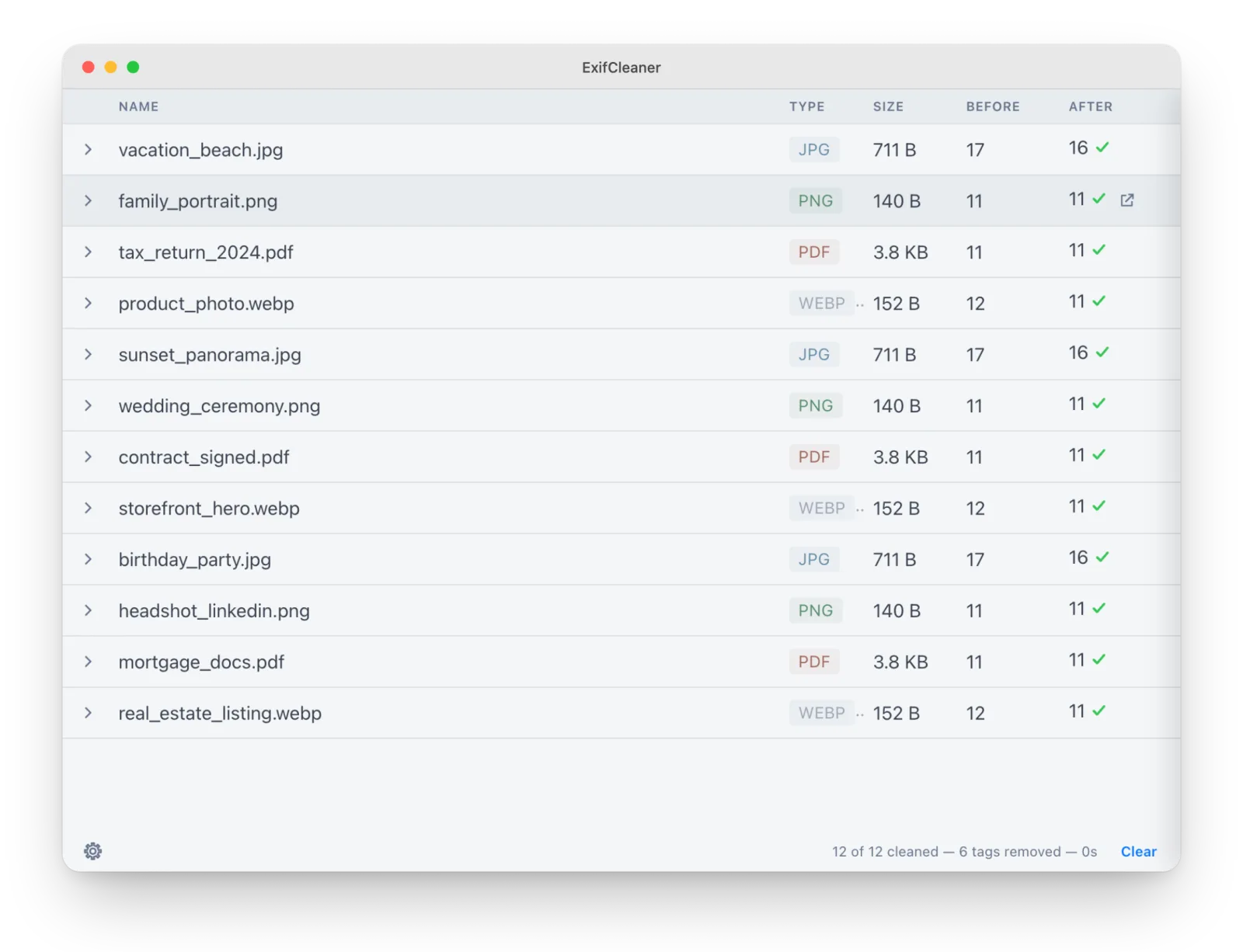
A photo taken on a phone can carry the place it was shot, the time and the phone model when you send the file. ExifCleaner is a desktop app that removes those tags: drag a file in, and it drives ExifTool to strip them. It is MIT-licensed and open source, built with Electron, React and TypeScript. The repository dates from December 2019, and the latest release, v4.6.0, came out on October 20, 2026.
Core features
- Batch work: Drop several files at once, or a whole folder, and it processes each file inside.
- Before and after, per file: Expand any row to see which tags were removed and how the size changed.
- A tested allowlist of formats: The README says the app accepts a tested intake list, not everything ExifTool can read or write. Images include JPEG, PNG, GIF, TIFF, WebP, HEIC, AVIF and SVG plus RAW formats such as Canon CR3 and Nikon NEF. Media includes MP4, MOV, AVI and M4A, and the only document type is PDF.
- Privacy controls: Preserve orientation, save a copy instead of changing the original, remove macOS extended attributes and keep original timestamps.
- No network, no auto-update: The README says the app has zero telemetry and does not phone home.
Typical use cases
- Someone about to post photos: Drop the batch in, clean it, then upload.
- A person who received a file and wants to see what it carries: Use the expanded view to check which tags were removed.
- A team moving between macOS, Windows and Linux: Builds exist for all three, with the same interface and options.
- A photographer cleaning camera RAW files: CR3, NEF and ARW are on the list, but the README has a separate warning for RAW, covered below.
- Someone tidying a downloads folder: ExifCleaner handles metadata, and Czkawka finds duplicates; both work fully offline.
Quick start
- Download the package for your platform from Releases: an arm64 or Intel DMG on macOS, a portable exe on Windows, and AppImage, deb or rpm on Linux.
- The app is not code-signed, so the first launch is blocked. On macOS 15 or later, open System Settings, go to Privacy & Security and click Open Anyway. On Windows, SmartScreen shows a warning: choose More info, then Run anyway.
- To check the download, compare it with
SHASUMS256.txton the release page. The README also asks you to download only from GitHub Releases. - Drag files or folders into the window and read the before and after counts on each row.
Summary
ExifCleaner suits people who need to strip metadata from photos, videos or PDFs in bulk, especially those who want a small cross-platform tool that does not touch the network. It does not suit anyone who expects complete erasure, for the reasons below.
A few things to know first. PDF metadata is not actually removed. The README and ExifTool’s documentation both say a PDF gets a reversible update, so the original metadata stays recoverable. Stripping every tag from a RAW file is not recommended, because it can remove proprietary data needed to render the image correctly. The app relies on ExifTool’s writer, and ExifTool itself says it cannot guarantee a lossless rewrite for every file; the README advises keeping backups. Finally, the app is unsigned, so the first launch needs a manual override. That is a deliberate choice: a signing certificate would display the holder’s legal name in the system dialog.
The repository was created on December 5, 2019, and its last push was on October 20, 2026. It is not archived, and the latest release is v4.6.0 from October 20. As of October 22, 2026, it had 2,778 stars, and the license is MIT. We checked the README, the LICENSE file and the repository metadata, and we did not download or run the app.