System utilities#File management
omdrop-owl: Real AirDrop Between iPhone and Linux
omdrop-owl runs the AirDrop link layer in userspace: Linux laptops with MediaTek MT7925 Wi-Fi trade files with an iPhone both ways while Wi-Fi stays connected.
Project facts
GitHub Ecosystem- Language
- Shell
- Stars
- 954
- Data checked
- 2026-10-10
Snapshot figures reflect the check date and may change over time.
Getting photos off an iPhone onto a Linux laptop used to mean a cloud detour, a cable, or the OpenDrop route: an external Atheros Wi-Fi dongle and a connection that dropped every time a transfer started. omdrop-owl, open-sourced on October 8, 2026 by Tristan (GitHub id t4t5, the author behind the 22k-star sweetalert), takes a different path. In two days it collected 954 stars. It runs AWDL — the link layer under AirDrop — in userspace through OWL on a monitor interface, so an ordinary x86 laptop with a MediaTek MT7925 card can send and receive with an iPhone in both directions while its Wi-Fi association stays up. Receiving runs at about 1.3 MB/s: a photo lands before you put the phone down.
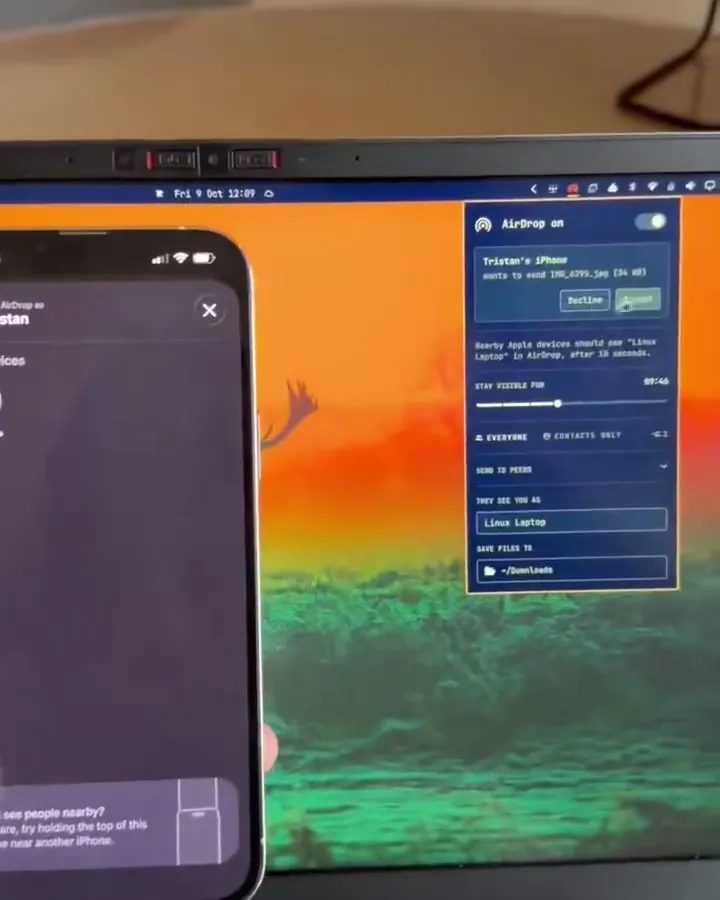
The frame above comes from the demo video in the project README: the author sends IMG_8799.jpeg (34 MB) from his iPhone to a machine named Linux Laptop, and the file lands in ~/Downloads after one tap on Accept.
Core features
- Wi-Fi stays connected during transfers. AWDL sits on the access point’s own channel (the AP must be on 6, 44, or 149 — AWDL channels), a monitor interface injects frames using the station’s MAC, and the station interface ACKs the phone’s unicast. The radio never leaves the AP, so browsing and AirDropping coexist.
- Both directions work. Tested on the MT7925 (Framework 13): iPhone to laptop and laptop to iPhone. The README reports about 1.3 MB/s receiving and 490 kB/s sending (checked 2026-10-10).
- A radio backend for omdrop. Everything installs under
/usr/lib/omdropand plugs into the omdrop CLI and bar panel through a documented contract. It is the sibling of omdrop-awdl, which drives the Broadcom firmware path; a machine runs one radio backend at a time. - A hardware profile table instead of guesswork. Each Wi-Fi driver gets one line of settings (whether to reconnect after teardown, which monitor MAC mode). Intel AX200/AX211 are marked as not working — connected injection drops frames and the firmware won’t ACK in monitor mode (issues #1, #4). Other cards can opt in via
/etc/omdrop/allow-untested, andtools/test-card.shwalks you through a photo each way, watches Wi-Fi for five minutes, and writes a report. - Distro packaging landed within days. Arch installs via
makepkg; Debian/Ubuntu builds a.debwithtools/build-deb.sh(merged October 10). A NetworkManager rule keepsawdl0andmon0unmanaged, and a polkit policy guards the privileged helper.
Benchmarks
| Setup | Measured speed | Wi-Fi during transfer | Source |
|---|---|---|---|
| omdrop-owl (MT7925) | ~1.3 MB/s in, ~490 kB/s out | stays connected | project README, 2026-10-10 |
| airdrop-mt7921 (MT7921/7922) | ~40–67 kB/s | dropped, restored after | that project’s README, 2026-10 |
The gap between the two userspace generations is more than an order of magnitude. Sending remains the slower side: injected frames leave at a fixed pace of about one every 2.5 ms, regardless of the PHY rate OWL requests, and the README says so plainly.
Typical use cases
- Photos straight to the laptop. On a Framework 13 or any machine with a MediaTek card, the iPhone’s share sheet lists the Linux machine; full-resolution photos arrive in ~/Downloads with no app installed on the phone.
- An Omarchy desktop that speaks AirDrop. With the omdrop main program installed, a bar switch opens the receive window, incoming files hit the clipboard and a notification, and
omdrop sendpushes files back to the iPhone from the CLI. - Growing the hardware table. If your laptop has a Realtek or Qualcomm card, run
tools/test-card.sh, then open a PR with the report’s summary.txt and your profile line.
Quick start
Two prerequisites: put your router’s AP on channel 6, 44, or 149 (start exits with an explanation otherwise), and install omdrop itself with radio-backend support (brentkearney/omdrop-plugin; v0.15.0 released 2026-10-10). Then install this package:
# Arch
makepkg -si

# Debian / Ubuntu
sudo apt install build-essential cmake git pkg-config dpkg-dev \
  libev-dev libpcap-dev libnl-3-dev libnl-genl-3-dev
tools/build-deb.sh
sudo apt install ./omdrop-owl_*.deb
Turn visibility on from the omdrop panel. If something is in the way, /usr/lib/omdrop/omdrop-discoverable probe names it. The first start returns in about 2 seconds: awdl0 is up, announcements are going out, and peers lists the phone.
Summary
If your Linux laptop has a MediaTek card, this works today; Intel (AX200/AX211) owners and anyone who can’t move their router onto one of the three AWDL channels should wait. Written in Shell, and the repository carries no LICENSE file as of 2026-10-10 — ask before bundling it. Three known costs: sending runs at roughly a third of receiving speed; the MT7925 has a firmware bug where deleting a monitor interface wedges the driver, worked around by forcing a reconnect right after stop; and iPhones randomize their AWDL address each session, so no peer is remembered.
For the same job across any devices, croc and Syncthing are the general-purpose answers — encrypted CLI transfers and continuous sync respectively, both hardware-agnostic but requiring installs on both ends. omdrop-owl’s difference is that the iPhone side needs nothing at all: it is the AirDrop sheet the phone already ships with.