System utilities#Open source#CLI#macOS#Windows#Privacy#Dedupe#App uninstaller#Disk cleanup#AI cache#CleanMyMac alternative
MangoDisk: free, open-source disk cleaner for Mac
MangoDisk is a free, open-source disk cleaner for macOS, Windows and Linux: read-only scans, open cleanup rules, and an AI models and caches category.
Project facts
GitHub Ecosystem- License
- GPL-3.0
- Language
- Rust
- Stars
- 3,422
- Data checked
- 2026-09-28
Snapshot figures reflect the check date and may change over time.
A base-model Mac still ships with a 256 GB SSD, and the AI era fills it faster than ever: local models weigh gigabytes each, while HuggingFace downloads, Docker build caches, Xcode DerivedData and a dozen node_modules folders pile up in places you would rather not delete by hand — and CleanMyMac wants a subscription. MangoDisk is a free, open-source disk cleaner and space analyzer written in Rust and Tauri 2 by Harry, the developer behind MoneyPrinterTurbo (126k+ GitHub stars), released in August 2026 for macOS, Windows and Linux. The site’s own pitch: “Free & open source · No account required”. As of September 28, 2026 the repo sits at 3,422 stars, with v1.1.4 released on September 25.
Core features
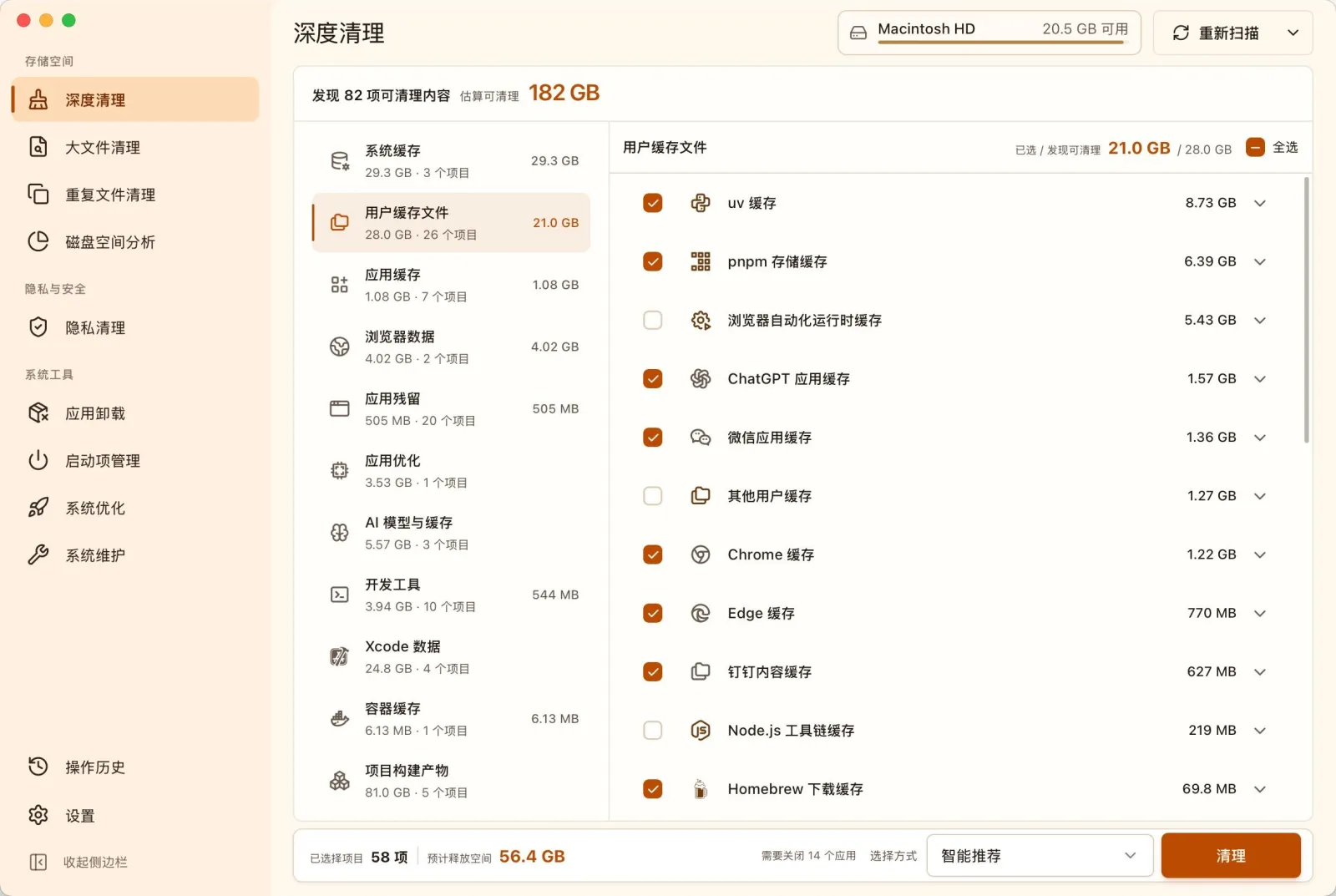
- AI models and caches get their own category: one scan surfaces large local models, download caches and transfer temp files; developer tools (Xcode, package managers, compiler caches), Docker container caches and build artifacts from Node.js, Rust, Gradle, Swift, Python, .NET, Godot and CMake projects are covered too, each with its reclaimable size shown upfront.
- Safety first by design: scans are read-only until you review and confirm each item; the cleanup rule library lives in the repo for anyone to audit, and a candidate rule only ships after validation on real systems; System Optimization runs built-in, validated settings only — no arbitrary registry paths, terminal commands or scripts.
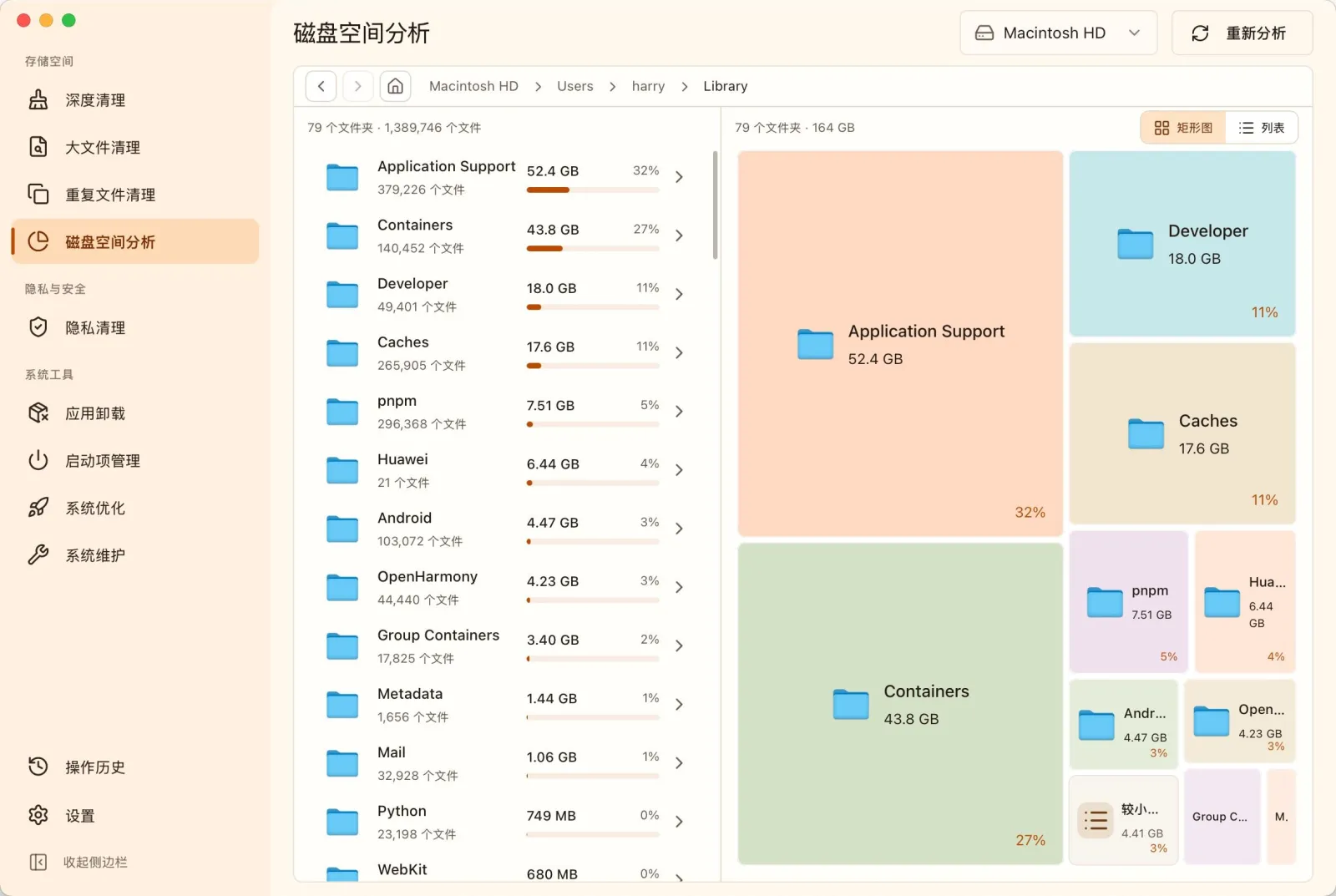
- Space analysis: a treemap plus list drills into the biggest folders and files, backed by large-file and duplicate cleanup (one copy kept per group, files that merely share a name are not treated as duplicates).
- Uninstall and system tools: remove apps with their caches, settings and leftovers, manage startup items, fix common issues such as broken search, wrong icons, no sound or network failures, plus a privacy cleanup for browsing history, cookies and clipboard traces.
- A CLI on the same engine:
mangodisk cleanscans and never modifies anything by default;--applyexecutes, with--dry-runfor preview and--format jsonfor scripting — non-interactive cleanup must also pass--yes. - AI explanations: when an item is unclear, it explains its purpose and impact from the item description and current scan results; official builds include a daily free quota, and you can connect your own AI service. A menu-bar resource monitor (CPU, memory, disk) arrived in 1.1.1.
Typical use cases
- A developer on a 256 GB MacBook whose disk is permanently red: one scan locates the rebuildable build artifacts and container caches eating tens of gigabytes.
- Anyone running local models: the AI models and caches category rounds up models and download caches scattered across the home directory.
- Users tired of paying for CleanMyMac: a free, no-account, open-source alternative.
- Scripters: put
mangodisk clean --format jsonon a schedule to watch reclaimable space, and add--yesonly when deletion is actually wanted.
Quick start
macOS 12.5 or later, one Homebrew line for the desktop app:
brew install --cask harry0703/tap/mangodisk
CLI only:
brew install harry0703/tap/mangodisk-cli
mangodisk clean
mangodisk clean touches nothing by default. Windows (one PowerShell line) and Linux (.deb, AppImage) install commands are in the README. Review the per-category list and confirm before anything is deleted.
Disk space analysis draws the biggest directories as a treemap, with a list to drill down further:
Summary
MangoDisk fits Mac users who are out of disk and out of patience for subscription cleaners; developers gain the most, since AI models, Xcode, container caches and build artifacts are exactly the categories it tracks. If you want a literal one-click clean-everything, the confirm-every-step flow feels slower — that is the price of the safety-first design. GPLv3: free for personal use, but derivative distributions have to stay open source. The project is young — created August 1, 2026 — and moving fast, with 3,422 stars and 253 forks as of September 28, 2026. Cleanup and uninstalls are irreversible, so read the list and keep backups. Among peers, Pearcleaner focuses on app uninstalling and Czkawka on duplicates; MangoDisk is the full toolkit: cleanup, analysis, uninstall and maintenance.