HarnessRouter: Call multiple agent harnesses through one API
HarnessRouter is a self-hosted, OpenAI Responses-compatible API for 30 agent harnesses, with sessions, streaming, files, and cancellation.
Project facts
GitHub Ecosystem- License
- Apache-2.0
- Language
- Python
- Stars
- 3,805
- Data checked
- 2026-11-01
Snapshot figures reflect the check date and may change over time.
Connecting coding agents such as Claude Code and Codex to a product means handling more than model requests: sessions, files, streaming progress, and cancellation need their own plumbing too. HarnessRouter is a self-hosted agent harness API that connects different runtimes through an OpenAI Responses-compatible interface. metadata.harness_id selects which harness executes a request. Its README listed 30 harness bases on November 1, 2026; the repository had 3,805 stars and uses Apache-2.0.
Core features
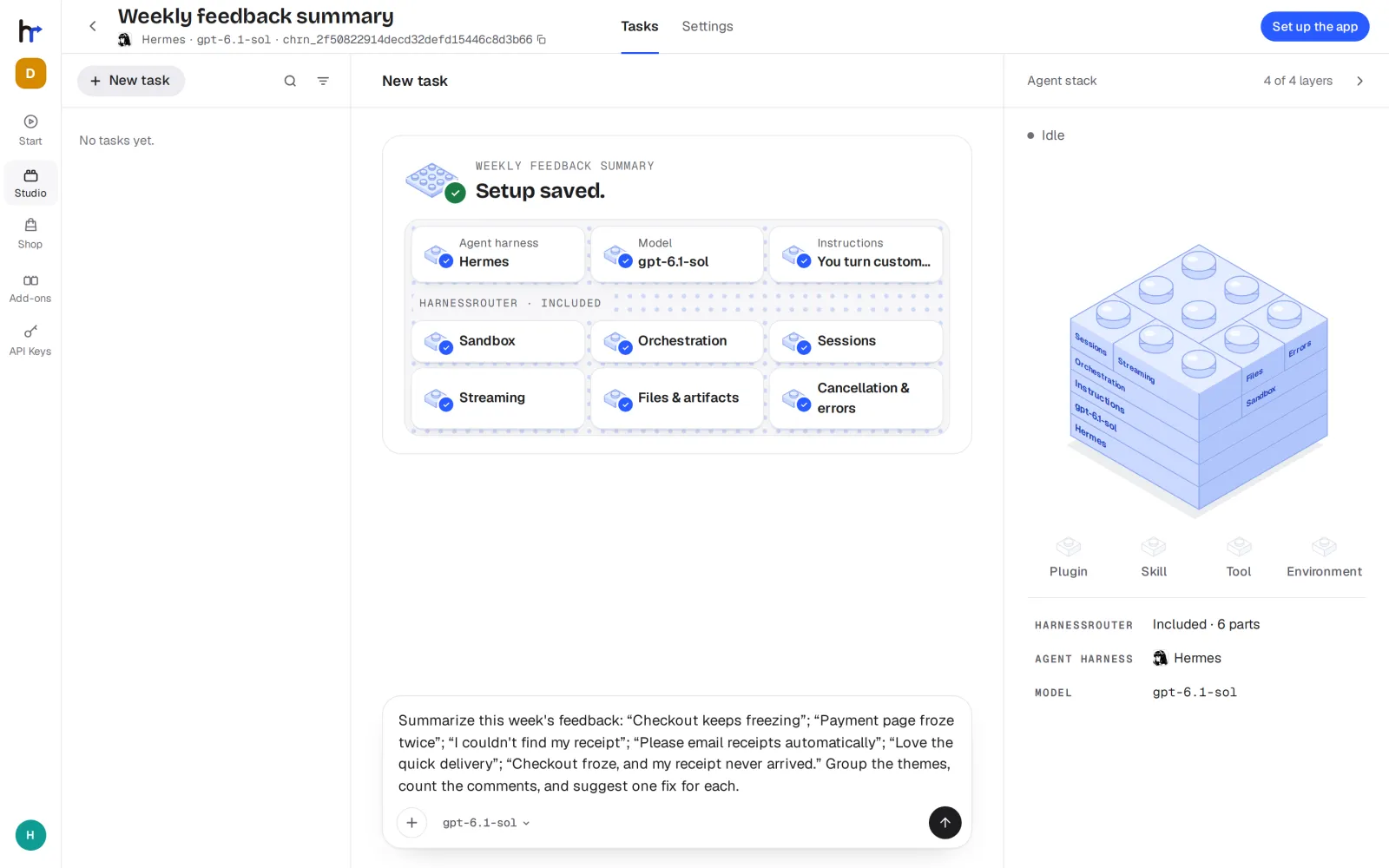
HarnessRouter places several coding-agent runtimes behind one product-facing interface. An application can switch the backend harness without maintaining a separate session protocol for every tool. The project implements the Unified Harness Protocol (UHP) and exposes an OpenAI Responses-compatible request surface.
- Connect multiple harnesses: The README listed 30 harness bases on November 1, 2026, including Codex, Claude Code, Hermes, Pi, Gemini CLI, OpenCode, and OpenHands. Availability still depends on the provider and deployment configuration.
- Keep a Responses-style API: A product backend can submit tasks through the same API and select the runtime with
metadata.harness_id. Existing Responses SDKs, streaming parsers, and UI components can use the same request shape. - Handle the task lifecycle: The API supports persistent sessions, streaming progress, input files and generated artifacts, cancellation, structured errors, and execution traces. A session can also receive follow-up instructions.
- Try a harness in the Console: The built-in Console configures harnesses, models, skills, plugins, and tools. README example jobs replay recorded results, so a team can inspect the interface flow without spending model tokens on that demonstration.
- Self-host Community Edition: The Apache-2.0 Community Edition deploys the Console, Gateway, and Runner together in Docker. The operator controls provider keys, sessions, files, and workspaces; model requests still go to the configured provider.
The README’s count of 30 refers to harness bases, not a promise that every entry runs on every operating system, provider, or container setup. Its support matrix lists installation paths and provider limits by harness. The public surface is a Responses API; inside the deployment, the Gateway connects to the Runner that executes tasks. HarnessRouter integrates the runtime interface, not the models themselves.
Typical use cases
- Add coding agents to a product: Reuse one Responses-style API and select Codex, Claude Code, or another enabled harness on the backend, while receiving files and streamed results.
- Run tasks on your own infrastructure: Teams that need local CLIs, filesystems, or Git workflows can host Community Edition on a server they manage and call it from their product backend.
- Evaluate harness combinations: Build a setup in the Console, choose a harness and model, and inspect a task before integrating it. Changing the execution harness does not require rewriting the entire product API.
The deployment boundary is worth understanding before exposing an instance. Community Edition puts the Console, Gateway, and Runner in one container. Sessions get separate workspaces and operating-system users, but each task does not run in its own container. Teams that need stronger isolation should design around a trusted host and network instead of publishing the loopback port directly.
HarnessRouter connects agent runtimes. For routing model, MCP, and A2A traffic, see the adjacent agentgateway project.
Quick start
The README’s Community Edition quick start uses Docker and binds the service to the local loopback address:
docker run -d --name harnessrouter \
  -p 127.0.0.1:3000:3000 \
  -v harnessrouter:/data \
  harnessrouter/harnessrouter
First launch installs the enabled harness CLIs. The README recommends about 4 GB of disk space and requires you to supply a model-provider API key. Open http://localhost:3000, then change the default Console password documented in the README before considering other access paths. When integrating the API, keep its key in your server backend, never browser code.
The Console password, model-provider key, and HarnessRouter API key have separate roles. The provider key authorizes model requests; the API key accesses your HarnessRouter instance. Store and rotate them separately, and keep each out of public repositories.
Summary
HarnessRouter fits development teams that need several coding-agent runtimes in a product and want tasks, sessions, and files behind one interface. It connects the OpenAI Responses-compatible API, UHP, and multiple open-source harnesses. The repository is written in Python and licensed under Apache-2.0; its GitHub star count was checked on November 1, 2026.
Self-hosting Community Edition does not provide local model inference: provider keys still send requests to the model service you configure, and no model or trial credits are bundled. First launch installs harness CLIs, and deployment needs Docker and about 4 GB of storage. Each CLI remains under its upstream license. Keep the instance local initially, change its default credentials, and plan access control before exposing it elsewhere.