Creative#Coding agent#UI design#Branding
huashu-design: one line in, a deliverable design out
huashu-design is Huashu's MIT design skill: one line into Claude Code or Cursor gets a web page, clickable prototype, editable PPTX or infographic.
Project facts
GitHub Ecosystem- License
- MIT
- Language
- HTML
- Stars
- 26,004
- Data checked
- 2026-10-23
Snapshot figures reflect the check date and may change over time.
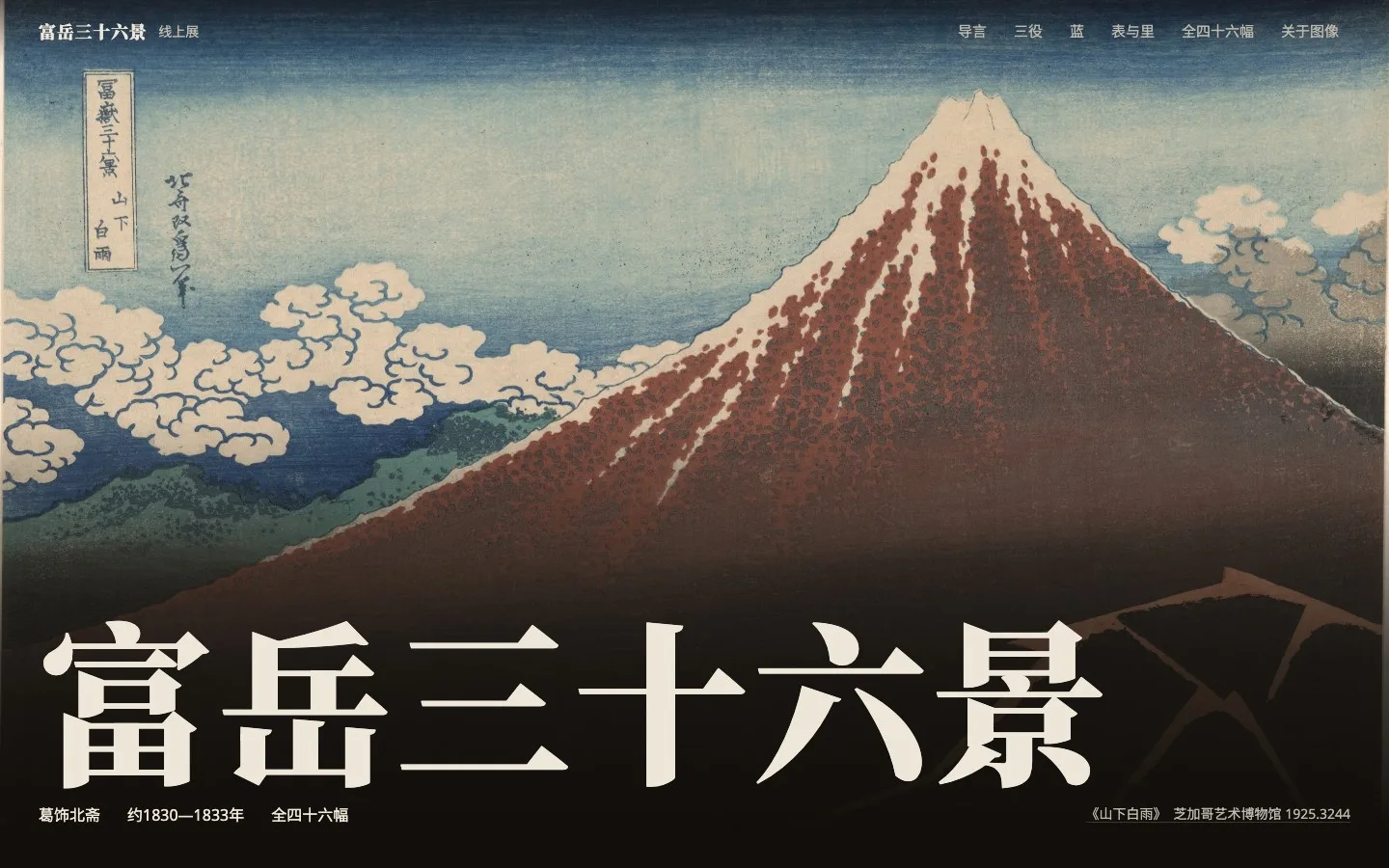
An agent can write your product’s whole codebase, and the step that still stalls is design: the homepage you lay out yourself looks amateur, and waiting for a designer takes days. huashu-design is an HTML-native design skill by the Chinese developer Huashu (alchaincyf), MIT-licensed, primarily HTML, created in April 2026, with 26,004 stars as of October 23, 2026. Install it into Claude Code, Codex or Cursor, type one line such as “make an online exhibition site for Hokusai’s Thirty-six Views of Mount Fuji”, and it first shows six direction thumbnails for you to pick three from, then delivers a deployable web page, a clickable app prototype, an editable PPTX or a print-grade infographic. The README puts delivery at 3 to 30 minutes (the author’s own figure) and makes a bold claim: every design in that README was made by the skill itself.
Core features
Everything in huashu-design’s mechanics circles one idea: never make you choose blind.
- Six candidates, pick three directions: when a brief is too vague to start, a design advisor fires. Three complementary logics, the best designer for the job, an award-winning work in the same medium (screenshotted first by script so the agent has actually seen it), and a seconds roulette over the style library, each produce two candidates drawn as one thumbnail sheet. The strongest and most distinct three become real designs; the other three stay as alternates. The author ran three rounds of internal blind tests: two rounds built on forced metaphors and long ban lists won a single brief between them; the third round, “more options, no bans”, won both briefs it entered.
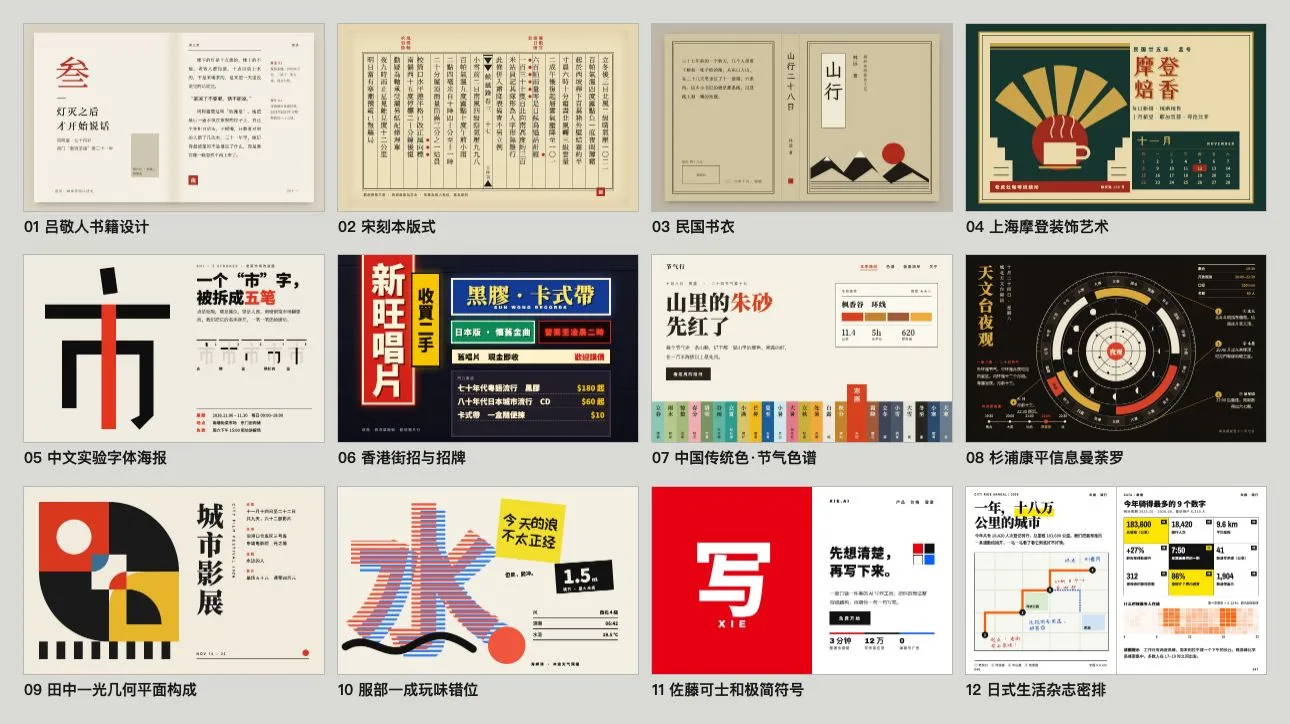
- An 84-style library with a specimen for every style: web 20, decks 20, infographics 20, apps 12, Chinese and East Asian 12, all pure HTML/CSS with no image generation, each style backed by a specimen image and its source under
assets/style-specimens/.
- Five deliverables: a single-file HTML interactive prototype with an iPhone 15 Pro bezel, state-driven multi-screen navigation and Playwright click tests; an HTML deck plus an editable PPTX, where
html2pptx.jsreads each element’s computed style and translates it into a real PowerPoint text box you can double-click and edit; a Stage + Sprite timeline animation exported as MP4 or GIF with 60fps interpolation and optional BGM; a print-grade infographic exportable as PDF, PNG or SVG; and a 3-minute five-dimension expert review that outputs a radar chart and a Keep/Fix/Quick Wins list. - The brand asset protocol: whenever a real brand is involved, five forced steps: ask for existing guidelines, search the official brand pages, download assets (three fallback routes), grep every hex value and sort by frequency, then freeze it all into
brand-spec.mdand CSS variables. The README’s own words: never guess a brand color from memory. In the author’s internal A/B test, the version with this protocol had five times lower variance in stability (six agents per arm). - Three features that learn your taste: experience, where
learn.pyrecords the taste phrases you used and lessons learned, asking before it writes anything down and accepting a no; a look ledger, where every delivery logs its background, palette, fonts and layout skeleton so the next project steers away, aimed squarely at the “each one looks fine, together they all look the same” monotony; and a design check, wheredesign_lint.pymeasures only checkable facts, with broken images, unreadably small text, low contrast and console errors as red flags and habitual template chrome like uppercase eyebrows as yellow. Whether it looks good stays your call; it gives no score. All records live only in~/.huashu-design/on your machine; delete the folder and it forgets everything.
The skill has a clear division of labor with the author’s other repos. huashu-motion shoots product launch films, with its strengths in a browser editor where you point at a frame to request changes and a locally composed score; huashu-design’s animation engine only brings a page of design to life and exports it. Per the huashu-motion README, this line is actually older: when Anthropic released Claude Design in April 2026, the author reverse-engineered its core capabilities into a skill that became huashu-design, and huashu-motion followed only after Claude Motion shipped in October. The huashu-art-motion skill handles explainer animations in 35 art styles. In the 32-second 3.0 launch film, every page was designed by huashu-design itself and the edit was cut with huashu-motion, the two skills splitting the work on the same film.
The README’s capability and timing table (the author’s figures, not our measurements):
| Capability | Deliverable | Typical time |
|---|---|---|
| Prototype | single-file HTML, clickable, Playwright-verified | 10–15 min |
| Slide deck | HTML deck + editable PPTX | 15–25 min |
| Animation | MP4 + GIF + BGM | 8–12 min |
| Infographic | print-grade layout, PDF/PNG/SVG export | 10 min |
| Expert review | radar chart + actionable fix list | 3 min |
Typical use cases
huashu-design covers the whole path from a one-line idea to a finished artifact, which fits a few kinds of people well:
- Indie developers and small teams shipping a product front: a launch page, a homepage, a prototype clickable enough to show investors or users, without opening Figma once.
- People whose decks must survive PowerPoint: the exported PPTX keeps real text boxes, every page double-click editable, so a colleague can pick it up and keep writing.
- People who want to choose a direction before the work starts: drop in a one-line brief, receive six direction thumbnails first, then wait for the finished piece, instead of burning 30 minutes on the wrong direction.
Quick start
npx skills add alchaincyf/huashu-design
Check the install right after. The README warns that this skill is more than one SKILL.md: the references/, assets/, scripts/ and demos/ directories hold 99 referenced recipes, scripts and assets that all must be present. Old skills CLI versions (1.5.15 and earlier) had a bug that synced only the single file, fixed in 1.5.19; if the install directory holds only SKILL.md, run npm i -g skills@latest and reinstall, or fall back to git clone into your skills directory. Then just talk to the agent: “Make me a slide deck on the psychology of AI, recommend 3 style directions to choose from.” No buttons, no panels, no Figma plugin.
Summary
huashu-design suits people who already live in the terminal and in agents, and who would rather not open a graphics tool for one launch page. It does not suit anyone who needs layer-precise editing or who must design a brandless interface from nothing: the README itself says quality drops to 60–65 points there, and that work still belongs to a designer. Three limits are stated in the README’s Limitations section: the output is HTML, with no layer-editable PPTX round-trip into Figma or Keynote for repositioning text; Framer-Motion-tier 3D, physics and particle animation is out of scope; and the 3-to-30-minute delivery times, along with the claim that it looks like a big-company design team, are the author’s figures that we did not verify.
One licensing change is worth knowing: the repository launched in April 2026 under “free for personal use, commercial use requires a license”, and switched to MIT on May 14, 2026, removing the commercial restriction entirely. On security, the README states the core pipeline (design, render, export) runs 100% locally with zero network calls and zero keys, that cloud features (Doubao TTS narration, AI video review) are isolated in scripts/cloud/ behind your own keys and an explicit --yes consent on first use, and that the local taste records and look ledger never upload. The author is candid about where the skill sits, in the README’s words: “This is an 80-point skill.” We checked the repository metadata, the Chinese and English READMEs and the SECURITY.md claims; we did not install or run it.