iPhone-use: let Codex drive your real iPhone over USB
iPhone-use is a Codex plugin for macOS: it drives a real iPhone over USB via WebDriverAgent, with 17 tools and a live screen widget. MIT licensed.
Project facts
GitHub Ecosystem- License
- MIT
- Language
- Python
- Stars
- 3,379
- Data checked
- 2026-10-13
Snapshot figures reflect the check date and may change over time.
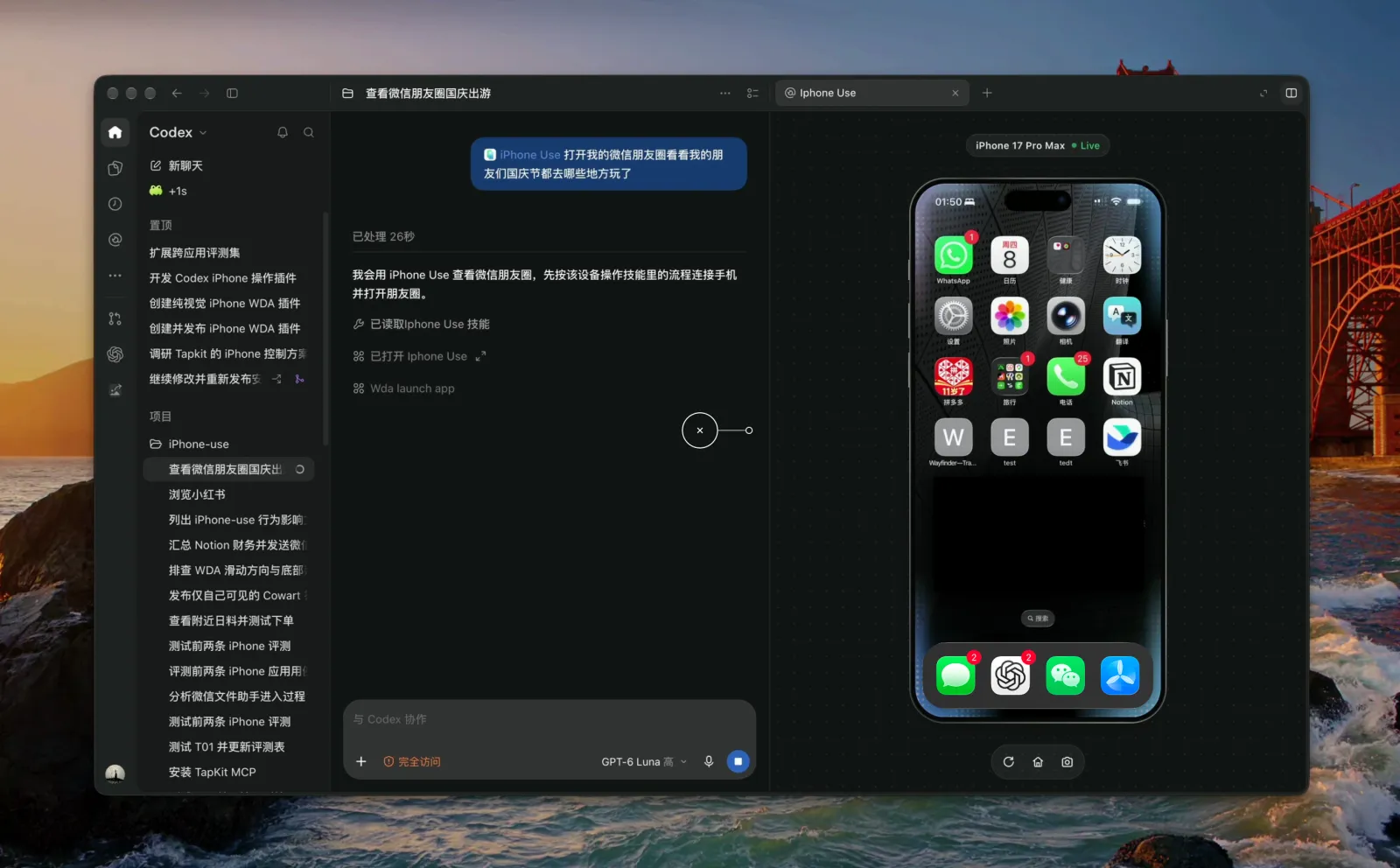
Letting an AI touch a real device is awkward on every familiar route: simulators lack the App state you are logged into, cloud phone farms hand your device to a third party, and bare Appium means standing up the whole service yourself. iPhone-use by zhongerxin (MIT, about 3.4k stars as of 2026-10-13) takes a different path: it is a Codex plugin on macOS that drives the iPhone on your desk over USB through WebDriverAgent (WDA). Describe a task in natural language and Codex opens apps, reads pages, taps, scrolls, types and collects lists, with your phone screen mirrored in a sidebar widget. No jailbreak, and no separate Appium Server to run.
Core features
- 17 tools for the whole real-device loop:
pua_doctor,pua_setupandpua_readyhandle diagnostics and device setup;pua_observeandpua_findread the control tree and screenshots;pua_tap,pua_swipeandpua_press_buttonact;pua_type_textandpua_waitcover input and waiting;pua_batch,pua_scroll_findandpua_collect_listgroup known steps into one call to cut model round-trips. Two more tools serve the screen widget. - Local USB channel, nothing leaves the machine: the Python MCP service reaches WDA through a local loopback forward, so run data and signing builds stay on your Mac; WDA is pinned to the verified 16.14.0 commit, with download, signing and build managed by the setup flow.
- Screenshot fallback when controls fail: if an element is obscured, unfocused or the tree is incomplete, the tools return a screenshot with handling notes, and the model converts pixels via
image.pixel_to_pointbefore callingpua_tapinstead of blindly replaying taps. - Live screen widget: the sidebar draws an iPhone shell with device status, an operation glow and clearly visible tap/drag indicators; refresh, home and screenshot buttons sit at the bottom, lock screen and deliberate pause are distinguished, and READY resumes the preview after unlock.
- Input stays separate from submit: tools do not submit text by default; the model checks key pages, recipients, quantities and final results, while passwords, verification codes and Face ID are left to you in the system UI, with a pause button for the takeover.
- Built for Chinese and long text: full Unicode strings in one call, segmented input with resume for long text, and list collection through bounded scroll-find with overlap detection and dedup, returning coverage boundaries.
Typical use cases
- Have Codex open Notes, draft an entry, type a passage of Chinese, verify it and keep it.
- Search a name inside an app and read the first few results into a tidy list.
- Scroll a long list in bounded chunks, dedup as you go, and report what was covered and what is still unconfirmed.
- Manual regression: have the agent repeat a fixed path on the real device and keep screenshots as evidence.
Quick start
git clone https://github.com/zhongerxin/iPhone-use.git
cd iPhone-use
sh scripts/install.sh
The script registers a local marketplace through the Codex CLI, installs the plugin and skill, and registers the service as the standard MCP server iphone_use. Then paste the Chinese prompt from the README into Codex and it walks you through signing, building and starting WDA until pua_ready returns ready=true and the phone screen appears in the sidebar. A configured device reuses its build, so you do not reinstall every time.
Summary
For people running Codex on macOS who want the agent to reach a real device; if you only use simulators or only automate the desktop, skip it. The hurdle is mostly on the phone side: full Xcode (Command Line Tools alone is not enough), a usable Apple account and dev team to sign the WDA Runner, a Mac-trusted iPhone with developer mode on, and the device unlocked during setup, plus Python 3.9+ and Node 20.19+/22.12+/24+. Two notes: the README still says the repository is private, but the code is in fact public and cloneable; and the plugin sends anonymous usage statistics to a separate PostHog project by default (no screen, input or device identifiers) — set IPHONE_USE_ANALYTICS=0 or DO_NOT_TRACK=1 to disable it. For a similar idea on a different surface, browser-control lets an agent drive your everyday Chromium, while typesafe-computer-use automates the Mac desktop with OCR plus the accessibility tree, billed per step.