MoneyPrinterTurbo: a topic in, a finished short video out
MoneyPrinterTurbo is an open-source AI video generator: give it a topic and it writes the script, matches footage, adds voiceover and renders a 1080p cut. MIT.
Project facts
GitHub Ecosystem- License
- MIT
- Language
- Python
- Stars
- 129,329
- Data checked
- 2026-10-08
Snapshot figures reflect the check date and may change over time.
Turning a topic into a publishable short video normally means writing the script, hunting for footage, recording a voiceover and timing subtitles — half a day gone per minute of output. MoneyPrinterTurbo, an open-source Python project by developer Harry, collapses that pipeline into one input: give it a topic or keyword and it writes the script, matches stock footage line by line, generates the voiceover and subtitles, and renders a finished 1080p cut. The repo had 129,329 stars as of October 8, 2026, and v1.3.8 shipped on October 3. Harry is also the author of MangoDisk, the disk cleaner we covered earlier.
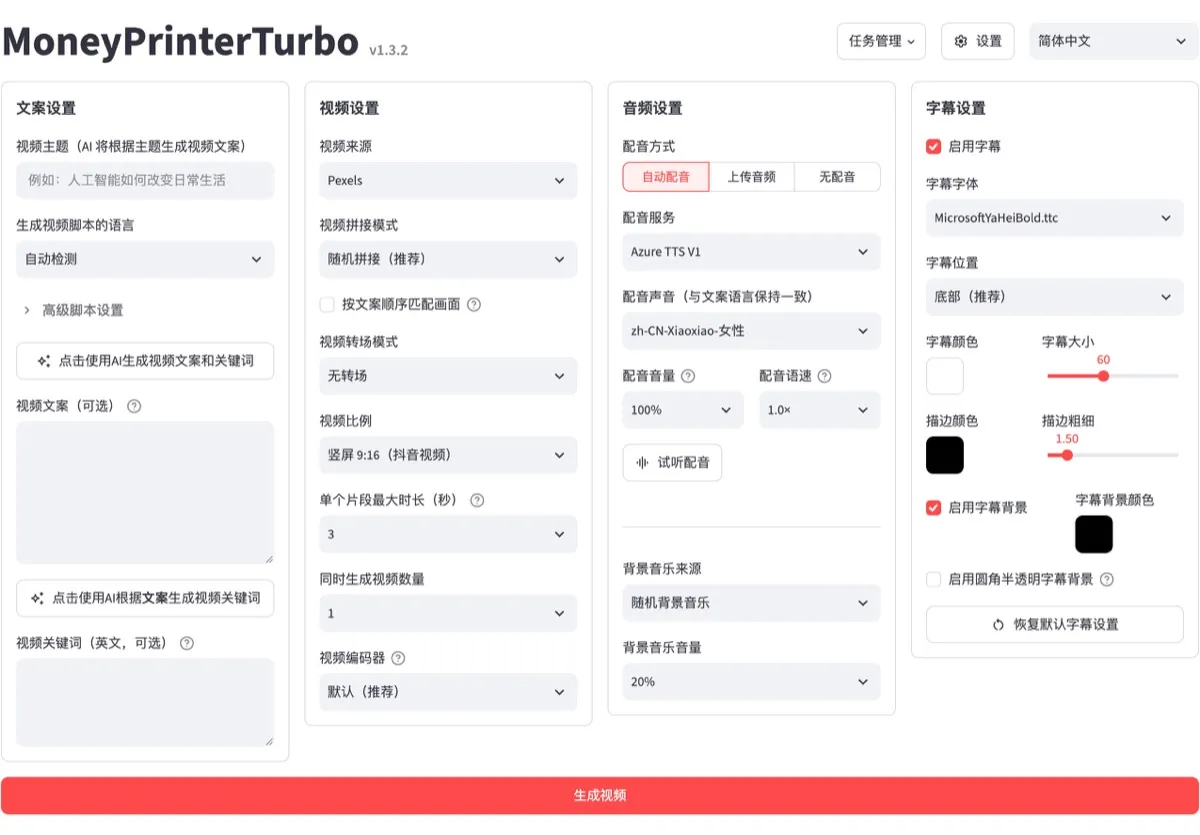
Core features
- Topic in, video out: the pipeline runs script → footage → voiceover → subtitles → render; paste your own script to skip the writing step. Three aspect ratios — 9:16, 16:9 and 1:1 — at 1080p.
- Two footage routes: by default it pulls free stock clips from Pexels, Pixabay and Coverr, or you can upload your own; wire in a text-to-video API (MiniMax H3, Volcano Seedance, WaveSpeed) to generate original shots per script line. Compared with Pixelle-Video, which generates every frame through a local ComfyUI install, the stock-footage route is much easier to set up — the trade-off is that relevance depends on the search terms the LLM picks.
- Swap every service: scripts go through any OpenAI-compatible endpoint — Kimi, DeepSeek, Claude, Gemini, Qwen, or a local Ollama model. Voiceover is free out of the box via Edge TTS, with Azure, ElevenLabs and MiniMax among the roughly ten alternatives.
- AI short video generation at volume: queue multiple videos per run, keep task history, auto-upload finished cuts to TikTok, Instagram and YouTube Shorts, and export or restore your settings and API keys.
- Four entry points: a WebUI, a REST API (same-origin only by default), a CLI, and a Skill prompt you can hand to Claude Code so an agent installs and drives it for you.
Typical use cases
- A knowledge-content creator queuing five topics in the morning and picking the two usable cuts after lunch.
- E-commerce sellers producing many product clips from one selling point.
- Developers wiring the API into their own content pipeline.
Quick start
Windows users can grab the one-click package from the releases page (keep the extract path free of non-ASCII characters and spaces). On macOS and Linux:
git clone https://github.com/harry0703/MoneyPrinterTurbo.git
cd MoneyPrinterTurbo
uv python install 3.11
uv sync --frozen
sh webui.sh   # opens http://127.0.0.1:8501
First launch creates config.toml from the example file; drop your LLM API key into the WebUI settings and render your first video. A Google Colab notebook in the README skips local setup entirely, and Docker users can pull the prebuilt image with docker compose -f docker-compose.release.yml up.
Summary
MoneyPrinterTurbo fits creators and e-commerce operators who need volume, and developers who want video generation as a pipeline step. If you want every frame original and no stock-footage licensing questions, Pixelle-Video is the better shape. MIT-licensed, Python 3.11+, GPU optional — bring your own keys for cloud LLMs and TTS. Two honest caveats: the free Edge TTS voices sound synthetic, so swap in a paid TTS or your own recording before publishing; and stock-footage relevance is only as good as the LLM’s search terms, so review the cut before you post.