Products#Speech to text#Model inference
Google AI Edge Foresight transcribes meetings offline on Mac
Google AI Edge Foresight is Google free experimental Mac notetaker, launched October 6: EmbeddingGemma 2 and Gemma 4 transcribe meetings on-device, offline.
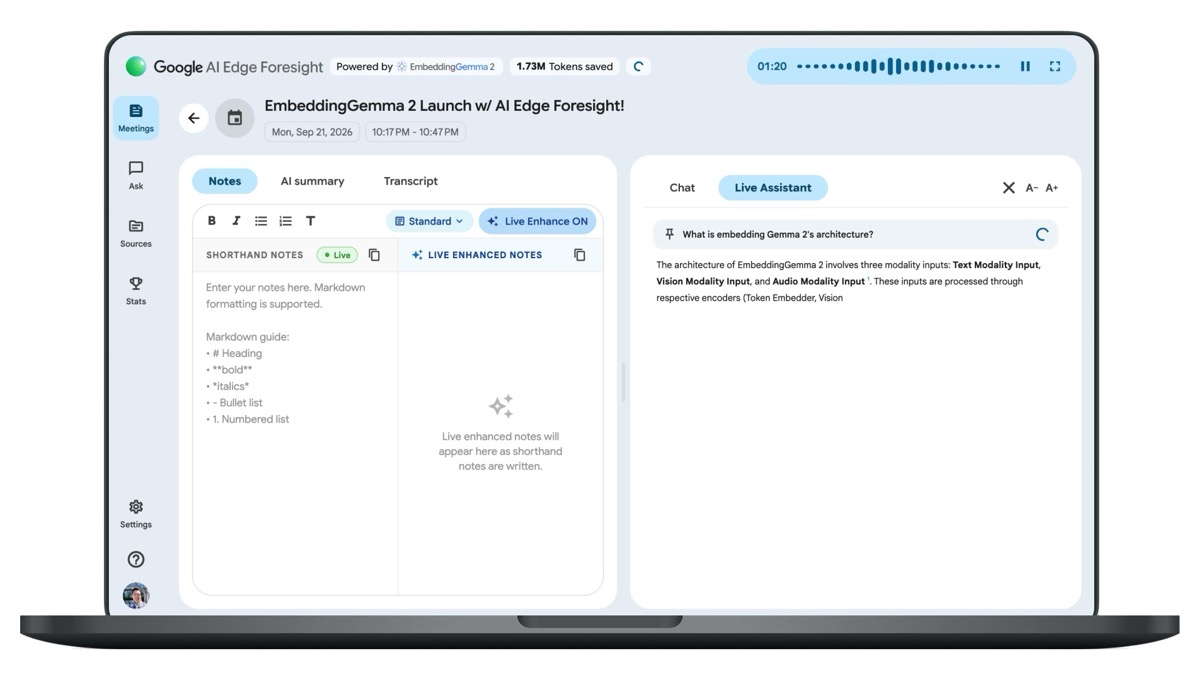
Google announced Google AI Edge Foresight on October 6, 2026, in the same developer blog post that introduced EmbeddingGemma 2: an experimental Mac app that transcribes meetings and answers questions about them without sending audio anywhere. Google splits the work between EmbeddingGemma 2, a 740M-parameter multimodal embedding model that locates information in a local vector space, and Gemma 4, which writes the answers. The Verge reports the app is free and that your files, meeting audio and notes “never leave your computer.”
Key points
- Google’s blog lists three capabilities: expanding handwritten shorthand with live meeting context (Live Enhance), retrieving images, documents, transcripts and notes with natural-language queries, and running entirely on-device with no cloud subscription cost.
- The bar is a Mac with Apple Silicon, according to Google’s FAQ. Capture goes through the microphone plus system audio, so it works across Google Meet, Zoom and in-person conversations.
- Independent verification is close to zero. Four Hacker News submissions between October 7 and 12 point at the official page, the highest scoring 7 points with no comments, and no third-party review has appeared.
From dictation to meeting notes
Foresight is not Google’s first local dictation tool. PingWest reported on October 9 that the same team shipped an AI dictation app running local models back in April, but that one stayed experimental and never went mainstream; PingWest reads the new app as a demonstration of what the Gemma models can do offline.
The second thread is competition. PingWest treats Foresight as a direct challenge to Granola, while How-To Geek lines it up against Fathom and the AI features Notion has built in. Those tools share a set of assumptions: audio goes to a server, you pay per seat, and the room’s conversation ends up on someone else’s machine. Foresight bets on the opposite — that it works with the network off.
The model underneath is worth reading on its own; we covered EmbeddingGemma 2 in the Product Hunt roundup for October 12. At 740M parameters it maps text, images, video frames and audio into one vector space under an Apache 2.0 license. Foresight is its first app aimed at an everyday task.
How the offline part works
The offline claim is a division of labor rather than a slogan. Google’s blog gives the memory numbers: about 191MB of active RAM for the text-only weights and about 567MB for the full multimodal model, measured on a Pixel 11 Pro.
| Item | What Google says |
|---|---|
| Model split | EmbeddingGemma 2 retrieves, Gemma 4 generates |
| Where it runs | Entirely on-device; files, audio and notes stay on the computer |
| Platform | macOS, optimized for Apple Silicon per the FAQ |
| Cost | Free, with no cloud subscription |
| Resource requirements | Google publishes no memory or storage floor |
| Windows version | Not mentioned; How-To Geek expects one eventually |
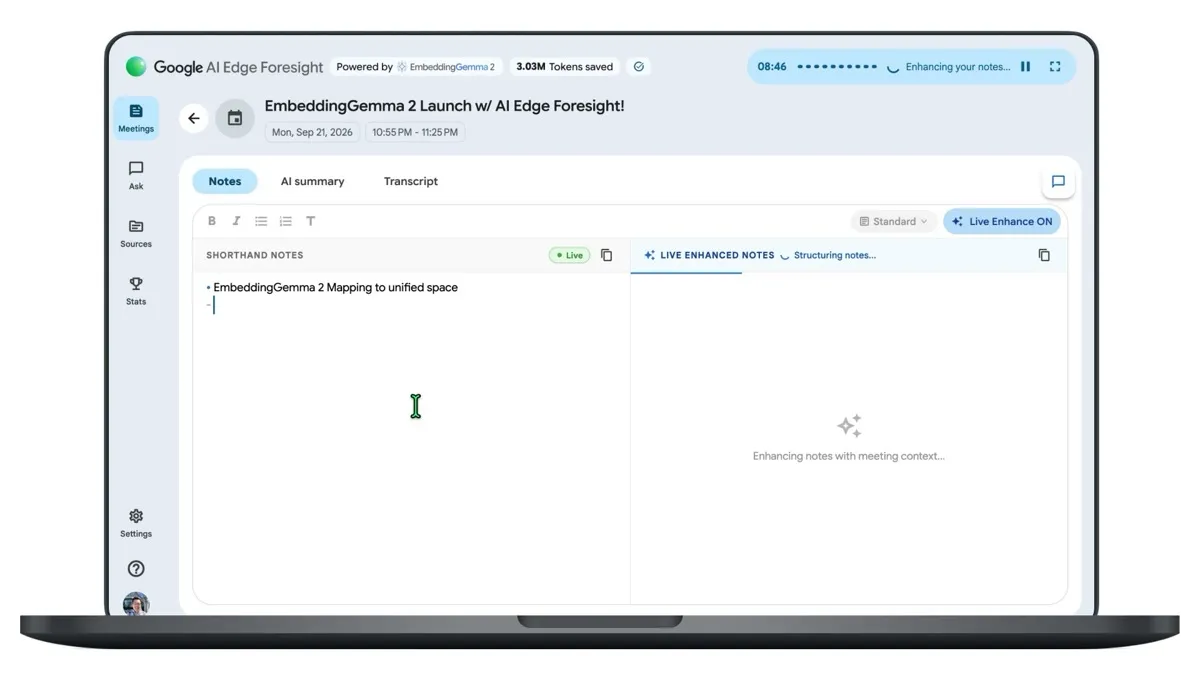
The interface is a split view. In Google’s own demo clip, your own shorthand notes sit on the left and the model’s live enhanced notes on the right, the header reads Powered by EmbeddingGemma 2, and a Tokens saved counter ticks along in the top corner — 3.03M at that point in the clip. You can keep typing by hand while transcription runs; the tabs above are Notes, AI summary and Transcript, and the sidebar splits into Meetings, Ask, Sources and Stats.
A second demo shows Live Assistant answering a question mid-meeting. The answer it produces describes EmbeddingGemma 2’s architecture: three modality inputs — text, vision and audio — each going through its own encoder. You can also feed the knowledge base yourself; PingWest lists PDF, Google Docs, Microsoft Office formats, plain text, Markdown and web bookmarks, all queryable while the meeting runs.
What others say
The reporting agrees on the facts and differs on what matters. The Verge leads with staying offline as the differentiator: AI notetakers are everywhere, and what separates Foresight is that processing happens on the device. How-To Geek adds the interaction details and says Google describes the app as light on resources and low on battery. PingWest is interested in the fight with Granola.
eWeek takes the compliance angle, which is the part enterprise readers should not skip. macOS manages system-audio recording permission and microphone access separately, and Google only added explicit participant consent controls for native recording, transcription and AI note-taking in May 2026, disabled by default. The upshot: turning off recording inside Meet does not establish that another authorized desktop app cannot capture the same conversation. Foresight working independently of any meeting platform is exactly its selling point and exactly why retention and disclosure rules are yours to write.
There is also a matter of how much anyone has checked. Four Hacker News submissions, no comments, no independent teardown. In a category that already has Granola, Fathom and Notion AI, “runs on-device” is currently a vendor claim rather than a measured result.
Is it worth installing today
If you need minutes on a plane or in a dead-zone meeting room, or a contract forbids audio leaving your machine, Foresight is worth installing: it is free, downloads directly, and needs no seat assignment or API key. Cloud transcription models such as MAI-Transcribe-2-Streaming are a different bet on accuracy and language coverage; Foresight changes where the work happens, not what the ceiling is.
It should not be treated as a compliance answer, though. On-device processing solves data staying on the device, not whether you should be recording at all — retention windows, who can read local transcripts and when they get deleted are still your decisions. Keep expectations low as well: this is an experimental Google app, it only runs on Apple Silicon Macs, and Google has not published even a memory or storage requirement.
How to try it
Download it from developers.google.com/edge/foresight. After install, macOS asks for microphone and system-audio permission separately, and you need both — grant only the microphone and it cannot capture anyone else. Drop a relevant document into Sources first, then run a test meeting to try Live Enhance and Live Assistant, which is where the local models either show their value or their limits.
What to watch
Two things. A Windows version is the obvious gap; How-To Geek expects Google to build one, and “windows” already shows up as a Google Suggest completion for the app’s name. And EmbeddingGemma 2 is slated to reach Android “in the coming weeks” as a service through ML Kit, per Google’s blog, which would put the same local retrieval in a different shape on phones.