Compositor: A Free, Open Photoshop Alternative for Mac
Free, open-source Mac image editor built around Photoshop habits: layers, masks, PS blend-mode order and shortcuts, plus PSD import with editable layers.
Project facts
GitHub Ecosystem- License
- MIT
- Language
- Swift
- Stars
- 15,288
- Data checked
- 2026-10-10
Snapshot figures reflect the check date and may change over time.
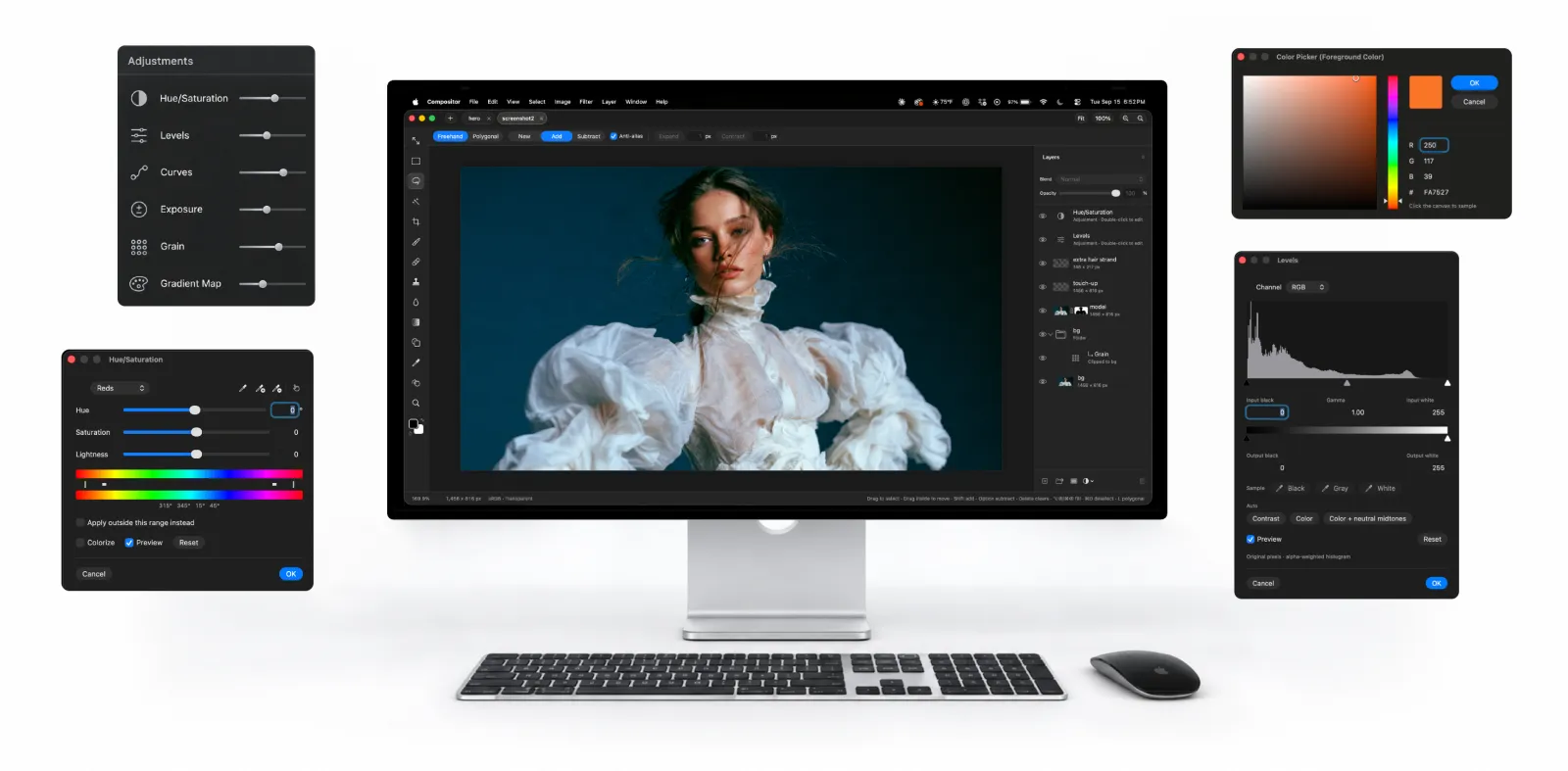
Mac users shopping for a free Photoshop alternative usually end up torn between Adobe’s subscription and GIMP’s unfamiliar panels. Compositor is one former Photoshop user’s answer: Robbie Tilton used to composite and post-process in PS, then built himself an editor that follows those habits, and open-sourced it under MIT on September 16, 2026 (Swift, 15,288 stars in 24 days as of 2026-10-10). Everything mirrors the Photoshop mental model — the blend modes are listed in PS’s original order, the PS shortcuts work and are remappable, and an imported PSD keeps its layers and masks editable. Relearning cost is the thing it attacks first.
Core features
- A Photoshop-grade layer system: layers and folders (a folder’s opacity dims everything inside), layer masks that extend past a layer’s own pixels and can be linked or unlinked, clipping masks, 12 adjustment layer types (Hue/Saturation, Levels, Curves, Exposure, Gradient Map, Black & White and more), plus GPU-rendered layer effects — stroke, drop shadow, inner/outer glow — editable at any time.
- Smart selection and repair: the Magic Wand selects by color, Object selection traces whatever you click, Select Subject picks the subject in one step; selections expand, contract and feather, and Content-Aware Fill can even extend the image past its edges.
- Retouching and painting: a content-aware Spot Healing Brush, an aligned Clone Stamp sampling one layer or all of them, a Blur tool, shape tools that stay editable instead of rasterizing, and a paragraph-box Type tool that doubles as a clipping mask.
- Camera Raw filter: light, color, curves, color mixer, color grading, detail, optics and geometry in one panel; ⌃⌘F reruns the last filter with the same settings.
- PSD/PSB import: 8-bit RGB (CMYK won’t open); folders, masks, blend modes, fill rectangles/ellipses and horizontal text stay editable, the rest converts to pixels — with a conversion report shown before anything is applied.
- Canvas and file details: multiple projects in tabs, non-blocking saves; the memory budget for large documents scales with the Mac, and a PSD too big to open gets its layers cropped to the canvas; a navigator minimap, layout grid, and 3:4 / 9:16 crop ratios are all there.
- An interface for AI agents: a
.compproject is just a folder of PNG layers plus a manifest, so scripts and agents can build or edit a project live while it is open on screen.
Typical use cases
- Mac designers leaving Adobe’s subscription: the shortcuts and panels carry over, so the first working day after installing feels like the old one.
- Compositing and post workflows: select subject, content-aware fill, stacked adjustment layers, export to PNG/JPEG/PDF — each step maps to its PS counterpart.
- Batch image work by agents: scripts write layer files in the
.compformat and the open window updates live, which slots the editor into automated pipelines.
Quick start
Needs an Apple Silicon Mac on macOS 26.0 or later:
brew install --cask robbietilton-compositor
It opens into the familiar dark Photoshop-style layout. Press ⌘F for the command palette, type any tool or menu command by name, hit Return. Signed and notarized DMGs are also on the website and GitHub Releases.
Summary
For Apple Silicon Mac users who want out of Adobe’s subscription without relearning their tools, this is the smoothest free option for PS veterans right now; Intel Macs are out, and Windows/Linux users can look at the community CompositorWindows port or AIPS, a fork with Simplified Chinese and PSD import. MIT-licensed and written in Swift. Three caveats: PSD import is 8-bit RGB only, CMYK files won’t open; the interface is English-only and the author is explicitly not accepting translation PRs for now (a one-maintainer trade-off); and the project’s pace depends on Robbie Tilton alone.
The other open-source Photoshop alternative we cover, PhotoCraft, takes the Rust cross-platform route and is still in alpha; our earlier piece on open-source alternatives to Adobe’s suite makes a good companion. Compositor’s difference is focus: Mac-native only, with a PS veteran’s muscle memory as the first requirement.