Developer tools#Data analysis#Text to SQL
DbGate: One open-source client for twenty-plus databases
DbGate manages MySQL, PostgreSQL, MongoDB, Redis and 20+ other databases from one cross-platform app, with schema sync and query charts. GPL-3.0.
Project facts
GitHub Ecosystem- License
- GPL-3.0
- Language
- JavaScript
- Stars
- 7,369
- Data checked
- 2026-11-02
Snapshot figures reflect the check date and may change over time.
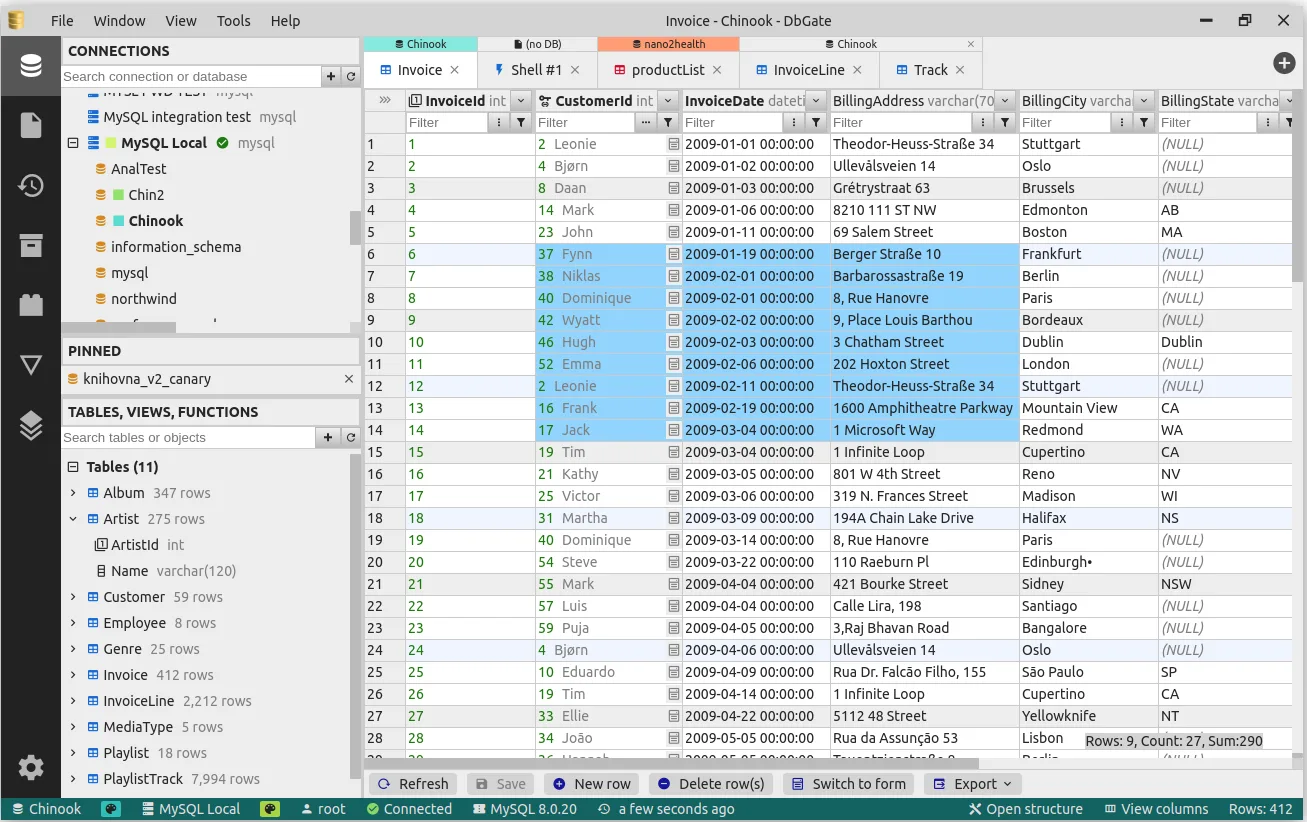
A backend developer’s machine tends to collect one client per database: a MySQL workbench, MongoDB Compass, a Redis GUI, each with its own saved connections. DbGate (dbgate/dbgate, ★7,369 on GitHub) collapses that into one app: MySQL, PostgreSQL, SQL Server, Oracle, SQLite, MongoDB, Redis, ClickHouse, DuckDB, Cassandra and twenty-plus others share a single connection tree. It runs as a desktop app on Windows, macOS and Linux, or as a Docker-hosted web app. Created in late 2019 and still releasing — v7.3.3 shipped October 27, 2026 — it is the longest-lived and widest-coverage open-source option in the “one client, many databases” category.
Its territory overlaps general-purpose database IDEs like DBeaver, but the shape is lighter: a Svelte UI over a Node backend, packaged from the same code into a desktop app, a Docker image, and an npm package (dbgate-serve). The last one deserves a note — deploy DbGate as a shared web instance for the team and connection configs live in one place instead of being set up on every new machine.
Core features
- Unified connections: relational (MySQL/MariaDB/PostgreSQL/SQL Server/Oracle/SQLite/DuckDB/Firebird/ClickHouse/CockroachDB), document (MongoDB/Cosmos DB/Firestore), and key-value (Redis/DynamoDB) stores in one tree.
- Schema compare and sync: diff two databases’ structures visually and generate a sync script — inspect the diff before touching anything.
- Query designer and charts: build complex conditions (including WHERE NOT EXISTS) without writing SQL, then render result sets as charts and export them to an HTML page.
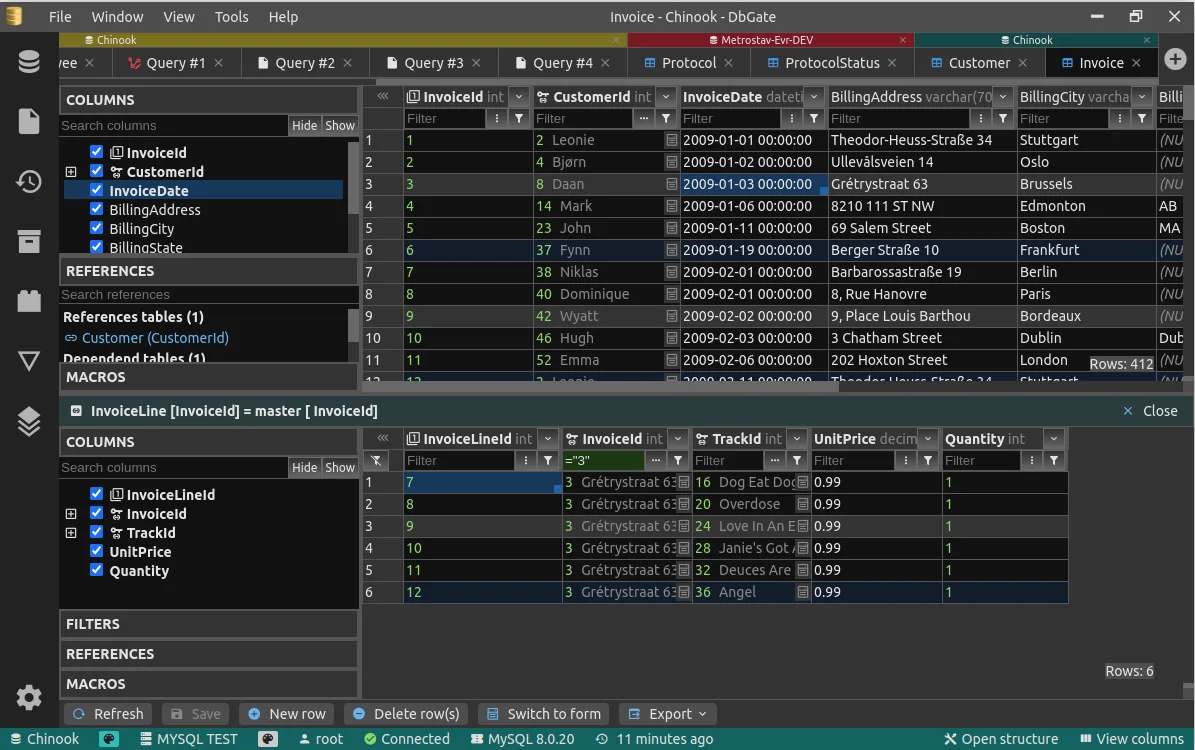
- Related-data views: master/detail views, foreign-key lookups, and expanding columns from related tables into a flat view, so FK-linked tables don’t mean constant tab switching.
- Bulk import/export: CSV, Excel, JSON, NDJSON, XML and DBF; NDJSON files double as browsable sources and local backup archives.
- Mongo and Redis specifics: a JSON view plus a JavaScript (Node syntax) script editor for MongoDB, a tree view and script generator for Redis.
Typical use cases
- Backend teams maintaining several databases: one client replaces four or five single-database tools, with connections managed centrally.
- Migrations and schema sync: run the structural diff before an upgrade, review, then apply.
- Quick data analysis: flip a query result into a chart on the spot instead of exporting to a spreadsheet first.
dbgate vs dbeaver is already a common search. DbGate covers NoSQL (Mongo scripting, Redis tree) and schema sync more deeply than Beekeeper Studio, while staying lighter than DBeaver overall. If you want self-hosted open-source tooling in another category, see our report on Twenty, an open-source Salesforce alternative.
Quick start
Download the desktop app from dbgate.io, or start the web version with one line:
docker run -d --name dbgate -p 3000:3000 dbgate/dbgate
Create a connection, enter host and credentials, and browse. There’s also a hosted demo at demo.dbgate.cloud if you want to poke the UI first. One thing to check before you commit: the GitHub repo is the free Community edition, and a separate Premium tier covers Redshift, Turso, Cloudflare D1, DynamoDB, Cosmos DB, Firestore and the GraphQL/OData/OpenAPI APIs — mainstream open-source databases are all in Community, but verify cloud-managed ones against the Premium list.
Summary
Use it if your stack mixes database types and you move or analyze data across them; a single-MySQL project is fine with the CLI or an editor plugin. Honest caveats: GPL-3.0 covers Community only — Premium is a commercial license, and cloud-database support is split across that line; as an Electron app its memory footprint is middling. Maintenance is solid: ★7,369 as of November 2, 2026, latest release v7.3.3 on October 27. GPL-3.0, JavaScript (Svelte/Node).