System utilities#Email#Office suite
Flectar Mail: a lightweight native email client written in Rust
Flectar Mail: Rust-native mail, calendar and contacts in one app, rendering email without a WebView and blocking remote images by default.
Project facts
GitHub Ecosystem- License
- AGPL-3.0
- Language
- Rust
- Stars
- 1,340
- Data checked
- 2026-10-13
Snapshot figures reflect the check date and may change over time.
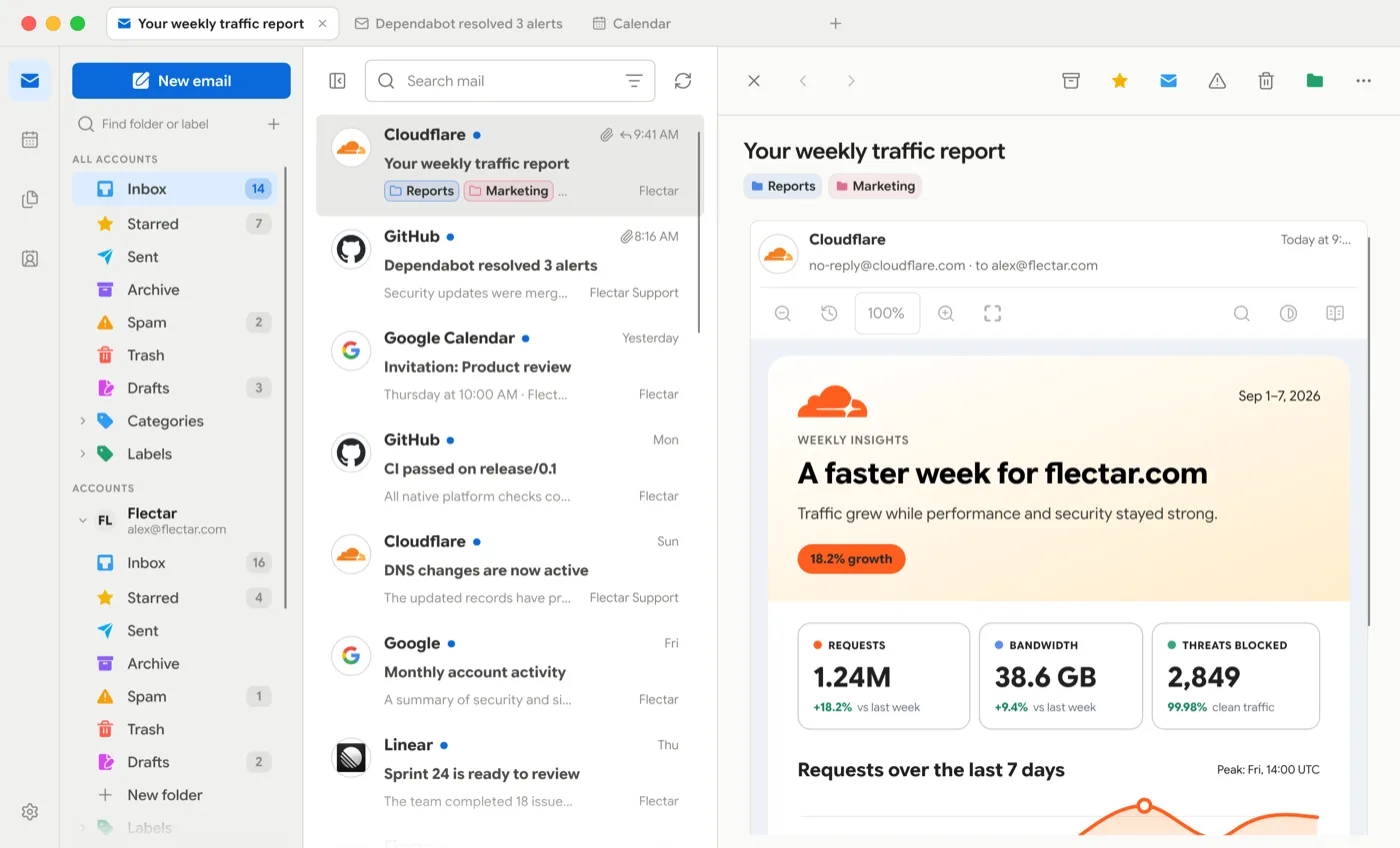
Desktop mail has narrowed to two shapes: a web app in a window, or an Electron client that starts at several hundred megabytes. Flectar Mail (flectar/mail, AGPL-3.0, about 1.3k stars and 90 forks as of 2026-10-13) takes a third route: written from scratch in Rust with Slint, with mail, calendars and contacts in one native app. The mechanism worth knowing about is how it draws messages — email HTML and CSS go through Blitz, the Rust renderer from the Dioxus team, so message content never touches a WebView.
Core features
- No WebView anywhere in the message path. Email HTML and CSS are drawn by Blitz, a Rust HTML/CSS renderer from DioxusLabs, and scripts in a message are not executed. Desktop builds offer CPU — Low Memory (the default, which does not initialize WGPU) and GPU — WGPU (Slint plus Vello on a shared WGPU device) under Settings → General → Renderer; the change applies after a restart and a failed GPU startup falls back to CPU. The project says it is among the first to run Blitz against arbitrary real-world email HTML and warns that complex messages can still render incorrectly.
- About 90 MB of RAM, by the project’s own numbers. The repo description and the site both say “as little as 90 MB of RAM.” The 20 MB figure circulating in Chinese short-video posts is not the project’s claim.
- Mail, calendars and contacts in one place. Gmail, Outlook and Microsoft 365 are supported alongside standards-based IMAP/SMTP, JMAP, CalDAV and CardDAV; data is stored locally first, so synced mail and calendars stay readable offline.
- Remote images are blocked by default. Nothing loads from the network until you allow it, which stops tracking pixels from reporting when you opened a message.
- OpenPGP on the desktop. Settings → Accounts → Signatures & OpenPGP sets up named signatures and separate new-message and reply defaults, with signing and encryption through an installed GnuPG 2.x (pinentry prompts for the private-key passphrase). Missing or invalid recipient keys block delivery, and protected drafts stay local until Send. S/MIME and mobile OpenPGP are not supported yet.
- An interface built around a real inbox. Switch between a full three-pane layout and a minimal one; browser-style tabs (⌘/Ctrl+T to open, ⌘/Ctrl+1–8 to jump, middle-click to close) each remember their own mailbox, search or conversation; threads stay in chronological order; accounts can be grouped into colored profiles such as Work or Support, marked along the left edge of messages in the unified inbox; light and dark themes with built-in or custom palettes.
Typical use cases
- Anyone whose laptop struggles with an Electron client: try the CPU renderer tier first and see whether the 90 MB claim holds on your own inbox.
- Anyone who would rather marketing mail never learn when you read it: remote images are blocked and message scripts do not run.
- Anyone separating work from personal mail: colored profiles make accounts distinguishable inside one unified inbox.
- Linux desktop users avoiding Electron: the Linux x64 builds ship as an AppImage, a
.deb, an.rpm, and a sideloaded Flatpak test bundle.
Quick start
cargo run --bin flectar-mail
Prebuilt packages are the other route: look for the build tagged Pre-release on GitHub Releases (the newest being 0.1.0-alpha.7 from 2026-10-08) — a DMG for macOS 14+ on Apple silicon or Intel, a setup .exe or portable ZIP for Windows x64, four package formats for Linux, and an experimental test APK for Android 8.0+. Every release ships SHA256SUMS and signed build-provenance attestations; with the GitHub CLI installed you can check a download using gh attestation verify <download> --repo flectar/mail. First launch walks you through connecting an account, which is where the caveat below bites.
Summary
This is for anyone put off by how much memory Electron clients use but who still wants mail, calendar and contacts in one app. Anyone looking for a daily driver today should wait: the README states the project is still in development and not yet stable, the current version is 0.1.0-alpha.7, and HTML rendering is flagged as the most experimental part.
It is written in Rust (1.92+, with Slint for the interface) and licensed AGPL-3.0 — not MIT, so the copyleft terms matter if you redistribute. As of 2026-10-13 it has 1,340 stars, 90 forks and 20 open issues; the repo was created 2026-09-03 and last pushed 2026-10-12, with 3,986 downloads across all releases.
Four things to know before you install:
- Gmail and Outlook sign-in are not ready. The README explains that Google OAuth requires an annual CASA security assessment, and whether a community open-source project can complete it depends on sponsors. Until then, builds without bundled OAuth keys have both providers disabled: you either save your own Google or Microsoft app registration under Sign-in settings on the welcome screen, or connect an IMAP/JMAP account.
- Signing status. Windows previews are unsigned and macOS previews are ad-hoc signed and not notarized, so expect operating-system security prompts and install updates manually.
- The Flatpak is a standalone test bundle, not a Flathub package, so it receives no Flathub updates, and its close-to-tray option stays disabled until the tray backend can use a sandbox-safe D-Bus name.
- Android APK updates need the same signing key; builds without a persistent test key may require uninstalling the previous app, which deletes local app data.
A different answer to the same problem is Mailflare, which runs a domain mailbox inside your own Cloudflare account — D1 storage, free inbound, a paid Workers plan to send — solving where mail lives rather than what you read it with. For picking the rest of the office stack alongside it, our comparison of ten free Office alternatives covers more ground.