System utilities#Virtualization
Mac.apk: run Android apps natively on Apple Silicon, no emulator
Mac.apk is an AGPL-3.0 early-stage project that turns APKs into native Mac apps, no VM or full Android system, on macOS 26.4 with Apple Silicon.
Project facts
GitHub Ecosystem- License
- AGPL-3.0
- Language
- Java
- Stars
- 2,841
- Data checked
- 2026-10-24
Snapshot figures reflect the check date and may change over time.
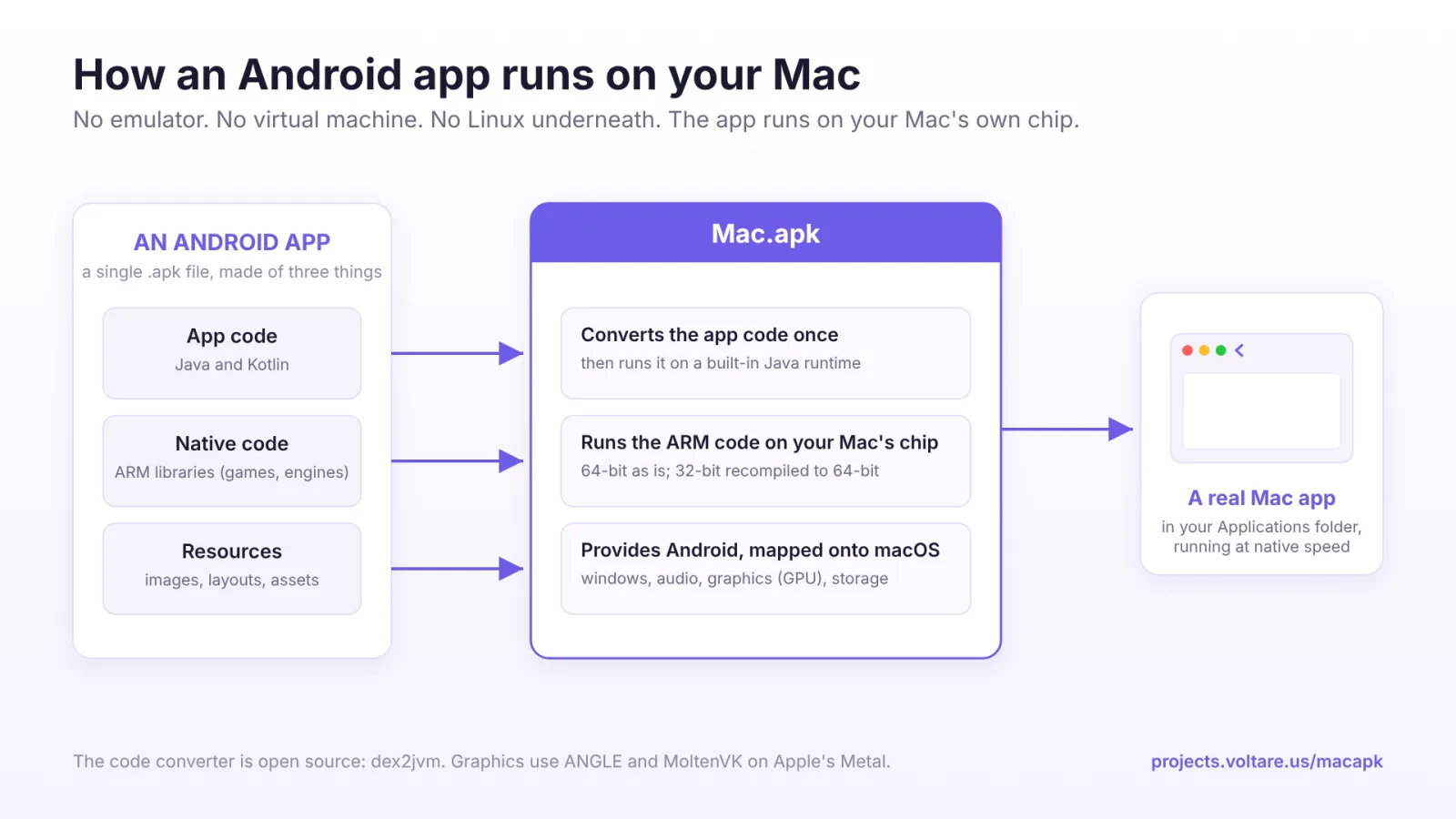
Running Android apps on a Mac usually means an emulator or a virtual machine. Mac.apk says it needs neither: it implements the Android application environment directly on top of macOS, so an installed APK runs as an ordinary Mac process with its own window, a Dock entry, GPU drawing through the Mac and native-speed CPU execution. It is an AGPL-3.0 Java project, created on May 19, 2026, with its last push on October 23.
Core features
- No emulator, no VM: The README states plainly that Android never boots in the background, no Linux kernel runs underneath, and nothing is interpreted instruction by instruction.
- Apps behave like Mac apps: Their own windows with a back button next to the traffic lights, resizable and rotatable, light and dark following the system; Android TV apps work from the keyboard, and game launchers can start other installed apps.
- Signed and notarized: The DMG from Releases is signed and notarized by Apple and opens normally.
- Common formats install directly: Double-click
.apk,.apkm,.xapk,.apksor.apkx, or drag one onto the Mac.apk window. - A compatibility list: The README links COMPATIBILITY.md with 71 apps tested and 58 fully playable.
Typical use cases
- Someone who wants a few specific Android apps on a Mac: Without installing a full emulator.
- Mobile developers: Checking app behavior beside a real device.
- Android gamers: The compatibility list marks which games run fully. For the iOS side of running a phone platform on a Mac, see vphone-cli.
Quick start
- Download the DMG from Releases and drag Mac.apk into Applications.
- Open it and click Install next to Runtime in the top left.
- Open Settings (the gear), find File types, click Make Default, and approve the macOS prompt.
- Double-click any APK, or drag one onto the Mac.apk window.
The first launch of any app is slow, up to a minute for a large one; later launches are fast.
Summary
Mac.apk suits people with an Apple Silicon Mac who want a few specific Android apps and can accept early software. It does not suit anyone running Android apps as production infrastructure, and Intel Macs are not supported.
A few things to know first. The README opens with Alpha — software under active development where some apps run beautifully, some partially, and some not at all. The system requirement is macOS 26.4 (Tahoe) or newer on Apple Silicon; disk use is about 280 MB for Mac.apk plus roughly 1.5 to 3 times each APK’s size per app. The license is AGPL-3.0 with a commercial option, so read it before embedding its capability in your own product. App sources are your own responsibility; no app store is built in.
The repository was created on May 19, 2026, its last push was on October 23, 2026, and it is not archived, with 2,841 stars as of October 24, 2026. The license is AGPL-3.0. We checked the README, the LICENSE file and the repository metadata, and we did not install or run it.