Agent frameworks#Device control#Agent memory
nanoMuse: an open-source personal agent for your phone and computer
nanoMuse is a GPL-3.0 personal agent for people who want one assistant across their phone, computer and browser. It asks before deleting, sending or paying.
Project facts
GitHub Ecosystem- License
- GPL-3.0
- Language
- Swift
- Stars
- 1,865
- Data checked
- 2026-10-21
Snapshot figures reflect the check date and may change over time.
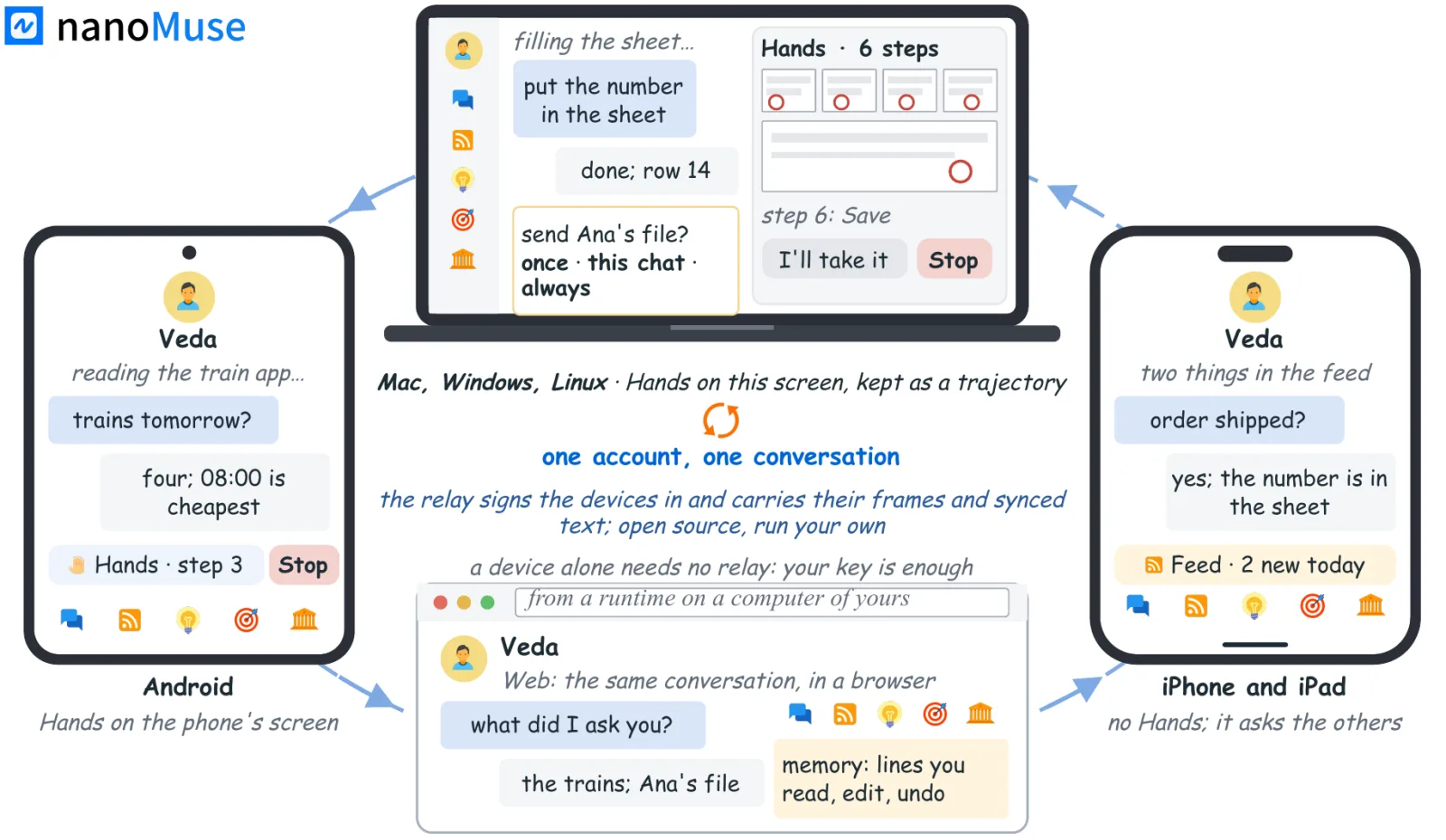
nanoMuse is an open-source personal agent that works on Android, iPhone and iPad, Windows, macOS, Linux and in the browser, all under one account. The code is GPL-3.0, and the latest release is 1.0.5 (Lookout), published October 13, 2026. Many apps have no API, so an assistant that meets one usually hands the tapping back to you. nanoMuse tries the API first and falls back to the screen.
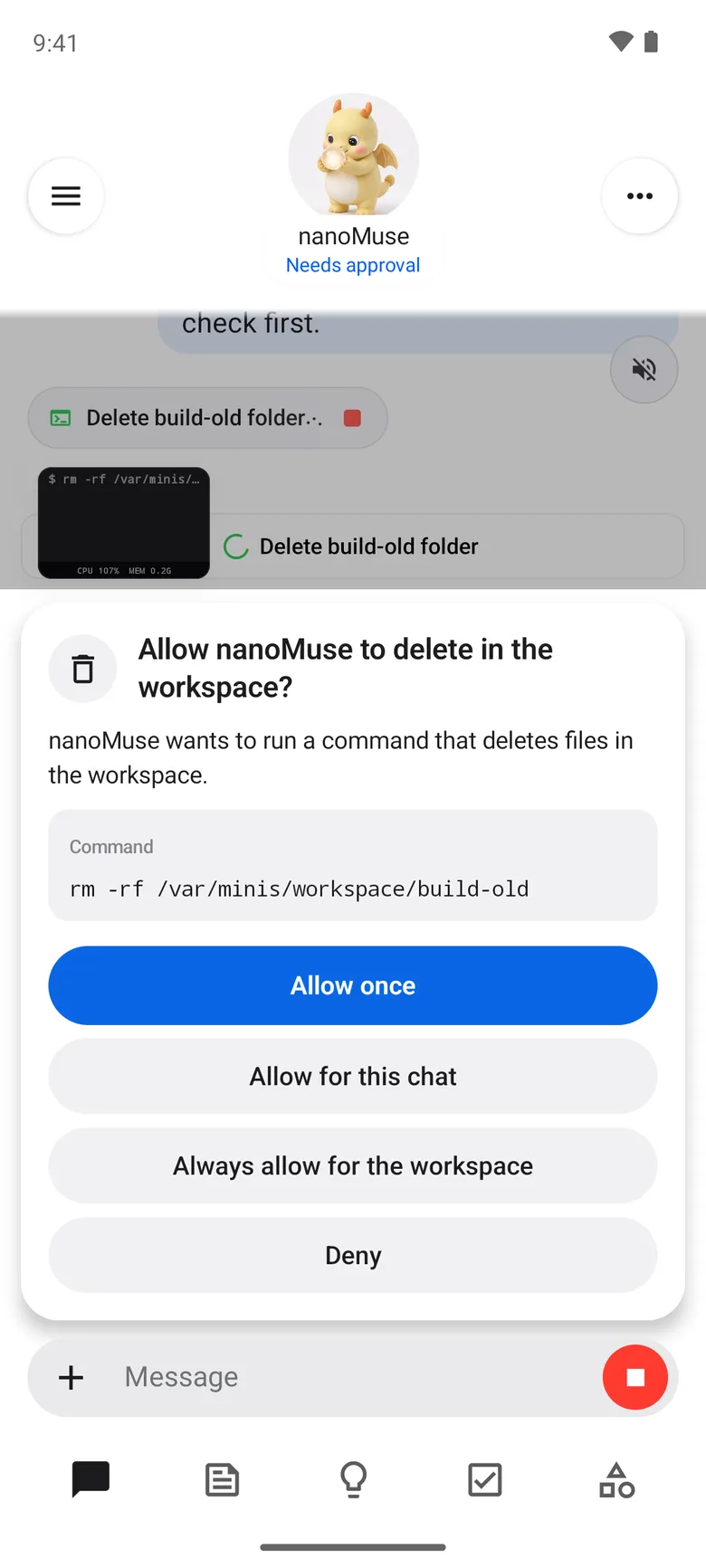
The card shows the approval step the README describes: anything the agent cannot undo waits for your answer.
Core features
- Asks before it acts: Deleting and sending stop for your answer. You can allow one action, the rest of the chat, or a folder, recipient or app from then on. Payments ask every time by default. A payment rule can cover one app or site only, and setting one up needs a screen-lock check. Passwords, codes and card numbers are typed by you.
- Hands on apps with no API: With Hands on, the agent works through the phone screen or a computer window, still API first. You take over for logins and CAPTCHAs, and it resumes after you tap Done. iPhone and iPad have no Hands, because the README says iOS does not allow it. To drive an iPhone from a computer, compare iPhone-use.
- Work across devices: A task said on the phone can run on the desktop. A line starting with
@Macpicks the machine, and approval requests return to the device in your hand. - Keeps going after the app closes: Goals run on a schedule, and the 12306 goal below is checked every two hours. The README says routines run while the app is closed.
- Memory you can edit: What the agent is, what it knows about you and when it wakes are Markdown files you can change. Memory stays on the device, but signed-in conversation text syncs to the relay by default.
- Pick the model: Signed-in accounts get a free allowance on the community relay, which the privacy notes set at ¥10 per account. After that, add your own key. The README lists 21 providers, and a ChatGPT, Claude or Kimi plan you already pay for also works.
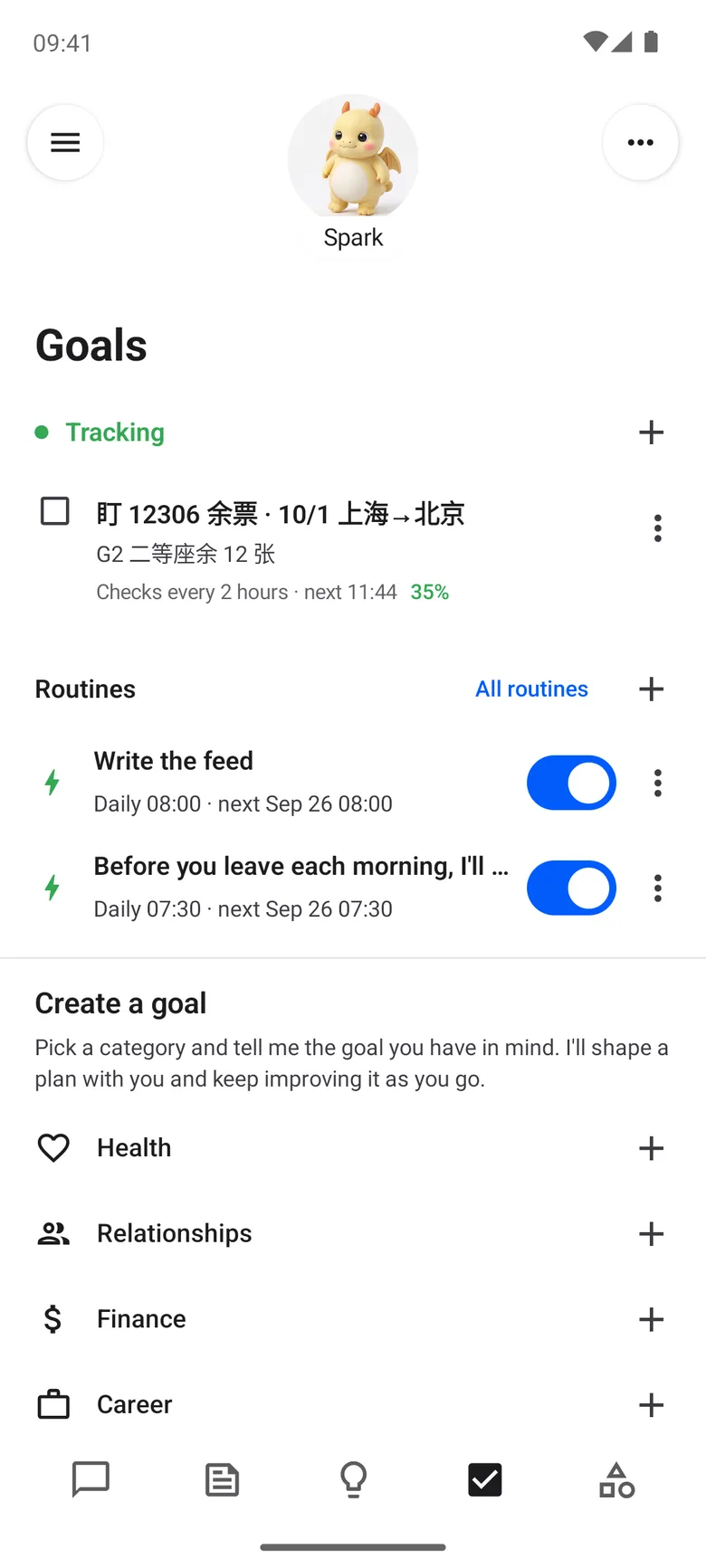
The Android goals screen behind the 12306 example above.
Typical use cases
- Someone sending work from a phone to a home computer: Say the task on the go, and the desktop runs it.
- Someone watching train tickets: The sample goal in the screenshots checks 12306 seats every two hours, so no booking page has to stay open.
- Someone who wants to hold their own data: With your own key, model requests go straight to your provider, and the relay handles only sign-in and device discovery. The self-hosting guide estimates about ¥30 to ¥60 a month in mainland China for a 1 vCPU, 1 GB server.
Quick start
To look first, open demo.nanomuse.dev, a demo on a simulated phone that asks you to sign in. For a real install, use the README’s install table; the Android build needs Android 8.0 or later on arm64. To run your own relay on one machine, use the local mode from docs/self-hosting.md:
git clone https://github.com/nano-muse/nanoMuse.git && cd nanoMuse
bash scripts/self-host.sh --local
Local mode serves the relay at http://127.0.0.1:8787, and sign-in codes appear in the relay’s log. You need Docker with the compose plugin, plus curl.
Summary
nanoMuse suits people who want one assistant across a phone, a computer and a browser, and who will bring a model key or run a relay. It does not suit anyone who wants a vendor-run service with someone to call when something breaks. The iPhone and iPad builds are TestFlight betas, and the macOS installers are not notarized, so you right-click and choose Open the first time. On Windows, click Run anyway.
GitHub detects GPL-3.0, while the README and the NOTICE file say GPL-3.0-or-later. The Android app is based on OpenMinis 1.13, also GPL-3.0, so a fork or modified build must keep its corresponding source under GPL-3.0. Earlier Python versions were MIT and tagged pre-openminis, so check the license of whatever you start from.
The project grew out of OpenMuse. Its archived, MIT-licensed Python repository, OpenMuseAgent/OpenMuse, covers versions 0.1.0 to 0.6.0 and says the work moved to nanoMuse. The nanoMuse README lists Zhejiang University as the affiliation of its paper, arXiv 2610.08699, but the arXiv page prints none. Conversation sync is on by default when you sign in, and model improvement is on by default for hosted-relay accounts created from version 0.9 on. Both can be turned off under Data controls. We read the docs, NOTICE and screenshots, but did not install the APK or the desktop app.