OnKey: the open-source Mac singing trainer that shows exactly where you go off-key
A free, open-source Mac singing trainer: play a song in Spotify, sing along, and it learns the melody on-device and scores every line you sing. MIT.
Project facts
GitHub Ecosystem- License
- MIT
- Language
- Rust
- Stars
- 335
- Data checked
- 2026-10-27
Snapshot figures reflect the check date and may change over time.
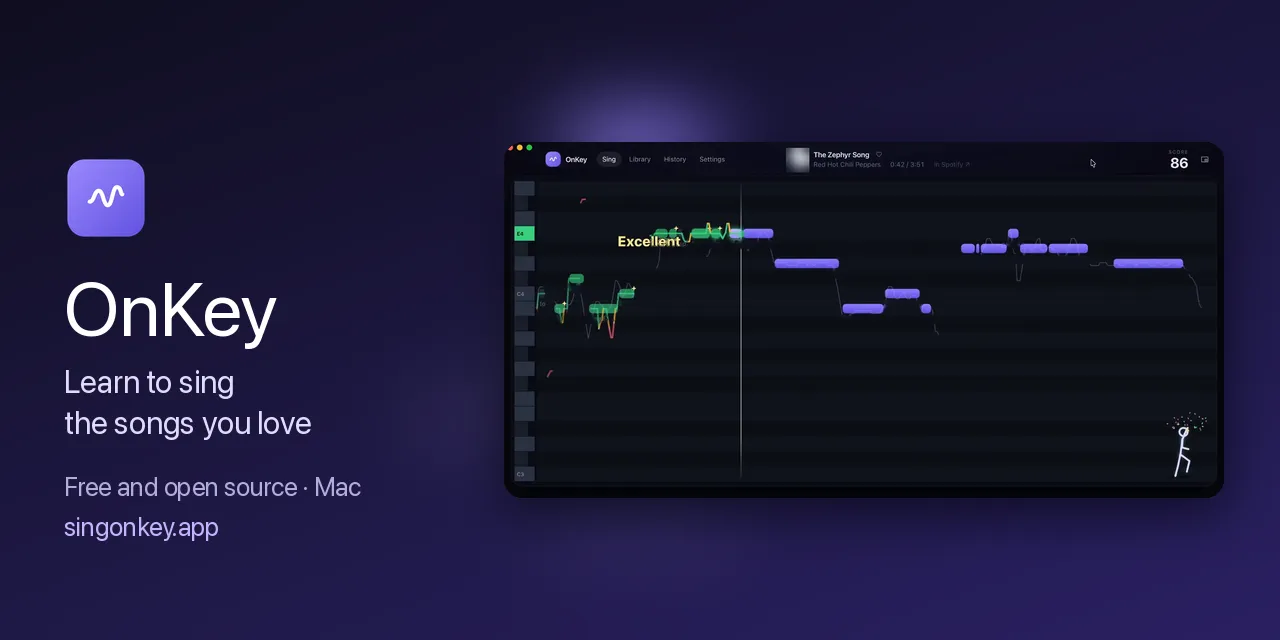
Singing along with the record sounds fine in your head — then you play the recording back and several lines were flat, with no idea which notes missed. Most singing apps make you practice from their own catalog, often padded with covers. Developer dsmurrell opened his Show HN post with a confession — he sings badly — and built the tool he wanted after his usual app flooded its song list with non-original recordings: OnKey is a free, open-source (MIT) singing trainer for the Mac. Play a song in Spotify, Apple Music, or YouTube in a browser and sing along. The first time, you get the lyrics and OnKey learns the singer’s melody on your Mac when the song ends. From the second play on, the notes scroll toward you, your pitch is drawn over them — green when you’re on the note, unmistakable when you’re not — and you get a per-line report and a score. The repo was created October 18, 2026, released v0.1.0 on October 22, and reached the Hacker News front page that day (235 points, 28 comments; 335 stars as of October 27, 2026).
Core features
- Sings along with your own music: no bundled catalog, no downloads — Spotify, Apple Music or browser YouTube all work as sources. The first play fetches lyrics; when the song ends, OnKey learns the original melody with no manual annotation.
- On-device melody learning: a local model separates the lead vocal from the music, CREPE tracks the singer’s pitch frame by frame, and a note model condenses it into one bar per syllable. Learned songs stay on your Mac; later plays sync up from the audio itself.

- Live pitch overlay: your pitch draws over the notes as you sing, and only green counts as on-pitch. Singing an octave down is accepted and being slightly late isn’t punished — the scoring rules are published on the site’s Scoring page.
- Per-line reports and sharing: after each take you get a report on every line; the shareable clip carries your voice and pitch line only, with no music underneath.
- A privacy policy you can read: recordings and learned songs never leave the Mac, with no account or analytics. The only outbound requests are Shazam song ID, LRCLIB lyrics, iTunes metadata and a GitHub update check — each individually switchable in Settings.
Typical use cases
- Practising at home against the original: anyone who wants to know precisely where they drift gets a line-by-line reference, instead of rehearsing over an app’s cover recordings.
- People who refuse to live inside an app’s catalog: if your playlist is in Spotify, you practise in Spotify; if the app hasn’t added your song, your own source works.
- Apple Silicon Mac owners: M1 or later running macOS 14.2 or newer; download the DMG and drag it to Applications.
Quick start
Grab OnKey.dmg from the releases page (v0.1.0, released October 22, 2026) and drag it to Applications. First-run setup asks for the microphone (to hear you) and system audio (to hear the music app); when asked about following Spotify and Apple Music, choose Listen only and it identifies songs by sound alone. The repo is a Rust project if you want to build it yourself:
git clone https://github.com/dsmurrell/onkey.git
cd onkey
Pick a song and sing along; after the first play you’ll see it marked as learned, and the second play draws your pitch line over the note bars.
Summary
OnKey is for Mac users who want to sing in tune without a subscription or a walled-off song list: MIT-licensed, free, mechanically transparent (the melody-learning and scoring methods are documented on the site), and its privacy page itemizes every network request — a rarity in this category. The limits: Apple Silicon Macs only, no Windows or mobile builds; v0.1.0 just shipped, so edge cases like failed learning on obscure songs or sync drift go to its Discord; and the README’s fair-use section is explicit — don’t share the melody transcriptions it learns, and use licensed karaoke services for bars and events. If you like tinkering with audio on a Mac, Spotifast is a Rust Spotify client without an embedded browser, and YuE2 walks the opposite direction — composing scores and generating sung vocals; OnKey keeps it simple: practise with the original, entirely on your machine.