Agent frameworks#Browser automation#Device control
OpenGCUA: an open stack for agents that use a real computer
OpenGCUA is an Apache-2.0 open stack for computer-use agents: an OSWorld harness, a macOS real-device harness and an SDK. The GCUA model is not released.
Project facts
GitHub Ecosystem- License
- Apache-2.0
- Language
- HTML
- Stars
- 374
- Data checked
- 2026-10-21
Snapshot figures reflect the check date and may change over time.
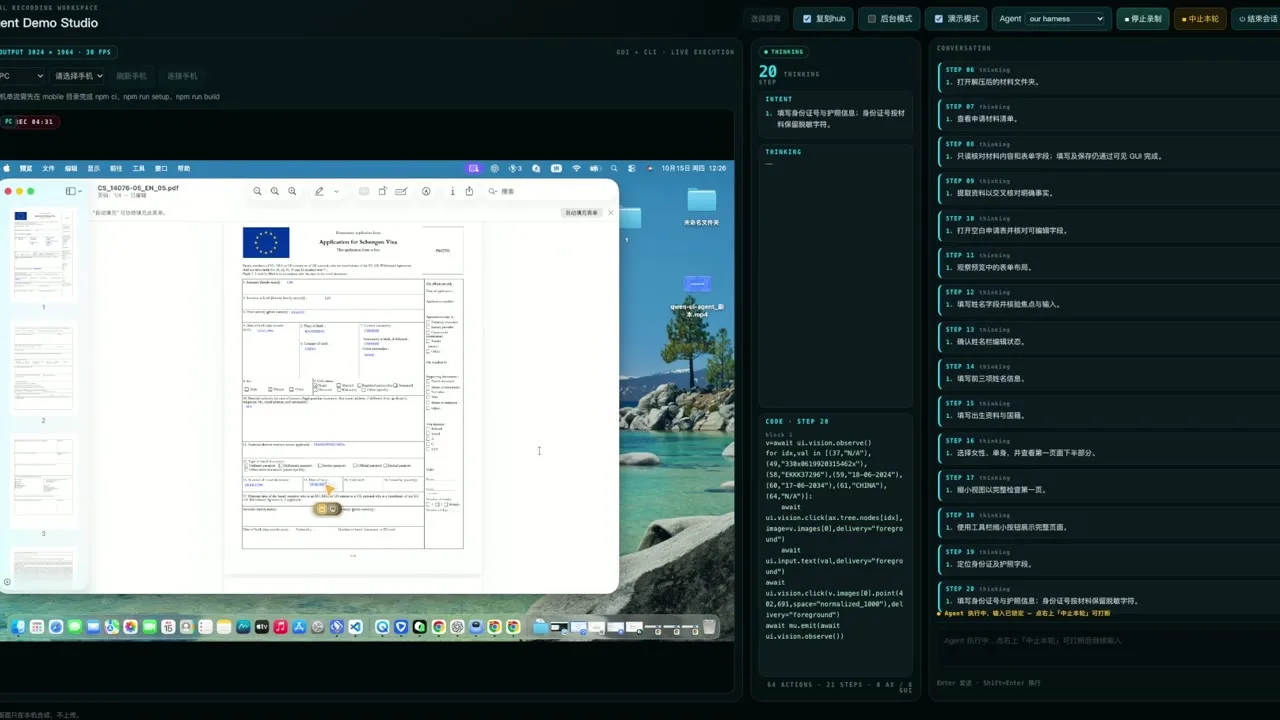
Letting an agent use your computer means it has to decide, at every step, how to look, how to act and how to organize the work. OpenGCUA is an Apache-2.0 project from the Tongyi-MAI organization on GitHub. It aims to open the full stack for generalist computer-use agents (GCUA). The README defines one as an agent that reads the accessibility tree, calls app APIs and runs shell commands, operates the GUI only when it needs to, and writes these actions as programs with loops and conditions.
A companion paper, arXiv:2610.22200, “OpenGCUA: Toward a Fully Open Stack for Generalist Computer Use”, was submitted on October 15, 2026, under CC BY 4.0. Its first author is Hanzhang Zhou. The README calls the project ongoing. This preview opens the agent design (an OSWorld integration with two reference agents), the evaluation trajectories, a macOS real-device harness, a Cross-Device SDK and a preview of the menu-bar app. The GCUA model itself is still on the roadmap and has not been released. The README marks the real-device harness and the SDK as preliminary.
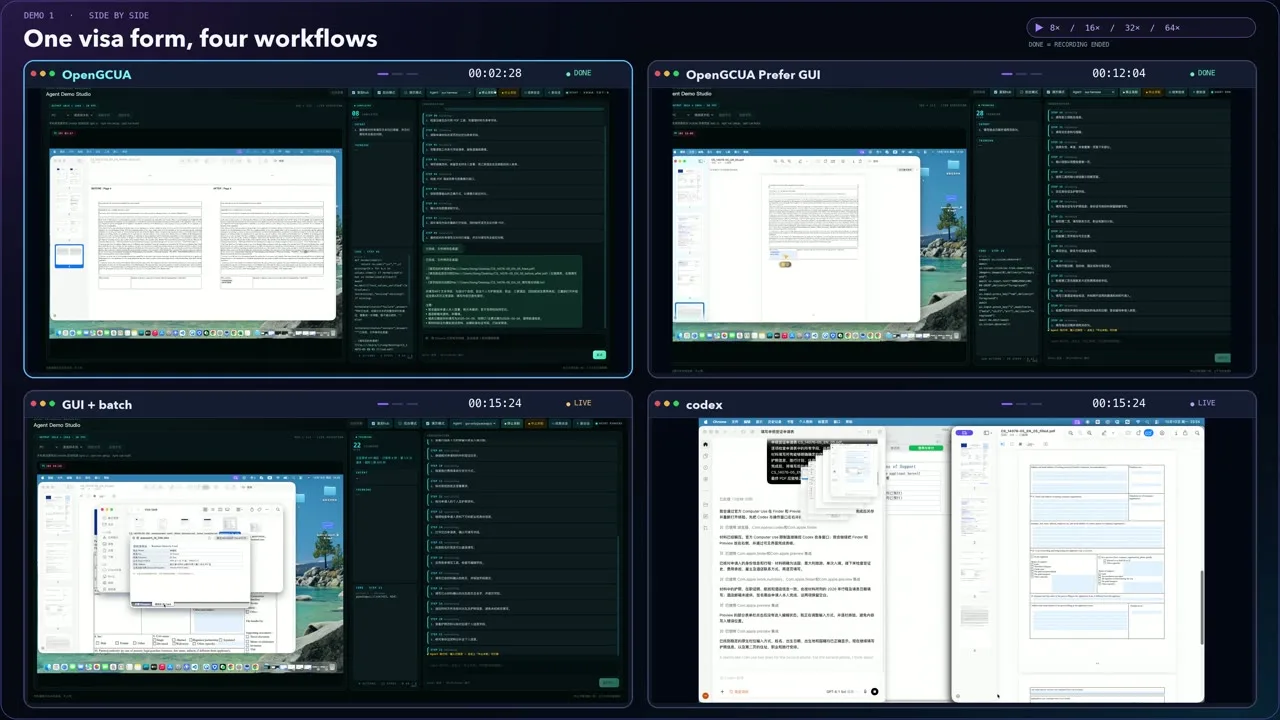
The four-panel image is a side-by-side demo recording. It shows the workflow, and it is not a benchmark.
Core features
- Code and GUI in one program: A step can be a Python program that combines accessibility-tree queries, app APIs, shell commands and GUI actions, with loops, branches and checks. Intermediate results decide the next step without another model call.
- Screenshots on demand: A typical GUI agent takes a screenshot after every action. Here, the model calls
screenshot()only when it needs one. - The model keeps the task list: It maintains a
todolist and states its<intent>before each program. - Cross-Device SDK (preliminary): One interface drives computers, browsers and phones. Each operation is bound to a device, app, window or tab. Accessibility and vision are separate ways to observe and act, and one program can coordinate several devices. The SDK has a Rust core with Python bindings and adapters for macOS, Android, browsers and Linux.
- macOS app (local development build): A menu-bar assistant that takes a task, folds into a floating control panel, answers questions and keeps saved results. It bundles Python, the SDK and a signed CuaDriver. The README targets Apple Silicon with macOS 14 or later, and it says the app is a local development build for now.
Benchmarks
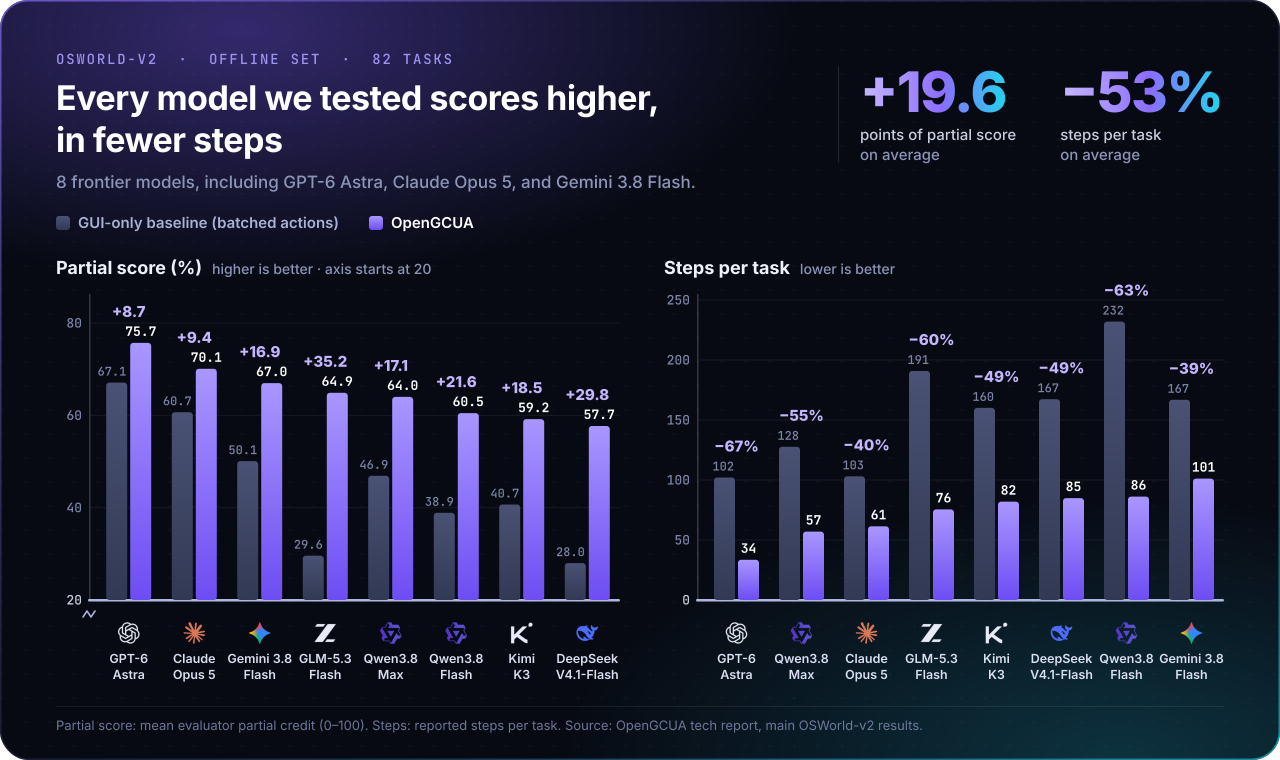
These figures come from the project itself. The README and the paper abstract agree on the headline numbers, and we did not reproduce them.
- OSWorld-v2 offline set: The mean partial score of eight frontier models rises from 45.3 to 64.9 (+19.6 points), and steps per task fall by 53.0% on average. The README’s example: GPT-6 Astra goes from 102 steps per task to 34.
- Four macOS tasks with the real-device harness: Qwen3.8-Max uses 19.4 times as many reasoning tokens per task as GPT-6 Astra, but it completes three tasks where GPT-6 Astra completes all four. The paper abstract gives the same 19.4 figure.
- Code execution: Compared with a GUI-plus-CLI agent under the same GUI and shell access, writing actions as code adds 6.1 points and cuts steps by 14.8%, averaged over three models.
Typical use cases
- Researchers studying agent design: The OSWorld integration, the two reference agents and the trajectories from eight models give you a set to test your own approach against. For another computer-use framework, see Agent-S.
- A developer who wants to try it on a Mac: Follow the quick start, run one small task through the real-device harness, then decide whether to invest more. For a different route to computer control, see LCU.
- A team that wants one program to drive computers, browsers and phones: The Cross-Device SDK is built for that job. It is still preliminary, so its interfaces and behavior may keep changing.
Quick start
You need macOS 14 or later, uv, the Xcode Command Line Tools, Rust/Cargo 1.89 or later, and Python 3.11 to 3.14 (3.12 is recommended). Installing only the prebuilt SDK wheels does not require Rust.
git clone https://github.com/Tongyi-MAI/OpenGCUA.git
cd OpenGCUA
uv venv --python 3.12
source .venv/bin/activate
uv pip install -e ./packages/sdk -e ./packages/harness/runtime
.venv/bin/mu setup macos
.venv/bin/mu doctor macos
- Copy the shipped defaults with
cp packages/harness/configs/macos_demo.json packages/harness/configs/local.json. Then setapi_key,model_nameandllm_base_urlinlocal.json. The README’s example uses DashScope withqwen3.8-flashand theopenaiprotocol. It also documents OpenAI Responses and Anthropic Messages endpoints in QUICKSTART.md. - In System Settings, open Privacy & Security and grant CuaDriver.app both Accessibility and Screen Recording. Quit and reopen it, then run
.venv/bin/mu doctor macosagain. - Start the terminal agent with
.venv/bin/python packages/harness/runtime/mac_agent.py, or runbash packages/harness/runtime/start_demo.shand open the demo studio at http://127.0.0.1:8800. - If you see
PERMISSION_DENIED,DEVICE_OFFLINEor a similar error, check the troubleshooting section of QUICKSTART.md.
If you only want the menu-bar app, the v0.1.2 release has an Apple Silicon DMG and a SHA-256 checksum file. The SDK wheels cover Python 3.11 to 3.14 on macOS arm64 and on manylinux x86_64.
Summary
OpenGCUA suits two groups. One is researchers who want to see how computer-use agents should observe and act. The other is developers who will try a preview on their own Mac and accept rough edges. It is a poor fit for a team that needs finished production automation: the GCUA model is not released, the real-device harness and the SDK are marked preliminary, and the macOS app is a local development build.
A few things to know first. The agent has to read your screen to choose its next step, and those observations go to the model endpoint you set in local.json. The README does not say more about how screenshots and accessibility data are handled, so choose the endpoint with that in mind. Once you grant Accessibility and Screen Recording, the agent can see and operate your screen. The README also says it can work in background windows without interrupting you, so try it first in an account that holds no sensitive data. The benchmark numbers are the project’s own, and the real-device comparison covers four tasks. GitHub lists the main language as HTML, because HTML takes the most bytes in the repository. The code is mostly Python, with Rust and Swift behind it.
The repository was created on October 15, 2026, and its last push was on October 21, 2026. It is not archived, and its latest release, v0.1.2, came out on October 19, 2026. The license is Apache-2.0. As of October 21, 2026, it had 374 stars. We checked the README, the LICENSE file, the arXiv abstract and the repository metadata. We did not install or run the code.