OpenMontage: turn your AI coding assistant into a video studio
OpenMontage turns your AI coding assistant into a video studio: 12 pipelines, a storyboard approval gate with per-asset cost, free without any API key.
Project facts
GitHub Ecosystem- License
- AGPL-3.0
- Language
- Python
- Stars
- 62,023
- Data checked
- 2026-09-30
Snapshot figures reflect the check date and may change over time.
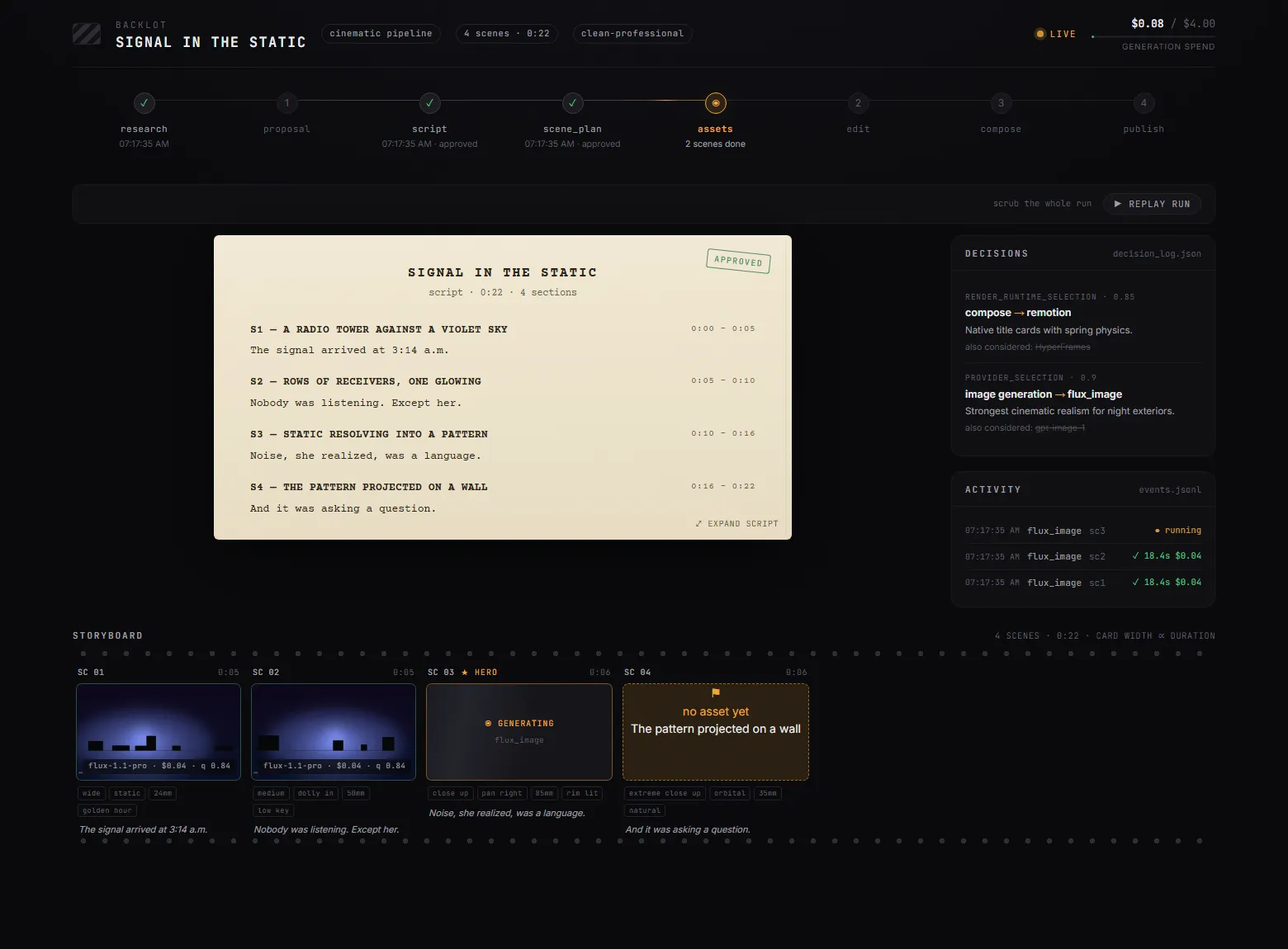
Ask most AI video tools for a finished piece and you get one generated clip; research, scripting, footage hunting, voiceover, subtitles and the edit stay with you. OpenMontage hands the whole production line to the AI coding assistant you already run — the official description calls it the world’s first open-source, agentic video production system, with 12 pipelines, 100+ tools and 700+ agent skill files. Describe what you want in plain language and Claude Code or Cursor runs from research through final composition. The mechanism worth watching is the pre-render approval gate: a local board called Backlot spreads out a storyboard with takes, prompts and per-asset cost, and waits for your nod. A 2026-09-19 video from the WeChat Channels account 爱科技AI recommended it early, at 59.4k stars.
Core features
OpenMontage ships no orchestrator code — the AI coding assistant is the orchestrator: it reads a YAML pipeline manifest and a Markdown director skill per stage, calls Python tools itself, self-reviews, and stops for your approval at creative decisions. Worth knowing:
- 12 production pipelines: the README table lists 11 — animated explainers, motion graphics, avatar presenters, cinematic trailers, clip factory, documentary montage, hybrid, localization and dub, podcast repurpose, screen demo, talking head — plus character-animation, named in the composition section, matching the official 12 (the video still said 11). All walk the same stages: research → proposal → script → scene_plan → assets → edit → compose; research is first-class, 15–25+ web searches cited in a structured brief before scripting.
- Real videos with zero API keys: unconfigured, you still get Piper offline narration, word-level subtitles and FFmpeg post-production, plus two composition engines — Remotion and HyperFrames, picked per brief at proposal and locked. The documentary-montage pipeline builds a CLIP-searchable corpus from Archive.org, NASA and Wikimedia Commons and cuts real motion footage, free.
- Backlot turns the storyboard into an approval gate: a production opens the board automatically; stages light up, the script lands as a screenplay page, and asset generation pauses on a scene-by-scene contact sheet — takes, prompts, per-asset cost, quality scores — until you approve.
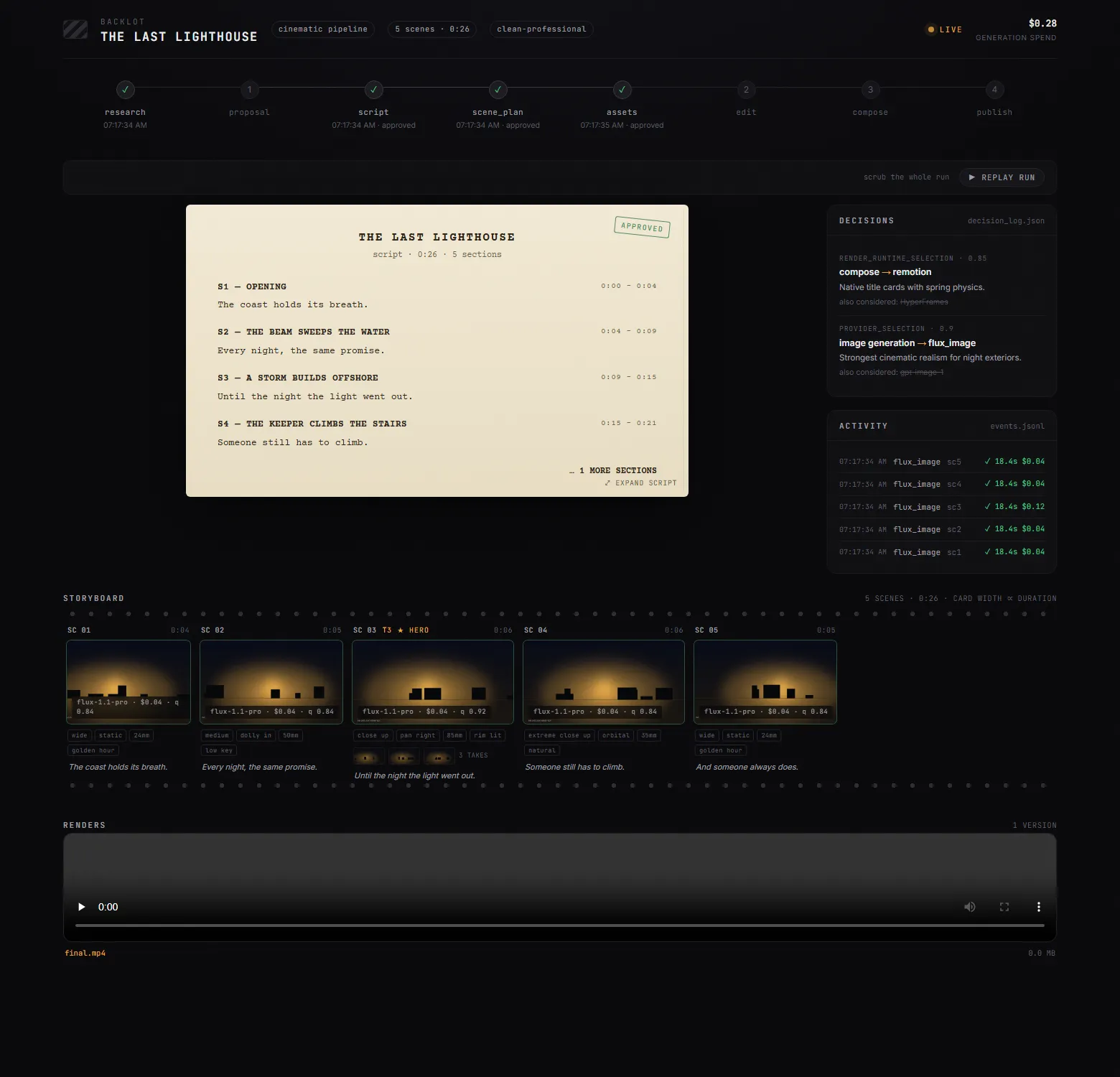
- The budget gets governed: estimate, reserve, reconcile; single actions above a $0.50 default pause for confirmation, and the total budget caps at $10. The README’s worked example: “THE LAST BANANA”, a 60-second Pixar-style short, cost $1.33 all-in.
- Start from a video you love: paste a YouTube, TikTok or local clip; the agent analyzes transcript, pacing and style and returns 2–3 differentiated concepts with cost estimates and a sample before full production.
- Quality gates with an audit trail: pre-compose validation blocks “motion-led” briefs that are 80% stills and scores slideshow risk on 6 dimensions; after render it runs ffprobe validation, frame sampling and audio analysis before showing anything. Providers are picked by a 7-dimension score, with the runners-up and reasons logged.
Typical use cases
OpenMontage’s pipelines map to concrete jobs:
- A knowledge-channel creator: “make a 45-second animated explainer about why the sky is blue” runs narration, captions and composition with no keys; for a lighter single-topic skill, html-explainer on this site.
- Podcast and long-video operators: Clip Factory turns a two-hour source into a ranked batch of shorts; for pure long-to-short, AutoClip.
- Archival-documentary hobbyists: ask for an “Adam-Curtis-style archival collage” and documentary montage cuts real open-archive footage at $0 generation cost.
- Teams distributing in many languages: Localization & Dub adds subtitles, dubs and translation to existing video; Google TTS alone offers 700+ voices in 50+ languages.
Quick start
OpenMontage needs Python 3.10+, FFmpeg, Node.js 18+ and an AI coding assistant (Claude Code, Cursor, Copilot, Windsurf and Codex each ship an instruction file):
git clone https://github.com/calesthio/OpenMontage.git
cd OpenMontage
make setup
Open the folder in your assistant and describe what you want — the README’s first example:
"Make a 60-second animated explainer about how neural networks learn"
API keys in .env are all optional — each one unlocks more tools — make install-gpu unlocks free local video models (WAN 2.2, Hunyuan, CogVideo) on a GPU, and make demo renders zero-key demos.
Summary
OpenMontage fits creators and small teams who already live in Claude Code, Cursor or a similar assistant and want explainers, product films or archival montages in volume — and developers who would rather extend its plain-text machinery: pipelines are YAML, skills are Markdown, all inspectable. Written in Python, AGPL-3.0, 62,023 stars by 2026-09-30 six months after the repo opened on 2026-03-29, last push 2026-09-06.
The honest catches: AGPL-3.0 is stricter than MIT — modify it and serve it over a network, and you owe that service’s users the source, so read the license before commercial distribution. The system hard-depends on an external AI coding assistant as the orchestrator, with no GUI, and local-LLM support (Ollama, LM Studio) is still marked coming soon. The free path’s visuals come from archives and stock; AI-generated motion needs a paid provider — the README prices prompts at about $0.15–$1.50 with an image/video provider configured and $1–$3 on a full setup.