CleanYourTV: point Claude Code at your TV to strip ads and replace the launcher
CleanYourTV gives Claude Code a prompt to reach your Android TV over Wi-Fi, disable ad and preload services, and install a 250 KB Apple TV-style launcher. MIT.
Project facts
GitHub Ecosystem- License
- MIT
- Language
- Java
- Stars
- 8,533
- Data checked
- 2026-10-20
Snapshot figures reflect the check date and may change over time.
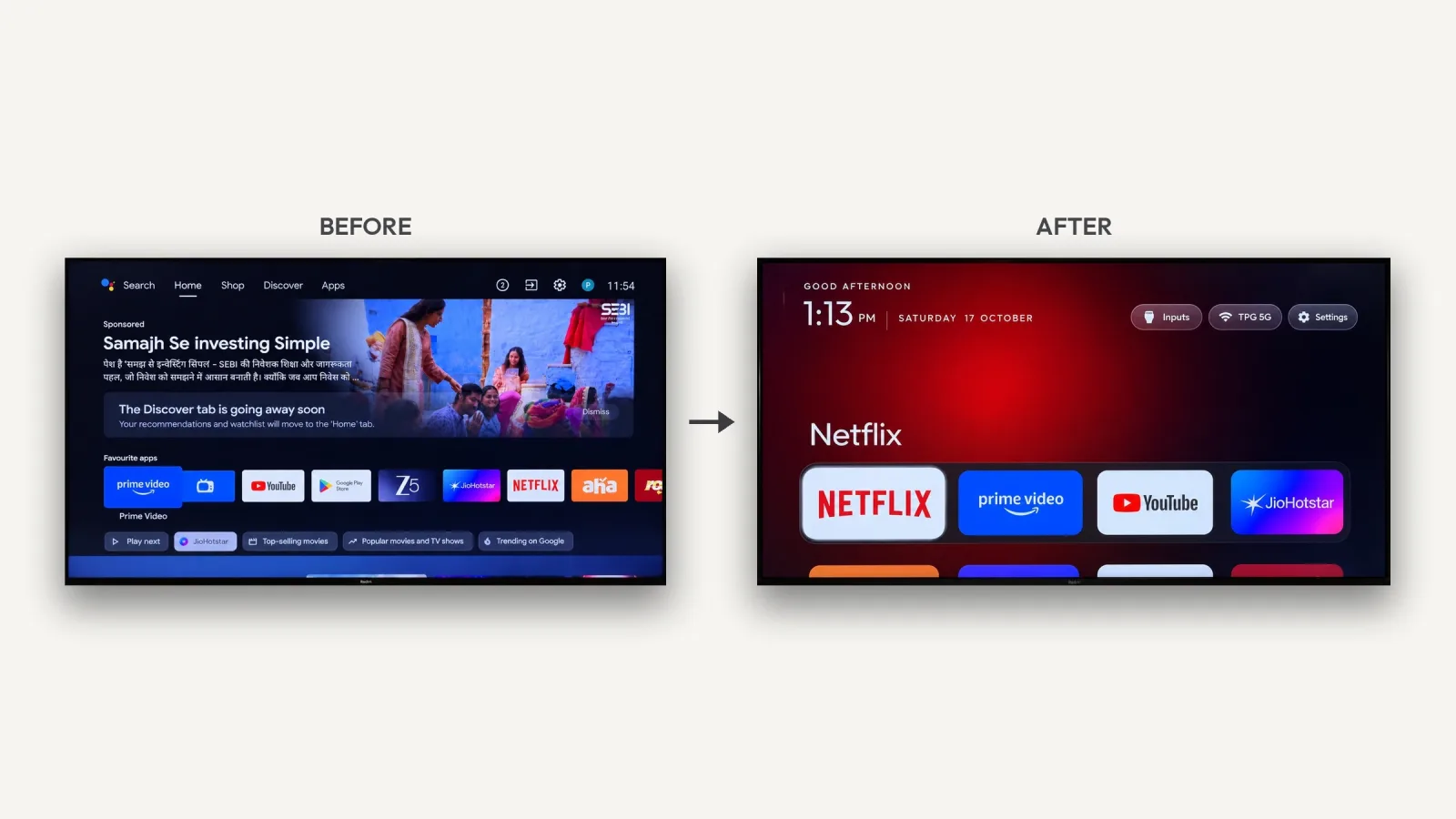
Smart TVs open with an ad and land on a home screen full of recommendations. The usual fix is a third-party launcher or an ad-blocking plugin, which tends to treat the symptom. CleanYourTV takes another route: give the TV’s model number to a coding agent such as Claude Code, let it find the set on the same Wi-Fi, disable the ad, telemetry and unused preload services, then install a lightweight Apple TV-style launcher. It needs no root, no cable and no uninstalling — disabling is reversible. The project is MIT, its primary language is Java, and it had 8,533 stars on October 20, 2026.
Core features
- Prompt-driven, no Android commands needed:
PROMPT.mdin the repository is the whole procedure. Paste it into Claude Code, Codex or Gemini CLI and fill in the TV model. The agent discovers the installed packages and sorts them into telemetry, ads and recommendations, unused background services, preloaded apps and video apps, then disables the first groups. - Guard rails: The prompt forbids touching services that carry HDMI input, remote and Bluetooth pairing, the keyboard and the app store. For packages whose names do not explain their purpose, the agent investigates before asking; anything involving personal habits — which video apps you use, whether to keep the voice assistant, casting or system updates — is asked first.
- Every step is checked: After each change the agent simulates remote presses and takes a screenshot to see the result, fixing problems on the spot.
- Fully reversible: Before touching anything it backs up the full package list and system settings. Disabling is not uninstalling, and one command restores everything:
TV_HOST=192.168.1.50 tools/restore.sh examples/<your tv>/debloat.txt. Even without a computer you can re-enable apps in the TV’s own settings. - A 250 KB launcher: The new home screen follows Apple TV: pitch black, four favourite apps in a dock, a glass highlight, a greeting and clock, and buttons for inputs and Wi-Fi. A clock screensaver drifts so nothing burns in. It is built for 1 GB TVs, with no blur effects and no network access.
- Reusable lists: The repository already holds debloat lists for 92 TV models, so the same model can skip the discovery step.
Typical use cases
- Android TV owners tired of boot ads: Hand the model and prompt to an agent and answer three or four questions. The author’s first run took an afternoon; with a list for your model, users report about 15 minutes.
- People who want to keep the stock system: Disabling rather than uninstalling makes this lower-risk than flashing firmware.
- Low-spec TVs: At 250 KB the launcher is lighter than the stock one and runs on 1 GB of memory.
- Developers studying agents that operate real devices:
PROMPT.mdis a complete device procedure, covering classification, asking, verification and rollback.
Quick start
On the TV, open developer options: Settings → Device Preferences → About → press OK on Build seven times → back → Developer options → turn on USB debugging (and network or ADB debugging if present), and keep the TV on. Put the computer on the same Wi-Fi, then hand the prompt to an agent:
git clone https://github.com/Gathin23/cleanyourtv.git
# Paste PROMPT.md into Claude Code, Codex or Gemini CLI and fill in your TV model
Accept “Allow USB debugging?” on the TV, then answer the checklist: which apps you use, which four go in the dock, whether to keep the voice assistant, casting and updates. The agent then backs up, sorts, disables, installs the launcher and verifies with screenshots.
Summary
It suits Android TV or Google TV owners who are tired of boot ads and recommendation rows and would rather not flash firmware. It does not suit Samsung Tizen or LG webOS sets, which run different systems — the repository points to a webOS port in SHOWCASE.md — and Fire TV only gets the debloat half, because Fire OS will not hand Home to a third-party launcher. A few China-market TCL sets refuse third-party launchers entirely, and their lists say so.
A few things to know. The computer and TV must be on the same LAN, or the agent cannot reach the set. Everything depends on the TV’s ADB debugging, and vendor firmware differences affect how much works. The project backs up and restores, but changing system settings still carries risk, so read the list before running it. MIT, Java, 8,533 stars. The same “put idle hardware to work” idea runs through SideScreen, covered earlier here, which turns an Android tablet into a Mac display.