Products#Branding#Image editing
Canva's Affinity comes to iPad: free all-in-one app opens pre-orders, lands November 3
Affinity for iPad opened pre-orders Oct 26 and lands Nov 3 free: core tools need no subscription, only Canva AI Studio features need a paid plan.
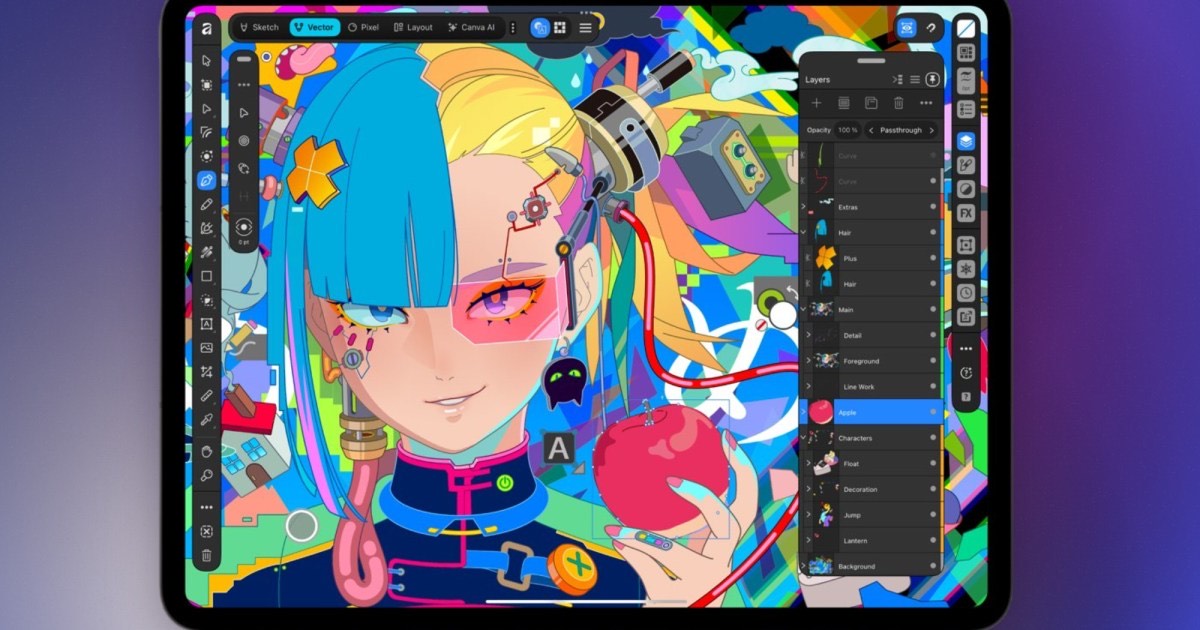
Affinity, Canva’s all-in-one creative suite that packs photo editing, vector design and page layout into a single file, is finally coming to iPad. On October 26, 2026, the official Affinity account announced on X that pre-orders for the new iPad app are open, and the App Store pre-order page pins the date: “Expected Nov 3, 2026,” free to download. For designers who sketch, retouch RAW files and lay out brochures on a tablet, this is the first time the free suite covers touch and Apple Pencil workflows.
Key points
- Pre-orders opened October 26; the App Store page lists November 3, 2026 as the release date. The app is free with in-app purchases, requires iPadOS 18.0 or later, and weighs 1.9 GB.
- One file carries the whole workflow: sketching, vector, pixel and layout work all happen in the same document, sketches convert to vectors in place, and the official description claims layouts “from short brochures to 500-page books.” The two studios it names are Sketch Studio and Vector Studio.
- The desktop pricing model carries over: core tools need no subscription, while the Canva AI Studio features — grain removal, blur rescue, background removal — unlock only with a Canva premium plan.
Background
Affinity began as Serif’s three paid, buy-once apps: Affinity Photo, Designer and Publisher. Canva acquired Serif in 2024, and on October 30, 2025, Affinity CEO Ash Hewson announced the merge: one all-new Affinity app for Mac and Windows, “completely free, forever,” with a single promise tucked at the end — “iPad coming soon.” As Mint reported at the time, the move ended speculation that Canva would adopt an Adobe-style subscription, and positioned Affinity squarely as an alternative to Photoshop, Illustrator and InDesign.
Details from that desktop launch matter again now. Adam Engst’s hands-on at TidBITS noted the app requires a free Canva account to activate online (it works offline after activation), and that “the new app can open files from previous apps, but its files are not backward-compatible with older apps” — the three V2 apps “remain functional but will no longer receive updates.” The iPad version repeats the pattern — according to Digital Trends, files created in the new iPad app cannot be opened in the older V2 iPad apps.
The facts
Reading the App Store pre-order page on October 27, 2026 and combining it with official announcements, the hard parameters of the iPad release are:
| Item | Detail |
|---|---|
| Release date | “Expected Nov 3, 2026” per the pre-order page |
| Price | Free, with in-app purchases |
| Requirements | iPadOS 18.0 or later; visionOS 2.0 or later for Apple Vision |
| Download size | 1.9 GB |
| In-app purchase samples | Canva Pro $18.00/month or $143.99/year; Canva Business $250.00/year |
| File interchange | Imports PSD, AI, INDD, IDML, PDF, SVG and more, with layers preserved |
On features, the official App Store description bets on finishing everything in one file: sketch, refine RAW, edit vectors node by node, control type and layout, then send the work to print. Apple Pencil pressure, tilt and barrel roll are all wired in — “Tilt your Apple Pencil to shade a line, then roll the barrel” is the description’s own line — and a sketch moves from the Sketch studio to the Vector studio inside the same document. The AI boundary matches the desktop version: Canva AI Studio handles grain removal, blurry-shot rescue and background removal behind a Canva premium plan, while the company’s stated line is that core tools are free.
The “pre-order” label on a free app is worth a second look. In App Store mechanics, pre-ordering costs nothing and the download lands automatically on release day — so for anyone who wants the app the minute it ships, tapping pre-order on October 26 is the cheapest way to wait until November 3. Digital Trends runs the fact under its own heading, “The app is free despite the ‘pre-order’ label,” without further explanation.
What others say
The official message centers on having listened. @Affinity’s October 26 post jokes that “We were going to count how many times you asked about iPad, but we ran out of numbers somewhere around ‘iPAAAAAAAAAAAAAAD’,” then adds, more seriously, “The truth? We were listening and we wanted to get it right.” That is also the closest thing to an explanation for the year-long wait after the desktop release.
The sharpest independent reaction concerns compatibility. Digital Trends states plainly that files created in the new app cannot be opened in the older V2 iPad apps — for illustrators with years of working files on an iPad, that warning outweighs any new feature — yet the official App Store description never mentions it, and DT is currently the only outlet reporting this detail. The earlier desktop launch drew the same reaction: TidBITS documented the pattern of working-but-frozen old apps and a one-way format — the new app opens old files, old apps can’t open new ones — while Mint only noted that the old apps keep working, saying nothing about formats. The iPad release appears to follow the same playbook. Coverage is thin beyond that: as of October 27, 2026, Digital Trends is the only independent English report we could find — MacStories was unreachable — so most of the specifics here trace back to the App Store page and the official announcement itself.
Our take
For existing users, the one sentence to remember is the incompatibility: if you still have active projects in the V2 iPad apps, keep those apps installed — they still run, they just won’t get updates. For everyone else, November 3 is worth a download for a simple reason: photo editing, vectors and layout in one free app, instead of three apps and three price tags — provided you accept signing in with a Canva account to activate. The honest catch is where the money sits: Canva AI Studio features need a premium plan, which mirrors how Adobe bundles Firefly across its suite from the opposite direction — core creation turns free while AI becomes the paid hook. Both companies are converging on the same playbook, and this release is one more data point. What remains unknown is real-world performance on iPad chips — whether thousands-of-layers documents actually run smoothly. That is the test on November 3.
Trying it takes one step: search “Affinity by Canva” on the App Store and tap pre-order, and the app installs itself on November 3. Once it lands, it becomes an interesting counterpoint to the free and open-source alternatives we tested in our InDesign alternative deep dive — worth comparing before you move your main toolchain. And on the AI side, our report on Canva’s first in-house image model Craft shows how generation and this free suite are being stitched into one workflow.