Products#Game porting#Virtualization
FX Steam Launcher runs the official ARM64 SteamOS in a VM on Apple Silicon Macs, Windows games via Proton
FX Steam Launcher 1.9.8 runs the official ARM64 SteamOS in a lightweight VM on Apple Silicon, translating Windows games through Proton and FEX to Metal.
Valve’s own SteamOS now runs on a Mac. FX Steam Launcher is a free, open-source Mac app (Apache-2.0; an independent project with no affiliation to Valve) that boots the ARM64 build of SteamOS — the one Valve ships for its Steam Frame headset — inside a lightweight virtual machine on Apple Silicon, on top of Hypervisor.framework. There is no QEMU and no CPU emulation for the OS itself: SteamOS runs as a native ARM64 image. Version 1.9.8, released November 2, adapts to the SteamOS 0.6.0 preview channel and stops a log flood of roughly 1,800 lines per second on M3/M4/M5 machines. The GitHub repo fxgl/steamac was created on October 4 and counts some 1,600 stars as of this writing.
Key points
- It is the official SteamOS image, not a compatibility layer. The image downloads from Valve’s servers as a signed RAUC bundle; signature and sha256 are verified before boot. Steam Cloud, achievements and the gamepad UI behave as they do on real SteamOS hardware.
- x86 Windows games cross three translation layers: Proton 11 ARM64 with FEX turns x86-64 code into ARM64, DXVK / vkd3d-proton turns DirectX into Vulkan, and Venus / virtio-gpu hands the calls to MoltenVK on the host, which renders on Metal. The whole chain is GPU-accelerated.
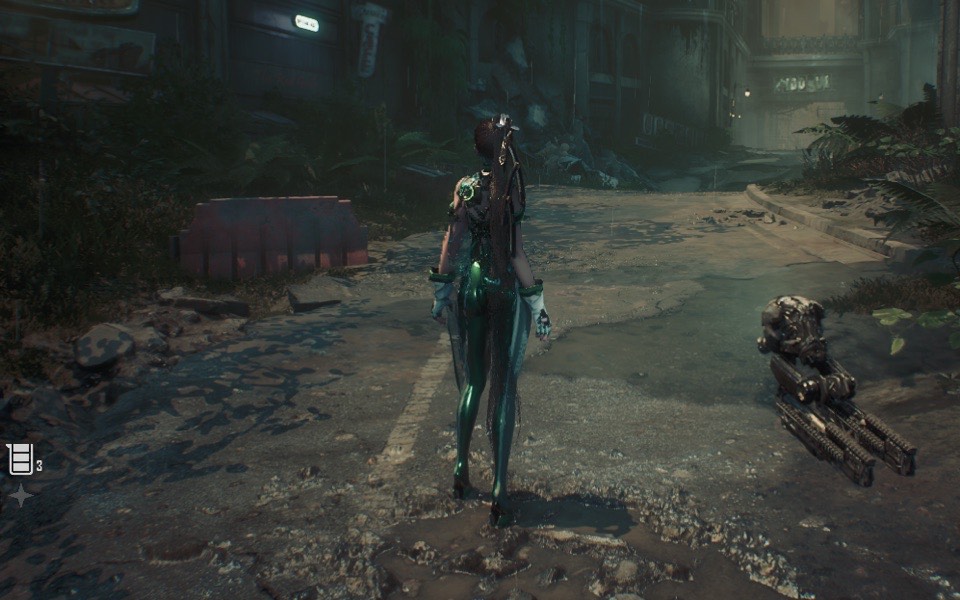
- It plays real games, within hard limits. ETA Prime measured about 60 FPS at 1280×800 for the Stellar Blade demo (DX12) on an M4 Max. Unreal Engine 5 titles (which need SM 6.6 / FL 12_1) will not start, and anti-cheat that blocks VMs stays unusable.
Background
The Mac-gaming gap has outlived half a decade of Apple Silicon performance gains: the machines got fast, the Windows game library never followed. The existing routes each cost something. CrossOver and Whisky translate Windows APIs to macOS through Wine, game by game, with the Windows Steam client itself running inside the translation layer; native ports depend on publishers and remain scarce. Valve changed the raw material when it built an ARM64 SteamOS for the Steam Frame headset — the first complete, self-updating Steam system image that exists without x86. We wrote last week about how loosely Valve holds its own archive, in the shape of the playable F-STOP reconstruction. FX Steam Launcher grabs that: instead of translating games one by one on macOS, put all of SteamOS in a VM and let Valve’s layers do Valve’s work. SteamOS before the Frame existed only on x86 — Steam Deck’s 3.2 and the licensed builds third-party handhelds ship since 2025. Once the ARM64 build appeared in 2026, several community projects raced to boot it; fxgl/steamac is the most finished one so far.
The facts
Version 1.9.8 shipped on November 2, 2026 at 08:12 UTC (per GitHub Releases) with two fixes. First, SteamOS 0.6.0 works: Valve’s preview-channel update replaced a library the VM’s Vulkan driver linked against, and after updating, the VM hung at “Starting Steam client” with no Vulkan device. The driver no longer uses that library, and a build check now accepts only libraries that SteamOS updates keep. Stable SteamOS 0.4.5 is unaffected; the release notes tell anyone whose VM is stuck to install 1.9.8 and start it again. Second, KosmicKrisp diagnostics no longer flood the launcher log — about 1,800 lines per second with the Steam UI open on M3/M4/M5.
The stack, layer by layer:
| Layer | Component | What it does |
|---|---|---|
| CPU | Proton 11 ARM64 + FEX | FEX JIT-translates x86-64 to ARM64; Apple’s hardware TSO is exposed via PR_SET_MEM_MODEL, skipping barrier emulation |
| Graphics, game side | DXVK (DX9/10/11), vkd3d-proton (DX12) | DirectX calls become Vulkan |
| Graphics, transport | Mesa Venus → virtio-gpu | Vulkan calls are serialized out of the VM; shared memory uses 16K-aligned blobs |
| Graphics, host side | virglrenderer → MoltenVK or KosmicKrisp | Replays Vulkan on Metal; MoltenVK is the UTM fork (Metal 3, macOS 15+), KosmicKrisp is Mesa’s driver on Metal 4 (macOS 26+), bundled since 1.7 |
| System | libkrun + Hypervisor.framework | Lightweight VM, no QEMU; the verified SteamOS image mounts read-only with A/B slot updates and rollback |
Requirements: an Apple Silicon Mac on macOS 15 or newer, and about 20 GB free for first-time disk creation (a ~14 GB disk image plus a 4.5–6 GB download; the sparse disk grows with games). As of this writing the repo shows some 1,600 stars, 68 forks, Apache-2.0 (kernel patches GPL-2.0, Mesa/virglrenderer patches MIT), written mainly in Swift.
Performance numbers come from the project page and ETA Prime’s hands-on video (published October 31, about 293,000 views as of November 3): the Stellar Blade demo (DX12) reaches about 60 FPS at 1280×800 on an M4 Max with MoltenVK; on an M1 Max, KosmicKrisp manages about 29 FPS and MoltenVK about 18. Death’s Door’s title screen hits about 117 FPS on an M1 Max through the experimental DXMT path versus about 41 through DXVK. The page notes the recordings are real, edited only for window cropping and stall cuts.
The limits are stated just as plainly: DirectX 12 tops out at feature level 12_0 on KosmicKrisp and 11_0 on MoltenVK, shader model 6.0 — so games demanding 12_1 or SM 6.6, typically Unreal Engine 5 titles, refuse to start. Anti-cheat that blocks virtual machines stays unusable. New effects stutter for 50–100 ms while Metal compiles their pipelines (cached afterwards). Switching the Vulkan driver rebuilds shader caches: the Stellar Blade demo took about 28 minutes on its first M1 Max run.
What others say
ETA PRIME’s verdict in “SteamOS on a Mac?! This Actually Works!” (October 31) is that official SteamOS finally runs on Apple Silicon, with no cloud streaming — everything renders locally. That video is the main reason the project spread over the following two weeks. The developers state their own limits first: the README and project page put “UE5 won’t start” and “anti-cheat unusable” on the first screen of known limitations. Release cadence tells its own story — GitHub Releases shows three versions on November 1 alone (1.9.5, 1.9.6, 1.9.7) and 1.9.8 the next day, most fixes driven by user reports: DXMT went black-screen in 1.9.5 and was fixed in 1.9.6, and 1.9.7 fixed VRChat taking down the whole VM on quit. No major gaming outlet has reviewed it yet, and there is no Hacker News thread so far. That matches the project’s own framing — the page states clearly that it is unaffiliated with and unendorsed by Valve.
Our take
For developers, the interesting part is the structure, and “Mac gaming” is almost beside the point — CrossOver users have been running Cyberpunk 2077 for a while, and Epic is rewriting its own launcher to claim the same ground. A VM where Proton → Vulkan → Metal runs as three observable layers, each with a measurable cost (FEX on the CPU, Venus across the VM boundary, MoltenVK down to Metal), is the first sample of its kind for asking where Mac gaming performance actually goes. For regular Mac users the test is simpler: if your library has Windows games without kernel anti-cheat and you are tired of tuning Wine per title, 20 GB of disk buys a real trial. If your backlog is Unreal Engine 5, close the tab now. The suspense sits with Valve: the Frame’s ARM64 build hands the Mac gaming ecosystem a ready-made substrate, and if Valve ever supports the Mac directly — nothing in the README hints at it — this project’s mission would be over the day that ships. Until then it is another specimen of an independent developer filling a platform hole the platform owner left open.
How to try it
Grab the DMG from GitHub Releases (Apple Silicon, macOS 15+), create a SteamOS disk on first launch (budget ~20 GB), and sign in to Steam. To reproduce ETA Prime’s comparison, install the Stellar Blade demo and flip between MoltenVK and KosmicKrisp in settings — expect roughly half an hour of shader recompilation after a driver switch. Building from source needs Xcode 26+, OrbStack and rustup; the README has the steps.