Splat: a Mac Markdown editor you can type in from both sides
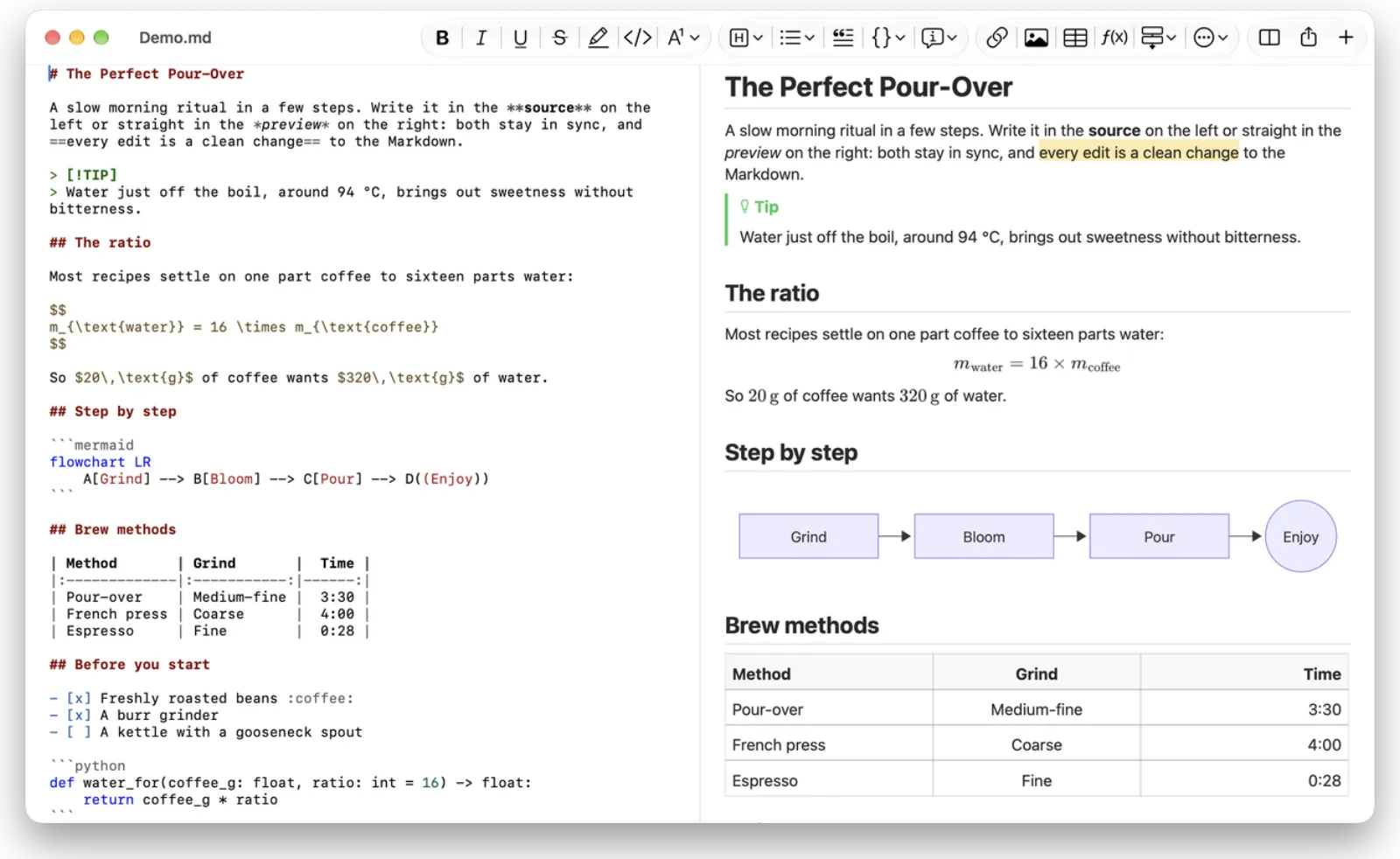
Splat is an open-source macOS Markdown editor in Rust: both panes are editable, and preview edits stay minimal source changes. Exports PDF, HTML and Word.
Project facts
GitHub Ecosystem- License
- MIT OR Apache-2.0
- Language
- Rust
- Stars
- 61
- Data checked
- 2026-11-03
Snapshot figures reflect the check date and may change over time.
Writing Markdown on a Mac usually means picking a side: plain source, where the rendering is a guess, or a WYSIWYG pane that reshuffles lines you never touched and wrecks the Git diff. Splat makes both sides editable — syntax-colored source on the left, a live preview you can type in on the right — and translates every preview keystroke into the smallest possible change to the file, so untouched lines stay byte-for-byte identical. It is a native macOS app written in Rust against real AppKit controls, no Electron, and the 1.0.5 disk image is signed and notarized by Apple.
Core features
- Both panes write. Preview typing, deleting and list indentation become minimal source edits, with one undo history per document spanning both panes; when Git or another editor rewrites an open file, Splat reloads it and keeps your caret and scroll position.
- The Markdown you already use. CommonMark, GFM, GitHub alerts, Obsidian wiki links, embeds and callouts, Pandoc and Typora extensions (highlights, super/subscript, definition lists), footnotes, front matter, BibTeX citations.
- Offline formulas and diagrams. LaTeX via MathJax with a MathLive visual editor; Mermaid, Graphviz and PlantUML render locally — PlantUML without Java. Click a formula or diagram in the preview to edit its code in place, with error messages right below.
- Three export paths. PDF with vector formulas, a single script-free HTML file, and a Word document with real heading styles, lists, tables and footnotes.
- Native down to the details. Tabs, Auto Save, Versions, dark mode, dictation and VoiceOver are the system’s own; the README clocks about 25 ms per keystroke in a 10 MB document.
- 35 interface languages. Simplified and Traditional Chinese included, following Apple’s own menu glossaries.
Typical use cases
- Docs that live in Git. Adjust layout in the preview; the commit contains only the lines you meant to change.
- A workbench for Obsidian notes. Wiki links, embeds and callouts render, so single files can be edited without opening the vault.
- Handing a draft over. Export to Word with embedded formulas and diagrams; the recipient installs nothing.
Quick start
brew install --cask sventmueller/tap/splat
Or download the signed Splat-1.0.5.dmg from the repo (about 16 MB, universal binary) and drag it to Applications. Files must be UTF-8 or UTF-16 with a byte-order mark — anything else is refused rather than guessed; unsaved text is copied every five seconds, so a crash costs a few seconds of typing and the next launch offers it back. Privacy is the default: the app stays offline, web images load only after you allow them, and image and diagram decoding runs in sandboxed helper processes. On second launch it asks once about daily update checks via Sparkle, and installs only updates carrying the developer’s signature.
Summary
Splat fits Mac users who treat Markdown as a working format and care about clean diffs. Cross-platform and mobile workflows are out of scope: macOS 14 or later only, and the README admits Intel is tested less. Embedded HTML, embedded notes and front matter are read-only in the preview, and a single tilde is subscript in the Pandoc convention, not strikethrough — watch text pasted from GitHub. The project was created on October 29, 2026; as of November 3 it counts 61 stars with a single maintainer, and the code is dual-licensed MIT / Apache-2.0. For comparison, GenOffice goes after AI editing of Office files and Xnote self-hosts notes as a web app — Splat takes the native-Mac road instead.